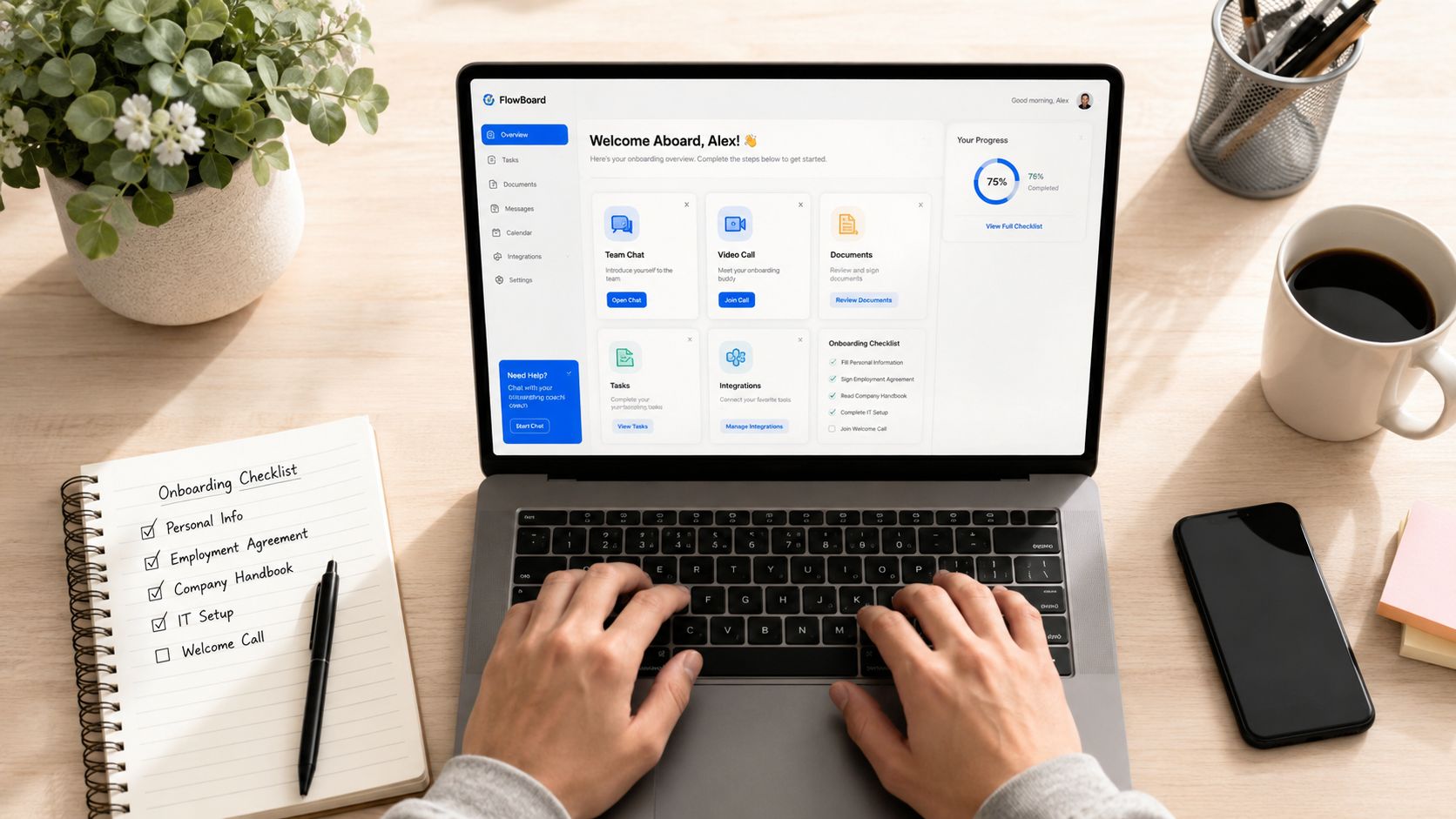
You’ve hired someone, but their laptop isn’t ready, payroll is waiting on missing information, the manager hasn’t scheduled a first meeting, and the new employee still doesn’t know where to find basic guidance. Human resource onboarding software connects those handoffs. It moves a hire from accepted offer through paperwork, access, orientation, manager follow-up, and early milestones. The buyer question is simple: which platform improves Day 1 readiness and the first 90 days, not just form completion?
What Human Resource Onboarding Software Does and Why It Matters in 2026
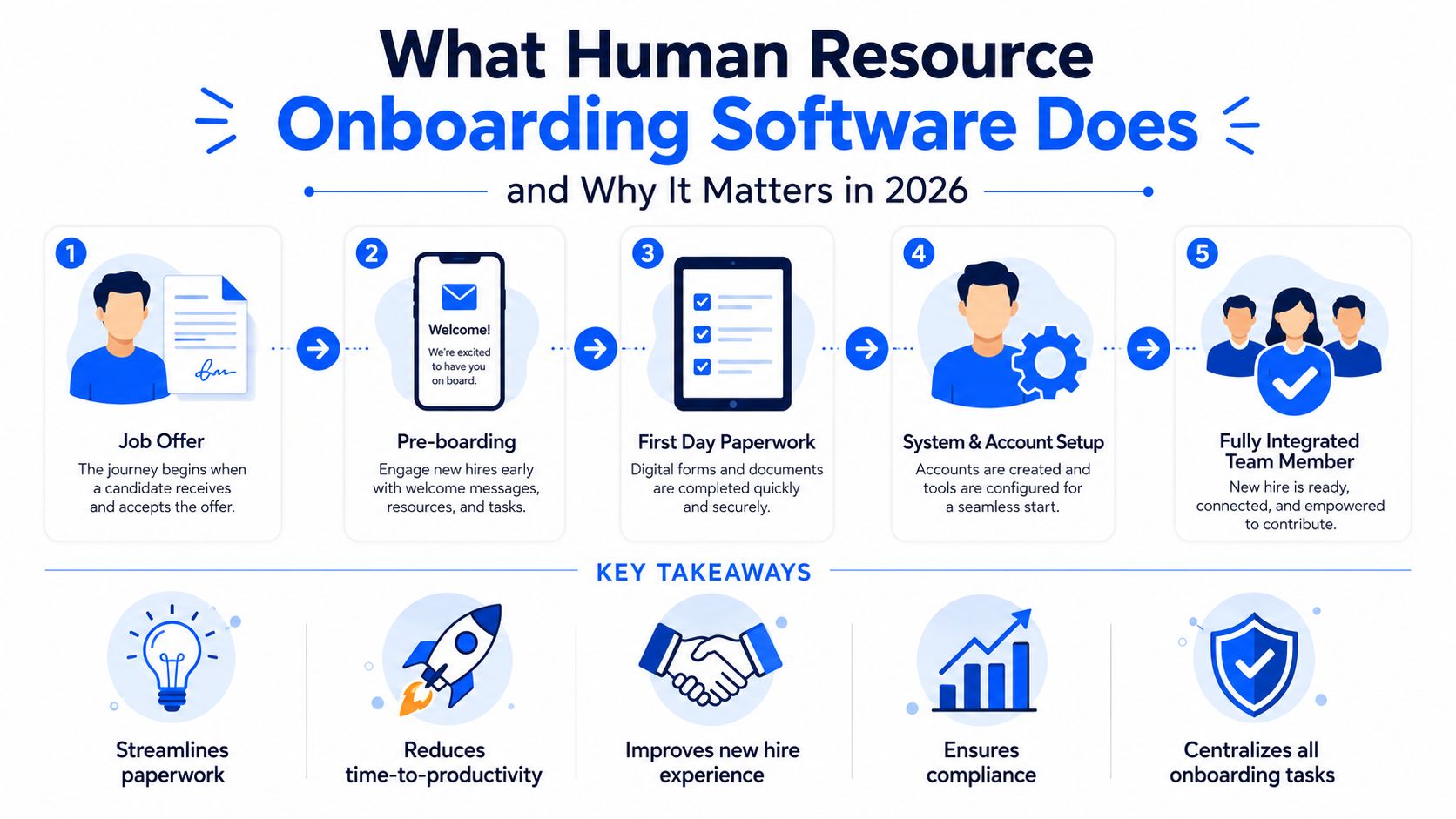
Human resource onboarding software is the operational layer between a signed offer and a productive, connected employee. It coordinates preboarding, new hire paperwork, electronic signatures, employee self-service, HRIS and ATS data, IT provisioning, compliance workflows, onboarding checklists, manager tasks, and 30-60-90 day follow-up.
Key Takeaways
- Choose for execution: The strongest employee onboarding software connects HR, IT, payroll, managers, and operations.
- Protect Day 1: Account provisioning, equipment, payroll setup, and required documents should be tracked before arrival.
- Design for the whole workforce: Mobile access, multilingual support, and simple workflows matter for frontline and distributed employees.
- Use AI selectively: AI should personalize paths, identify stalled work, and recommend next actions, not merely generate welcome copy.
- Measure outcomes: Track readiness, completion, manager follow-through, time to productivity, and retention signals through the first 90 days.
The market’s growth reflects this change. Independent estimates place the employee onboarding software market at about USD 1.9 billion in 2024, with a projection of roughly USD 3.7 billion by 2030 and a 9.8% compound annual growth rate, according to MarketIntelo’s employee onboarding software market analysis. Another estimate places the category at USD 2.11 billion in 2025 and USD 2.53 billion in 2026, implying near-term growth of 19.7% in that forecast.
That expansion matters because onboarding is no longer an isolated HR administration task. Market breakdowns assign 72.5% of 2025 market value to software, while cloud deployment represents 78.3% of revenue share in another estimate cited by the same market coverage. The direction is clear. Buyers are replacing paper-heavy processes with software-led workflow orchestration, document management, and task automation.
Why the first 90 days belong in the buying decision
Onboarding software should support more than a welcome portal. It should create a visible journey:
- Preboarding: Collect documents, confirm personal details, explain what happens next, and identify missing information.
- Day 1 readiness: Confirm devices, accounts, access permissions, payroll setup, schedules, and manager responsibilities.
- Early enablement: Deliver role-specific learning, policies, introductions, and job-critical knowledge.
- 30-60-90 milestones: Assign check-ins, pulse surveys, learning goals, and manager follow-up.
- Operational integration: Connect the employee to the systems, people, communication channels, and workflows needed for the role.
Research summarized by MyShortlister’s HRIS statistics coverage reports that onboarding automation can reduce time spent on onboarding tasks by 50%. The same source cites 42% of HR managers who don’t capture onboarding information electronically spending three or more hours per employee collecting and processing it manually. That administrative burden is precisely why teams should evaluate onboarding management software as workforce infrastructure.
For Turn On Work, the relevant lens is workforce experience, the intersection of employee engagement, internal communications, HR technology, AI, frontline enablement, and workforce operations. A platform earns its place when it helps people understand what to do, gives managers clear ownership, and removes operational blockers. The broader workforce experience perspective is useful because onboarding succeeds through coordinated communication and execution, not HR forms alone.
How Onboarding Software Fits Alongside HRIS, HCM, and ATS Platforms
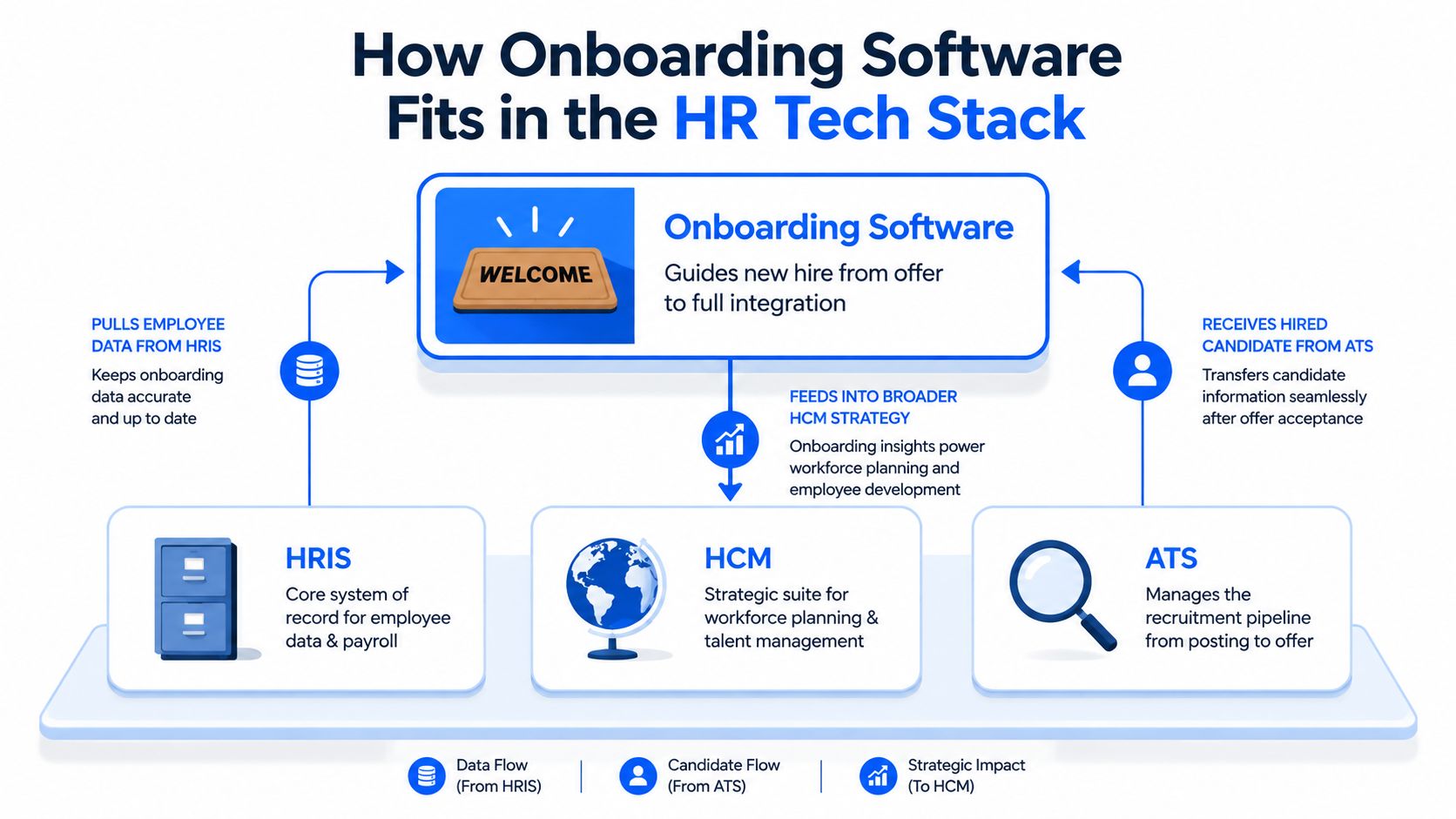
Onboarding software coordinates the post-offer experience, while an HRIS stores employee records, an HCM manages broader workforce processes, and an ATS manages recruiting through the hiring decision. The distinction matters because many teams buy a new hire onboarding platform expecting it to replace systems that serve different purposes.
An ATS manages the recruitment pipeline. It holds candidate information, interview activity, approvals, and offer data. Once a candidate accepts, onboarding software should receive the relevant record without forcing HR to re-enter information.
An HRIS acts as the core system of record for employee data and often supports payroll, benefits administration, and basic HR processes. An HCM generally extends that foundation into talent, workforce management, learning, performance, and planning. Some HCM suites include substantial onboarding functionality, but the buyer still needs to test whether the experience works for employees, managers, IT, and frontline operations.
The handoff is where most stacks fail
A strong employee onboarding system acts as an orchestration layer. It pulls the hired candidate from the ATS, sends authoritative employee data to the HRIS, triggers identity and access provisioning, coordinates equipment and facilities, assigns learning, and reports outstanding work to the manager.
That architecture creates an important data ownership rule. The HRIS should own employee records, the ATS should own candidate and requisition data, identity and access management should control permissions, and the onboarding platform should coordinate the journey. If vendors blur those responsibilities, teams can create duplicate records, conflicting updates, and unclear accountability.
Buyer rule: Ask every vendor to show the complete handoff from accepted offer to payroll, identity, device access, manager tasks, and employee communication. A polished onboarding portal can’t compensate for disconnected systems.
Integration depth separates a genuine HR software for employee onboarding solution from a digital checklist. Review APIs, prebuilt connectors, webhooks, identity workflows, payroll synchronization, ATS integration, and failure handling. Your team should know what happens when a field is missing, an approval stalls, or an access request fails.
This is also where the work graph concept helps HR and IT leaders think beyond individual applications. The employee’s experience follows work across systems. Your onboarding platform should make those dependencies visible rather than hiding them behind a single completion percentage.
Core Features Every Strong Onboarding Platform Should Include
The best HR onboarding software combines employee-facing simplicity with back-office control. Treat the following capabilities as procurement requirements, not optional marketing features.
Capabilities that should be non-negotiable
- Preboarding workflows: New hires should complete new hire paperwork, electronic signatures, policy acknowledgments, and personal details from a mobile-friendly experience before their first shift or workday.
- Personalized Day 1 portal: The employee needs one clear place for schedule, contacts, location, preparation, introductions, learning, and outstanding tasks.
- Role-based onboarding checklists: A warehouse employee, nurse, engineer, and manager shouldn’t receive identical onboarding workflows. The platform should assign tasks based on role, location, employment type, and start date.
- Identity and access provisioning: HR, IT, and security teams should be able to trigger account, device, application, badge, and facilities tasks through connected workflows.
- Manager dashboards: Managers need a short view of what they own, what is overdue, and what the employee needs next. A long task list without accountability is not onboarding automation.
- Compliance evidence: The system should preserve completion records, timestamps, approvals, document versions, and audit trails. Comparative coverage identifies I-9/E-Verify automation, SOC 2, mobile support, advanced workflow automation, and broad integrations as differentiators among leading tools in HR Cloud’s onboarding software comparison.
- 30-60-90 follow-up: Pulse surveys, manager check-ins, learning milestones, and early feedback should continue after orientation ends.
| Capability | What Buyers Need | Where AI Adds Real Value |
|---|---|---|
| Preboarding | Mobile forms, signatures, documents, reminders | Extracting information for review and identifying missing fields |
| Role-based workflows | Different paths by role, location, and employment type | Recommending relevant checklists and learning |
| IT provisioning | Identity, devices, applications, and permissions | Detecting stalled dependencies and suggesting next actions |
| Compliance | Evidence, approvals, policy acknowledgment, audit trails | Flagging exceptions for human review |
| 30-60-90 journey | Milestones, manager tasks, pulse surveys | Identifying ramp risk from incomplete activity or feedback |
Where AI earns its budget
AI is useful when it reduces ambiguity or helps a human make a better decision. It can personalize learning paths, summarize progress, identify a blocked workflow, recommend the next action, and surface new hires at risk of falling behind.
AI is decorative when it only writes a generic welcome message or adds a chatbot that can’t access the systems needed to resolve a problem. The strongest emerging pattern is an operational assistant that works across HR, IT, identity, and collaboration systems. IDC-referenced coverage from Enboarder’s onboarding trends analysis says 60% of organizations are already using or testing AI-enabled onboarding, while 25% plan to invest within 12 to 18 months.
Mobile-first design and multilingual support deserve the same scrutiny as AI. A frontline worker may not have a corporate laptop, a fixed desk, or time for a long form. Test the workflow on a phone, with limited attention, and without assuming that every employee works in the same language or location. Strong employee communication tools should complement, not replace, the onboarding system’s task and record capabilities.
Comparing the Leading Human Resource Onboarding Software Platforms
The leading platforms differ less by whether they can collect forms and more by how well they connect workflow depth, compliance, integration, and employee usability. The table below is an editorial comparison of the seven named platforms. Confirm current packaging and product scope during procurement.
| Platform | Workflow Depth | Integration Breadth | Mobile/Frontline | AI Features | Compliance Coverage | Best Fit |
|---|---|---|---|---|---|---|
| Workday Onboarding | High | High within enterprise ecosystem | Moderate to strong, configuration dependent | Available through broader ecosystem and workflow capabilities | Strong enterprise governance | Large, complex organizations |
| BambooHR | Moderate | Moderate | Strong for straightforward employee workflows | Selective, verify current modules | Solid core HR coverage, verify jurisdictional needs | Small and mid-sized businesses |
| Rippling | High across HR, IT, and finance | High | Strong, especially where device and app setup matter | Automation-led, verify AI scope | Strong operational coverage, validate regulated requirements | Fast-growing and technology-enabled companies |
| Gusto | Basic to moderate | Moderate | Suitable for small-business employee self-service | Limited compared with enterprise suites | Core small-business needs, validate advanced requirements | Small U.S. businesses |
| Deel | Moderate to high for global employment workflows | High for distributed environments | Strong for remote and international teams | Verify current AI capabilities | Global process support, validate local obligations | International, contractor, and EOR-heavy teams |
| SAP SuccessFactors Onboarding | High | High within SAP environments | Moderate, dependent on configuration | Broader SAP intelligence and automation, verify module scope | Strong multinational and compliance orientation | Global enterprises with SAP stacks |
| Click Boarding | High for structured onboarding journeys | Moderate to high, validate connectors | Strong frontline orientation | Verify current AI functionality | Strong workflow and compliance support, validate local rules | Frontline-heavy and operational workforces |
Situational recommendations
Workday Onboarding is the strongest candidate when Workday already owns the enterprise HR architecture. It offers depth and governance, but configuration, administration, and implementation can be demanding. Don’t buy it for a small team that needs a simple launch.
BambooHR is easier to adopt and often a good fit for growing organizations that want a clean employee onboarding platform around core HR. Its simplicity is also its ceiling. Complex identity, global compliance, or highly customized frontline workflows may require additional tools.
Rippling stands out when the buyer wants HR, IT, and finance automation in one platform. Independent enterprise onboarding comparisons specifically highlight Rippling’s ability to combine those functions, alongside zero-touch provisioning and automated device and access setup. Its consolidation advantage is strongest when the organization is willing to standardize processes around the platform.
Gusto fits small U.S. businesses that prioritize payroll and straightforward employee self-service. It isn’t the first choice for complex global operations, deep compliance governance, or multi-layered enterprise provisioning.
Deel is the natural option for distributed international teams managing employees, contractors, or employer-of-record arrangements. Buyers should test how well its onboarding workflows connect with their internal HRIS, identity, learning, and manager processes.
SAP SuccessFactors Onboarding suits multinational companies already invested in SAP. Its compliance orientation and enterprise depth come with configuration complexity, so local process ownership must be clear.
Click Boarding deserves attention from retail, hospitality, healthcare, manufacturing, and other frontline-heavy organizations. Its value depends on whether mobile, multilingual, shift-aware workflows and manager adoption match the operating environment.
For a broader employee experience stack comparison, review Microsoft Viva alternatives for employee experience. The onboarding platform shouldn’t operate as a communication island.
Onboarding Software Pricing and the Real Cost of Ownership
Employee onboarding software pricing varies by billing unit, product scope, workforce size, implementation complexity, and negotiated terms. Vendors may charge per employee per month, per new hire, by module, or through a broader HR platform agreement. Public pricing isn’t consistently comparable across the seven platforms, so don’t treat a vendor’s headline quote as total cost.
The visible subscription is only one layer. Your cost model should include:
- Platform fees: Core onboarding, HR, payroll, or HCM licensing.
- Implementation: Configuration, migration, workflow design, testing, training, and change management.
- Integration work: ATS, HRIS, payroll, identity, device management, LMS, collaboration, and facilities connections.
- Security and access: SSO, role-based permissions, audit configuration, and API requirements.
- Usage-based items: E-signature envelopes, employee volume, contractor or EOR services, and premium support.
- Ongoing administration: Workflow changes, new locations, policy updates, reporting, and exception handling.
BambooHR and Gusto commonly make the most sense when onboarding is bundled with core HR or payroll. Workday and SAP SuccessFactors usually belong in enterprise procurement conversations involving licensing, configuration, and professional services. Deel’s total cost can also include country-specific employment or EOR charges, while Rippling may price modules separately.
A simple buyer calculation
Use this formula before comparing proposals:
Total onboarding cost = annual platform fees + implementation + integrations + support + usage charges
Then divide by the number of hires onboarded during the same period:
Cost per hire = total annual onboarding cost ÷ annual hires
This calculation won’t tell you whether a platform is good. It will show whether a low per-employee quote hides a high implementation burden or whether an integrated platform reduces separate tools and manual work.
Procurement test: Require vendors to price your real workflow, including one standard hire, one frontline hire, one international or remote hire, and one exception case.
Contract levers include multi-year commitments, volume thresholds, phased rollout pricing, proof-of-concept terms, implementation caps, and defined support response obligations. Include data export, integration ownership, and price protection in the contract. Manual friction also creates workforce experience debt, the accumulated cost of systems that make employees and managers compensate for weak processes, as discussed in Turn On Work’s workforce experience debt analysis.
Matching the Right Platform to Your Workforce and Use Case
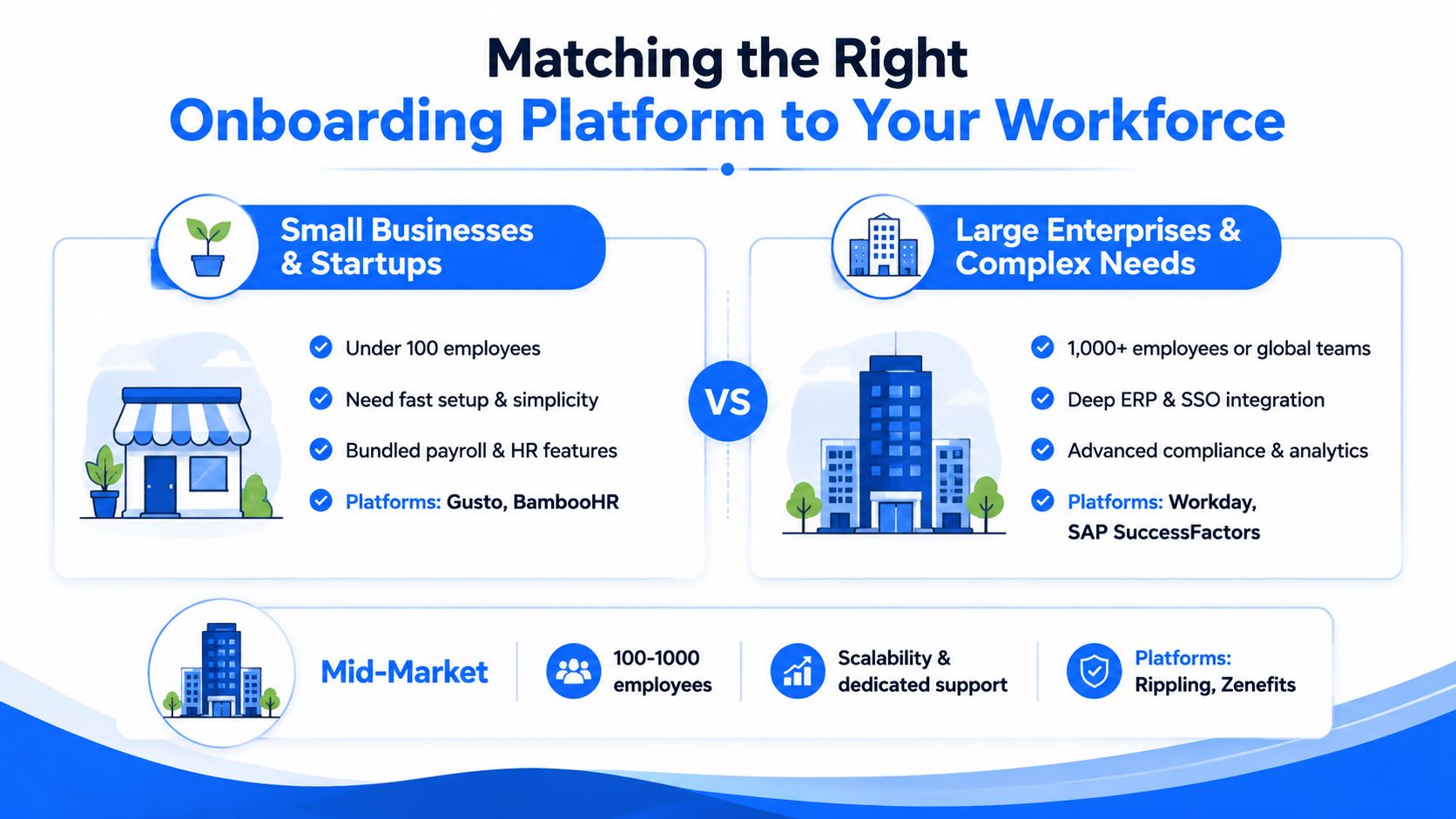
The right onboarding management software depends on workforce shape, not brand recognition. A small business with bundled payroll needs a different system from a global manufacturer with multiple sites, languages, shifts, and identity policies.
Small businesses and startups
Best fits: Gusto and BambooHR.
Choose Gusto when payroll, benefits, and fast employee self-service are central. Choose BambooHR when you need a cleaner HR record and a more structured employee onboarding experience. The trade-off is limited depth for advanced provisioning, complex compliance, or international workforce models.
Adoption tip: Build one standard new hire onboarding process before adding variations. Small teams lose more time from inconsistent ownership than from missing advanced features.
Large enterprises and complex organizations
Best fits: Workday and SAP SuccessFactors.
Workday is a strong match for organizations already operating a broad Workday environment. SuccessFactors is compelling for global companies with SAP infrastructure and multinational governance requirements. Both demand disciplined configuration, integration ownership, and internal expertise.
Adoption tip: Make HR, IT, security, payroll, legal, and operations co-owners of the workflow design. Enterprise onboarding fails when one department configures a process that another department must execute.
Remote and globally distributed teams
Best fits: Deel and Rippling.
Deel is designed around international employment complexity, while Rippling is attractive when distributed hiring also requires device, application, payroll, and identity coordination. Check language coverage, local document requirements, time-zone handling, contractor workflows, and handoffs into your core HRIS.
Adoption tip: Replace live-only orientation with an asynchronous path that includes a clear contact map, job-specific learning, manager actions, and an escalation route for access problems.
Frontline-heavy operations
Best fits: Click Boarding and Rippling, with BambooHR worth considering for less complex environments.
Retail, hospitality, healthcare, manufacturing, and field operations need mobile-first access, short tasks, multilingual communication, location-aware instructions, and workflows that respect shifts. A desktop portal can look excellent in a demo and still fail on the shop floor.
Adoption tip: Test the entire employee onboarding checklist on a personal phone, with a supervisor available for only a brief handoff. If the employee can’t complete essential steps without a laptop or long email thread, the design isn’t frontline-ready.
Regulated industries
Best fits: Workday and SAP SuccessFactors.
Financial services, healthcare, and government teams should prioritize audit trails, role-based access, document retention, approval history, policy acknowledgment, and jurisdiction-specific workflows. Validate I-9/E-Verify support where relevant, along with evidence export and administrator controls.
Adoption tip: Ask an internal compliance owner to review a completed onboarding record before signing. The question isn’t whether the platform has a compliance feature. It’s whether your organization can produce credible evidence quickly.
A TurnOnWork Framework for Evaluating Onboarding Software
The TurnOnWork evaluation model scores a platform on four dimensions, with extra weight assigned to the workforce conditions that create the most friction. This is an editorial model, not an established industry standard. Use a 1-to-5 score for each dimension, then apply the appropriate weight.
| Dimension | What It Measures | Desk-Based Weight | Frontline Weight | Score 1-5 |
|---|---|---|---|---|
| Integration depth | HRIS, ATS, payroll, identity, devices, and application connections | 30% | 25% | |
| Frontline readiness | Mobile workflows, multilingual support, shift and location usability | 15% | 35% | |
| Governance | Audit trails, role-based access, approvals, compliance evidence | 25% | 20% | |
| 90-day outcomes | Ramp tracking, completion, manager follow-through, retention signals | 30% | 20% |
For a desk-based workforce, integration depth and measurable ramp outcomes deserve the most attention. A delayed application account can block the first day, while weak manager follow-up can make a polished portal irrelevant. For frontline employees, mobile usability and short, role-specific workflows carry more weight because access conditions determine whether employees can participate at all.
Apply the model during the demo
Ask each vendor to demonstrate the same scenario:
- An accepted candidate arrives from the ATS.
- The employee completes required documents on a phone.
- HRIS data creates the employee record.
- Identity and IT provisioning begin.
- The manager receives assigned tasks.
- A compliance activity creates auditable evidence.
- The employee receives a 30-day check-in.
- HR can identify the blocker if one step fails.
Score the workflow, not the presentation. A vendor that shows a beautiful dashboard but can’t explain failure handling should lose points.
Use this 30-minute joint HR and IT checklist:
- Which system owns each field?
- What happens when the ATS record is incomplete?
- Can the platform trigger identity, device, and application tasks?
- What does the new hire see before Day 1?
- How does a manager know which task is overdue?
- Can frontline employees complete the process by phone?
- What evidence can compliance teams export?
- Which 90-day outcomes can the platform measure directly?
- Which retention and time-to-productivity metrics require another system?
- What will the vendor support contractually, rather than merely demonstrate?
The most valuable vendor answer is often a limitation stated clearly. If a platform requires an external identity tool, say so. If retention attribution needs an HR analytics layer, document it. Honest boundaries make implementation safer.
FAQs on Human Resource Onboarding Software
What is the difference between onboarding software and a traditional HRIS?
Onboarding software manages the employee’s transition from accepted offer through early integration, while an HRIS primarily stores employee records and supports core HR processes. An HRIS may include onboarding functionality, but dedicated onboarding management software usually focuses more on preboarding, role-based tasks, manager accountability, communication, IT handoffs, and the first 90 days.
How long does onboarding software implementation take?
Implementation time depends on integrations, workflow variation, data quality, compliance requirements, and the number of locations or employee groups involved. A phased rollout is realistic in 2026. Start with one employee population and a limited set of workflows, prove the ATS-to-HRIS and HR-to-IT handoffs, then add regions, frontline roles, learning, and 30-60-90 programs.
What compliance evidence should an onboarding platform produce?
A credible platform should preserve completion status, timestamps, approvals, document versions, policy acknowledgments, role-based access history, and exception records. Requirements vary by jurisdiction and industry, so have legal and compliance owners validate retention, access, export, and identity-verification requirements before purchase.
How should HR measure whether onboarding software works?
Baseline operational and employee outcomes before launch, then compare equivalent cohorts after rollout. Track Day 1 readiness, paperwork completion, access availability, manager task completion, learning progress, pulse feedback, time to productivity, and early retention signals. Use a phased rollout or matched comparison where possible so you can separate the platform’s effect from changes in hiring, management, training, or compensation.
Research summarized by Built’s onboarding automation coverage reports that technology-using companies were three times more likely to improve first-year retention and twice as likely to improve new-hire engagement. Treat those findings as directional evidence, not a promise for every implementation. AI onboarding trend research also cites potential reductions of 25% to 40% in time to full productivity and 30% to 50% in HR administrative hours per hire for AI-assisted onboarding. Your own baseline remains the final test.
If your current onboarding process still depends on spreadsheets, email reminders, and separate HR, IT, and manager checklists, map one real hire from offer acceptance through Day 90 this week. Score the bottlenecks using the TurnOnWork framework, invite HR and IT into the same vendor demos, and require each finalist to prove Day 1 readiness, frontline usability, compliance evidence, and measurable 90-day follow-through before you sign.