
An employee offboarding checklist for deskless teams is a role-based, time-bound workflow that assigns owners to access removal, asset recovery, final pay, knowledge transfer and exit feedback, with evidence for every action. With 5.786 million U.S. separations recorded in July 2025, the practical challenge is making that workflow work at the store, plant or job site, even when a departing worker has no corporate email and their supervisor is covering the next shift.
Deskless Offboarding Checklist at a Glance
A reliable employee exit checklist assigns a person, a deadline and proof of completion to every control. An HR record alone doesn’t establish that a worker’s badge stopped working, their route was reassigned or their final wages were paid.
The U.S. Bureau of Labor Statistics recorded 5.786 million total separations in July 2025, a 3.6% monthly separation rate, including quits, layoffs and discharges, and other separations. Construction accounted for 369,000 separations, with a 4.3% rate, reinforcing the need for repeatable procedures rather than improvised exit emails.
Key Takeaways
- Treat the final shift as a handoff. Assign unfinished work before the employee leaves.
- Separate security from administration. Removing someone from payroll doesn’t revoke their access.
- Make completion accessible. Managers need mobile instructions and a usable fallback.
- Keep evidence, not just checkmarks. Record timestamps, custody transfers and unresolved exceptions.
A deskless exit may happen at a hospital unit, vehicle depot or construction site. Build it into the deskless employee lifecycle, rather than creating a disconnected HR transaction.
| Control area | Owner | Timing | Evidence to keep |
|---|---|---|---|
| Trigger and classification | HR | Same day the exit is recorded | Planned or unplanned exit record, with sites and systems listed |
| Last-shift handoff | Supervisor | Before the final shift ends | Signed note covering open tasks, customers, sites and shared channels |
| Account and access removal | IT and security | Within the employer-defined window | Disablement timestamp for each system, including shared and mobile accounts |
| Device and asset return | Operations and facilities | Before the last shift or final day | Recovery log, condition notes and photo or barcode evidence |
| Final pay and statutory notices | Payroll and legal | Per state or jurisdiction rules | Proof of payment and required notices |
| Exit feedback | HR | Offered during or after the exit window | Channel used, completion status and personal-data retention rules |
| Case closure | HR | After every owner signs off | Closure record and exception log for anything outstanding |
For equipment collected away from headquarters, Beyond Surplus’s offboarding logistics and data security guidance offers a useful companion to the custody record.
Timing in this table is workflow guidance, not a universal legal deadline. Employers set security service levels; payroll and notice deadlines must satisfy the applicable jurisdiction.
Step-by-Step Offboarding Process for Frontline Workers
Run frontline worker offboarding from the exit trigger through verified closure, using a master workflow with role-specific tasks. The sequence below is an editorial operating procedure, not a legal timetable.
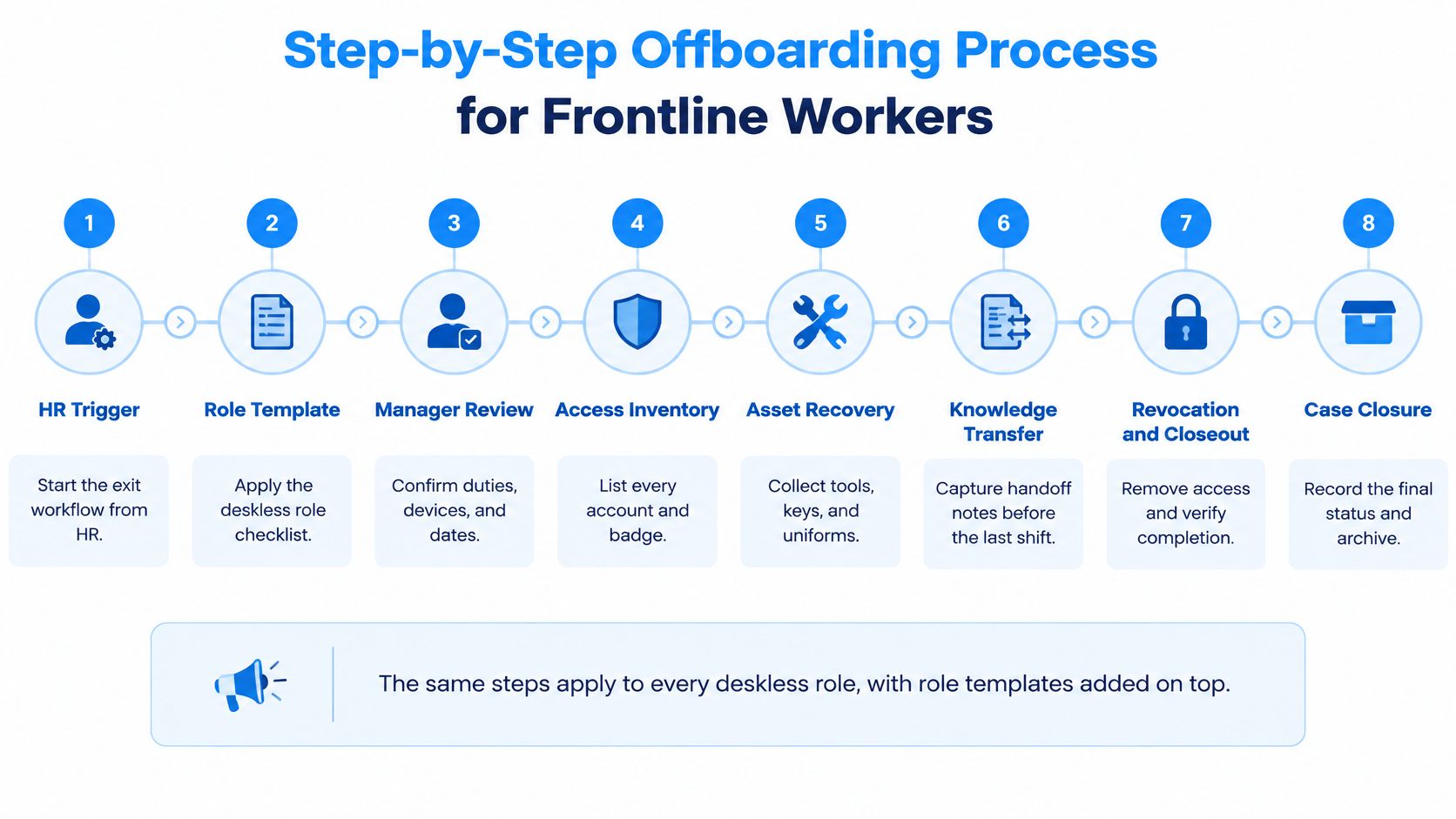
- Record the trigger and classify the exit. HR opens the case from a resignation, termination decision, contract end date, roster removal or scheduling-system deactivation. Record the effective departure time and time zone.
- Build the worker’s inventory. The supervisor identifies sites, shared tablets, point-of-sale logins, scanners, dispatch tools, keys, badges and uniforms. IT reconciles that list against its own records rather than assuming the HR system is complete.
- Complete the last-shift handoff. Assign open tasks, customer or patient transfers, route knowledge, safety responsibilities and shared-channel ownership to named successors. A hurried departure isn’t a reason to omit this step.
- Execute the approved access sequence. IT follows the exit’s risk classification. Planned handoffs can use restricted access; high-risk exits require security controls before operational convenience.
- Recover and secure assets. Operations records what changed hands, who received it and its condition. Equipment awaiting inspection belongs in a controlled location, not on an unattended counter.
- Resolve final pay and notices. Payroll confirms the employing entity, work location, governing jurisdiction and normal payday, then checks unpaid wages, overtime, commissions, expenses and applicable paid-time-off treatment.
- Offer accessible exit feedback. Give the employee a private route that doesn’t require their supervisor or a company login. Separate complaints needing investigation from general exit-survey responses.
- Verify closure. HR checks owner sign-offs and supporting records. Unfinished work remains visible in an exception queue with an accountable owner.
Make the Workflow Usable During a Shift
BCG reported that 66% of deskless employees lacked access to a corporate mobile device. Offer SMS instructions, mobile web, a kiosk or a printed fallback, and use offline-tolerant forms that retain timestamps until synchronization. A clear frontline employee communication process can also help supervisors share handoff reminders and important updates across shifts without relying entirely on corporate email.
Payroll must check the rules rather than assume the normal run is sufficient: the U.S. Department of Labor states that federal law doesn’t require an immediate final paycheck, but some states may require immediate payment.
Privacy rule: Don’t request unnecessary medical details in group messages. Sensitive information belongs in restricted HR or leave-management systems.
Access Removal for Shared, Mobile and Operational Accounts
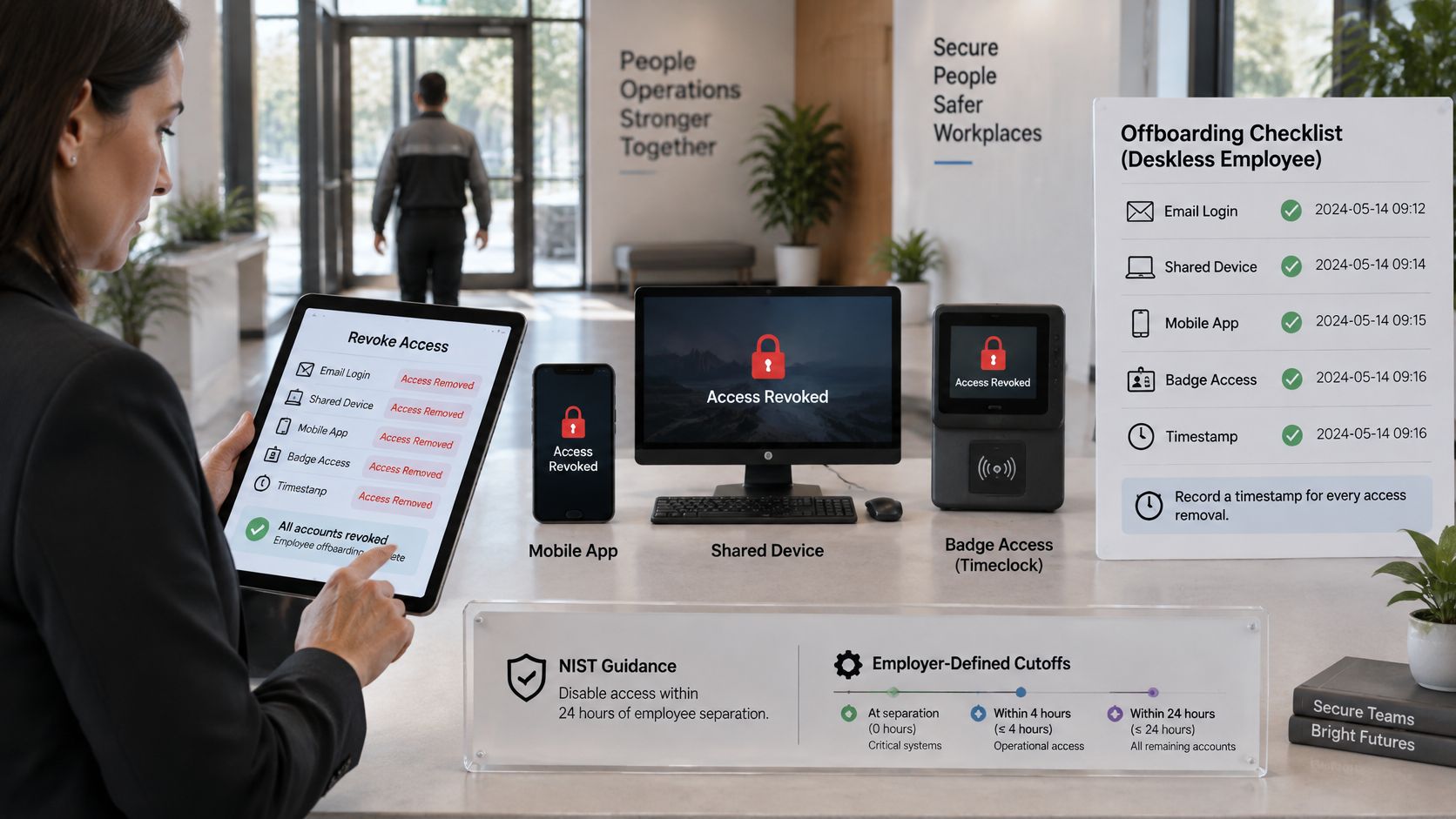
Access revocation must cover every account associated with the worker, with a timestamp for each completed action. Disabling corporate email doesn’t establish that a warehouse scanner, local facility account or active mobile session is inaccessible.
The personnel-termination control in NIST Special Publication 800-53’s revision draft calls for organization-defined access-disablement timing, credential revocation and retrieval of security-related property. That’s a control-design requirement, not a universal deadline for every employer.
| Access type | Typical examples | Revocation method | Evidence to keep |
|---|---|---|---|
| Corporate identity | SSO, email, HR self-service | Disable identity and end active sessions | Disablement timestamp and session log |
| Operational apps | POS, dispatch, clinical, warehouse tools | Revoke login and tokens; disable device profile | Per-app revocation record |
| Shared credentials | Tablet PIN, team login, kiosk code | Rotate shared secret and remove distribution access | Rotation date and owner |
| Timekeeping and scheduling | Clock-in app, shift-swap tool | Deactivate operational access and remove roster entry | Roster change and deactivation record |
| Network and tokens | VPN, hardware authentication token | Revoke VPN profile; recover and deactivate token | Revocation and token-return records |
| Physical access | Badge, key card, smart lock, building pass | Deactivate badge and recover keys | Deactivation record and custody sign-off |
| Contractor and local credentials | Agency login, facility account | Revoke at source against contract-end event | Contract-end record and revocation timestamp |
Include messaging groups and learning platforms in the application inventory, even when they aren’t connected to SSO.
Verify the Result, Not Just the Request
NIST’s published access-control guidance explains that revocation doesn’t always take effect immediately. Require a reviewer to confirm critical systems are inaccessible; where supported, use identity-provider blocking or device restrictions as compensating controls.
The Cloud Security Alliance and Astrix Security research found that only 19% of organizations automated API-key offboarding in 2024. Put manual applications, keys and integrations in an exception queue with a named owner.
Connect the HR trigger to identity, scheduling and device-management workflows where integrations support it. Use a frontline tech stack audit to identify gaps, and consider network access separately for personal devices; Purple Access’s guidance on managing personal devices across enterprise WiFi networks is useful context.
Asset Recovery Checklist by Role
Use a common asset-control minimum everywhere, then add the equipment and custody checks specific to each role. Badges, keys, company devices and responsibility for cash or stock belong in every company asset recovery review.
A generic employee asset return checklist won’t distinguish a missing uniform from a missing medication-cabinet key. Name a receiving custodian and document the handoff at the point of return.
| Role | Typical items | Recovery method | Required check |
|---|---|---|---|
| Retail | Registers, cash drawer keys, badges, uniforms, discount cards | Return at last shift with cash count | Cash count and register lock-out confirmed |
| Manufacturing | Hand tools, PPE, lockout keys, controlled-area cards | Tool-crib return and barcode scan | Supervisor-signed tool-crib reconciliation |
| Healthcare | Badges, medication cabinet keys, pagers, clinical devices, issued logo scrubs | Return to unit or department custodian | Controlled-substance and key custody sign-off |
| Hospitality | Room or site keys, key cards, POS devices, kitchen tools, uniforms | Shift-end return and key-card reset | Key-card deactivation and POS log-out |
| Transportation | Depot keys, fuel cards, handheld terminals, vehicles, route tablets | Vehicle inspection and terminal return | Vehicle condition note and fuel-card cancellation |
| Field service | Vehicles, tool kits, test equipment, radios, site access cards | Scheduled collection at depot or customer site | Serial-number check and site-access deactivation |
Document Custody Before Processing
Apply these checks to every role:
- Identify the item. Capture its serial number, barcode or other asset identifier.
- Record condition. Add factual notes and a photo where appropriate, avoiding customer or patient information.
- Confirm receipt. Record the employee, receiving custodian, location and timestamp.
- Route the next action. Assign inspection, secure storage, data handling or redeployment to an owner.
For manufacturing, coordinate lockout-key recovery with the authorized safety owner. Avoid interrupting an active isolation procedure just to complete an exit form.
A returned device isn’t ready for reassignment just because someone has collected it. Preserve custody while IT determines the approved data-handling and redeployment steps.
When outsourcing collection or downstream processing, compare IT recovery vendor checks from Reworx Recycling against your own requirements for custody, inventory and data handling.
If an item can’t be returned, record the reason, recovery plan and replacement-cost decision. Notify payroll where a deduction is being considered, but don’t treat a missing asset as automatic permission to deduct wages or delay final pay.
Knowledge Transfer Before the Last Shift
The final shift is an operational handoff, not just the end of account access. Complete employee knowledge transfer while the worker can still explain the work, and separate any remaining document-delivery needs from operational privileges.
In SHRM and Fidelity Investments’ survey, HR professionals reported average annual turnover of 26% for deskless employees versus 16% for office-based employees. Supervisors need a repeatable way to preserve working knowledge, not a request to document everything on the departure date.
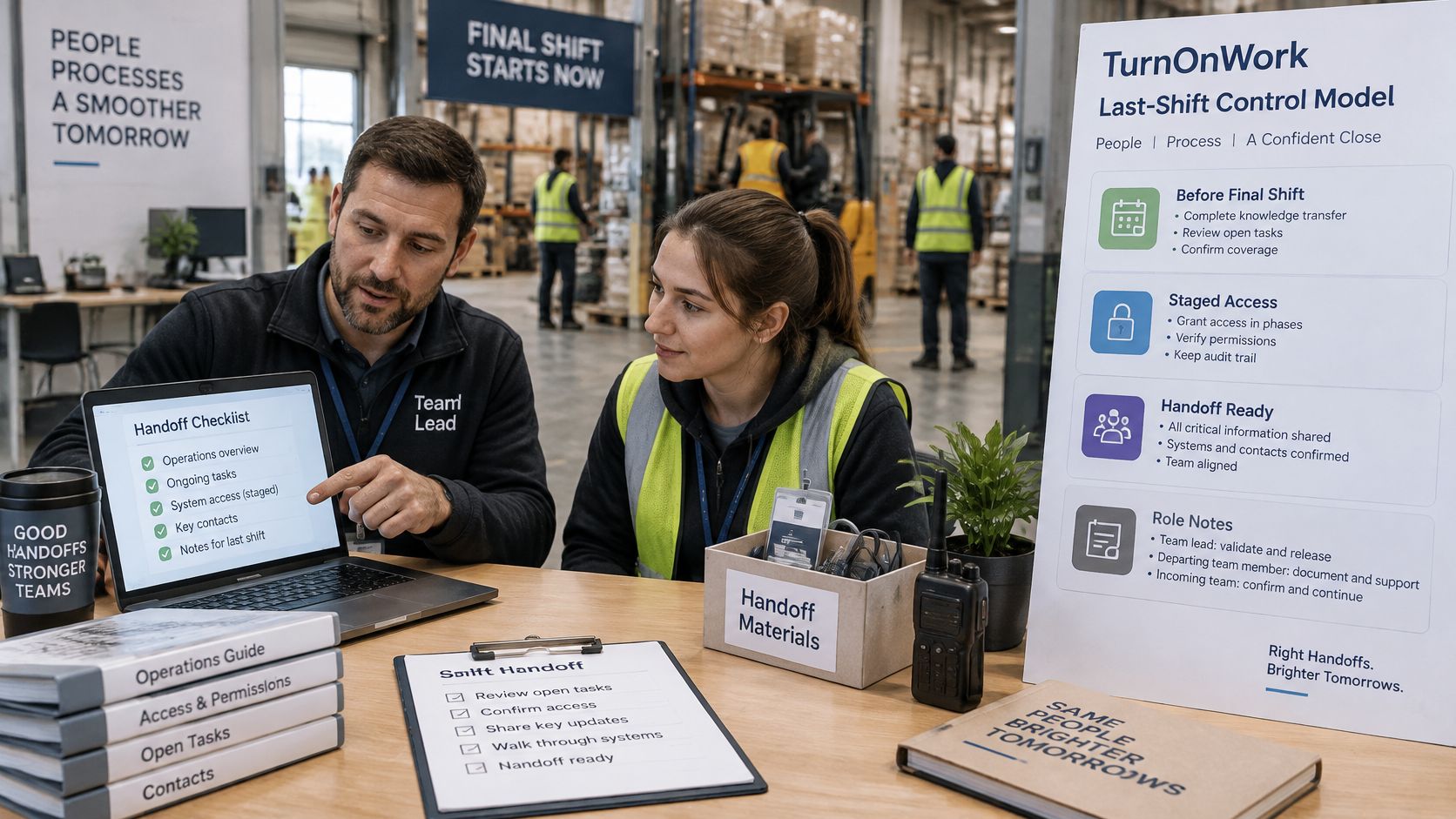
The TurnOnWork Last-Shift Control Model
This is an editorial model, not an established industry standard. Apply these tests to each critical open item:
- Named successor. Someone owns the work, with authority and access to complete it.
- Usable channel. The handoff reaches a channel the receiving team regularly reads.
- Acknowledged responsibility. The successor confirms receipt and understands the next action.
- Follow-up check. As an editorial operating target, review unresolved items after 24 hours.
Capture recurring tasks, route and site knowledge, customer or patient handoffs, contacts, documents and local workarounds. Distinguish useful local knowledge from unsafe shortcuts that shouldn’t be passed on.
For example, a field technician’s note should identify the unfinished job, equipment status, site contact, required part and next appointment. A short approved recording can help explain equipment layout, but confidential details belong in the authorized work system.
Stage Access Without Extending Risk
For a planned exit, retain only the communication and document permissions needed for the approved handoff. Remove operational privileges at the scheduled cutoff, and deliver outstanding final-pay or benefits information through a separate secure route if necessary.
Statutory communication needs aren’t a reason to leave broad system access open. For a high-risk exit, the manager should preserve and transfer work without depending on continued employee access.
Our shift handover communication guide provides practical formats for transferring unfinished work, safety concerns and responsibility. Pair that discipline with capturing tribal knowledge in frontline operations so important instructions don’t remain solely in a departing worker’s memory.
Voluntary, Involuntary and Multi-Location Exits
Keep the same control areas for every exit, but change timing and execution according to risk and location. The schedule below is an editorial recommendation that employers should reconcile with their policies and applicable requirements.
NIST’s personnel-security guidance emphasizes timely execution for terminations for cause and notes that organizations may disable accounts before notifying the individual.
| Factor | Voluntary exit | Involuntary exit |
|---|---|---|
| Trigger timing | Resignation notice date | Termination decision date |
| Access removal | Final working day, after handoff | Privileged and remote access before or during the conversation; standard access the same day |
| Knowledge transfer | Runs through the notice period | Compressed; rely on documented handoff notes |
| Asset return | Scheduled at final shift | Arranged at the conversation, with follow-up collection |
| Exit feedback | Private mobile or phone option | Non-manager escalation route |
| Main risk | Knowledge loss and missed handoffs | Late access removal and final-pay disputes |
Coordinate Across Sites and Employers
For multi-location operations, maintain a master employee offboarding SOP with local annexes. Record the employing legal entity, every site where the worker held access and the owner responsible for each location’s completion.
Assign a regional coordinator when no individual site manager can see the full inventory. Franchise operators should identify which employer owns payroll, records and notices rather than assume the brand’s central team handles them.
Contractors and agency workers need equivalent access and asset controls, triggered from the contract end date or supervisor’s removal request. Include the agency contact, but don’t assume an agency notification disables a local facility credential.
Protect the Employee’s Voice
Use exit interview questions for frontline employees without making the direct manager the only route for feedback. Offer translated forms, phone or kiosk access, and representative participation where applicable.
Managers shouldn’t pressure departing employees to disclose diagnoses. Don’t assume a recurring absence pattern is misconduct; route leave, accommodation and disputed attendance questions to the appropriate HR reviewer.
Pilot the Checklist at One Site and Track Four Numbers
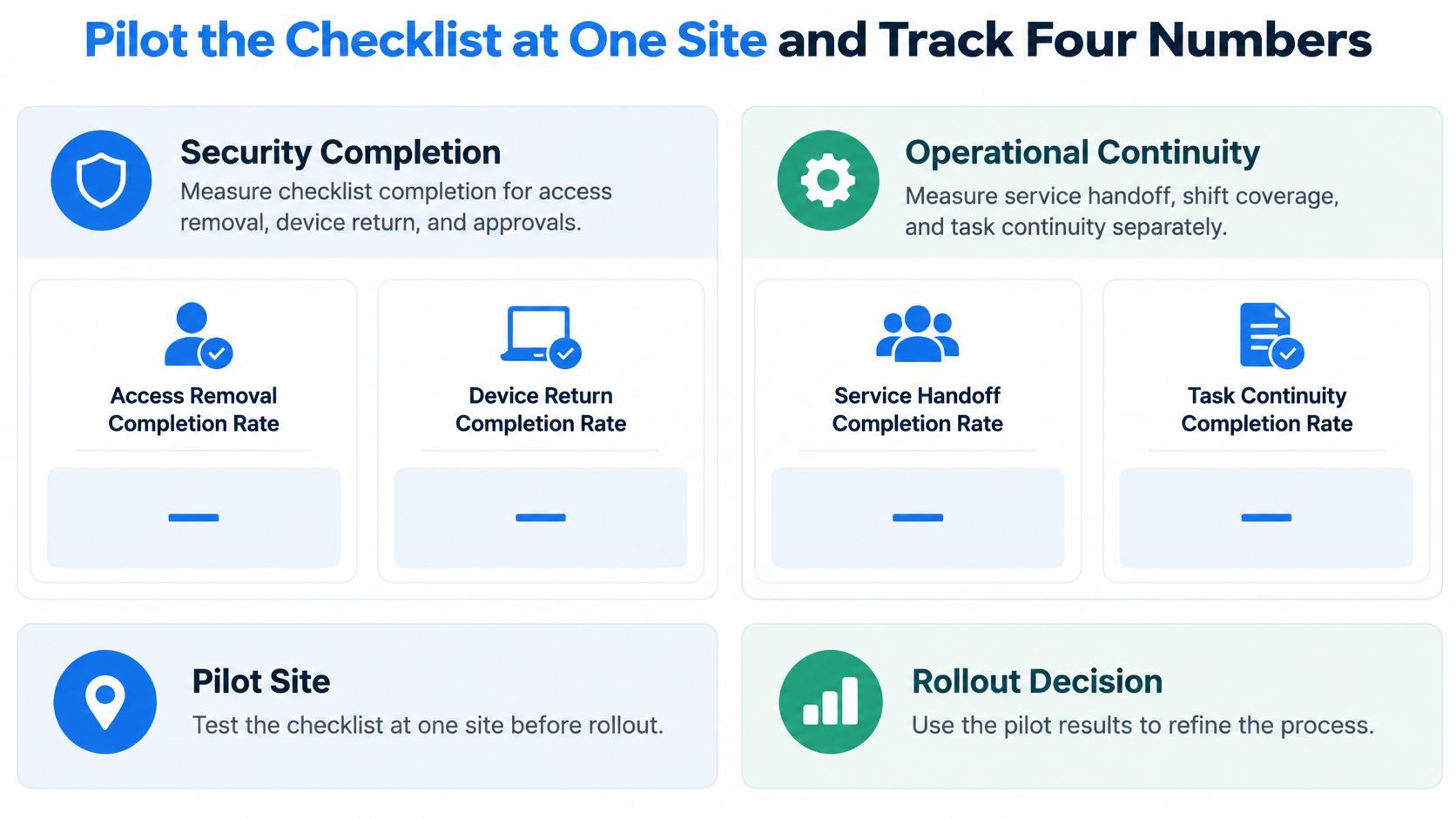
Measure security completion and operational continuity separately, then test the workflow at a single site before rollout. A closed HR case isn’t proof that either outcome was achieved.
Use these headline measures as a TurnOnWork editorial dashboard, not an industry benchmark:
- Access compliance. Percentage of identified accounts disabled within the employer’s policy window.
- Asset recovery. Percentage of due assets returned with a custody record.
- Handoff completion. Percentage of critical tasks assigned and acknowledged before departure.
- Verified closure. Percentage of cases with every required owner’s sign-off.
Keep Diagnostic Measures Behind the Headline
The NIST-aligned personnel-termination guidance summarized by UpGuard supports tracking recorded triggers, accounts disabled within policy, median and 95th-percentile revocation time, unresolved manual-app tasks and assets returned. Reconcile HR, identity, device, badge and application inventories so the dashboard doesn’t exclude accounts nobody remembered to list.
For operational continuity, monitor:
- Shift readiness. Whether the next affected shift has coverage.
- Task ownership. Whether critical responsibilities have an acknowledged successor.
- Outstanding handoffs. Items still unresolved at the recommended follow-up check.
- Manager verification. Whether supervisors confirmed readiness rather than merely submitting forms.
Review exit-feedback coverage by site, shift and language. The global communication study reported by PRWeek found that 58% of employees considering leaving cited poor internal communication as a factor, based on 3,574 respondents worldwide. A strong survey completion rate is less useful if workers without convenient digital access never receive a practical invitation.
Use Automation to Route Work, Not Declare Success
A digital offboarding checklist should support role templates, restricted permissions, mobile completion, timestamps and an exception queue. Test whether integrations confirm execution or merely report that a request was sent.
AI can help draft handoff summaries, translate instructions or flag missing fields. Require human review before sharing sensitive summaries, and don’t let AI decide final-pay obligations, misconduct findings or whether security exceptions are acceptable.
Rollout decision: Expand only when HR, IT and operations can explain the remaining exceptions and name the person resolving each one.
Set a baseline using recent exit records. A practical editorial starting point is the preceding six months, followed by a full-quarter pilot at a high-separation site, not a claimed benchmark.
Use the cost of frontline employee turnover to frame the operational case for improvement. Our guide on measuring employee engagement for frontline and deskless teams can also support feedback-method selection.
FAQs on Employee Offboarding Checklist for Deskless Teams
A deskless offboarding checklist should answer who acts, when they act and what proves completion. These are the common implementation questions.
Does Each Role Need a Separate Checklist?
Use a master checklist with role-specific additions. Keep common controls consistent, while adapting asset lists, safety responsibilities and handoff fields to the job.
What if the Worker Never Had Corporate Email?
Start with their actual site and system inventory. Shared credentials, scheduling tools, messaging access and badges matter even when there’s no email account to disable.
Should Contractors and Agency Workers Follow the Same Process?
Yes, apply equivalent access, asset and handoff controls. Trigger the workflow from the contract end date and confirm revocation at each source system.
Who Should Handle Feedback for Rotating Shifts?
Offer a private non-manager channel by phone, text invitation or kiosk. Record whether feedback was offered and completed, and apply appropriate personal-data retention rules.
How Do You Know the Process Is Working?
Review exceptions, access verification, returned assets and successor acknowledgments. Compare coverage across sites, shifts and languages rather than relying only on overall checklist completion.
Can Final Pay Wait for the Regular Payroll Run?
Not automatically. Payroll must confirm the governing jurisdiction and applicable payment requirements before choosing the payment date.
Choose a pilot site and put the checklist into operation. Assign HR, IT, payroll and operations owners, agree on evidence and escalation rules, and review the first completed cases together. Treat every missed handoff or inaccessible form as a workforce-experience problem to fix, not just another reminder to send.