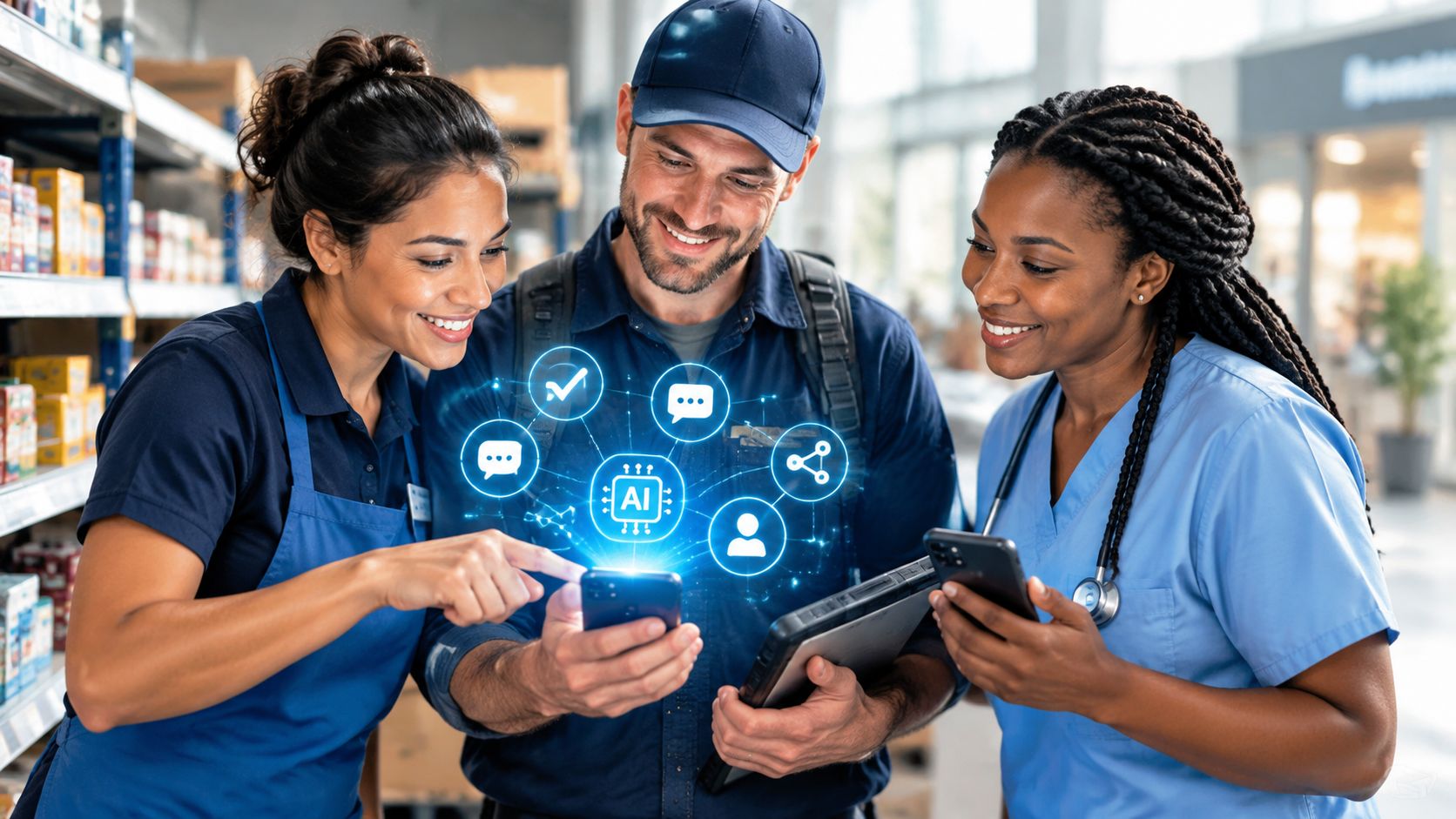
Most deskless workers aren’t hard to reach. They’re badly reached. The deskless workforce represents about 80% of the global workforce, or roughly 2.7 billion people, yet many still depend on paper, informal messages, or tools built for office employees. The right 2026 strategy connects mobile communication, scheduling, task execution, learning, feedback, and AI into one operational experience, with managers responsible for the human decisions technology can’t make.
Key Takeaways
- Design for the shift, not the office. Mobile access, simple navigation, weak-signal support, and role-based content matter more than another desktop portal.
- Treat communication as an operating system. Urgent alerts, schedules, procedures, and feedback need connected channels, not scattered broadcasts.
- Measure worker-side experience. Read rates, acknowledgement, task completion, support deflection, and active use reveal more than messages sent.
- Use AI for retrieval and routine administration. Keep humans accountable for safety, compliance, sensitive HR decisions, coaching, and final approvals.
- Pilot before scaling. Test one site, shift, or role, then expand only after the workflow proves useful in real conditions.
What the Deskless Workforce Is and Why It Matters
The deskless workforce consists of employees whose core jobs happen away from a fixed corporate desk. Retail associates, warehouse pickers, field technicians, drivers, healthcare aides, hospitality crews, construction workers, and manufacturing operators all fit the category. Their work is often customer-facing, site-based, mobile, shift-led, or performed with equipment rather than a desktop computer.
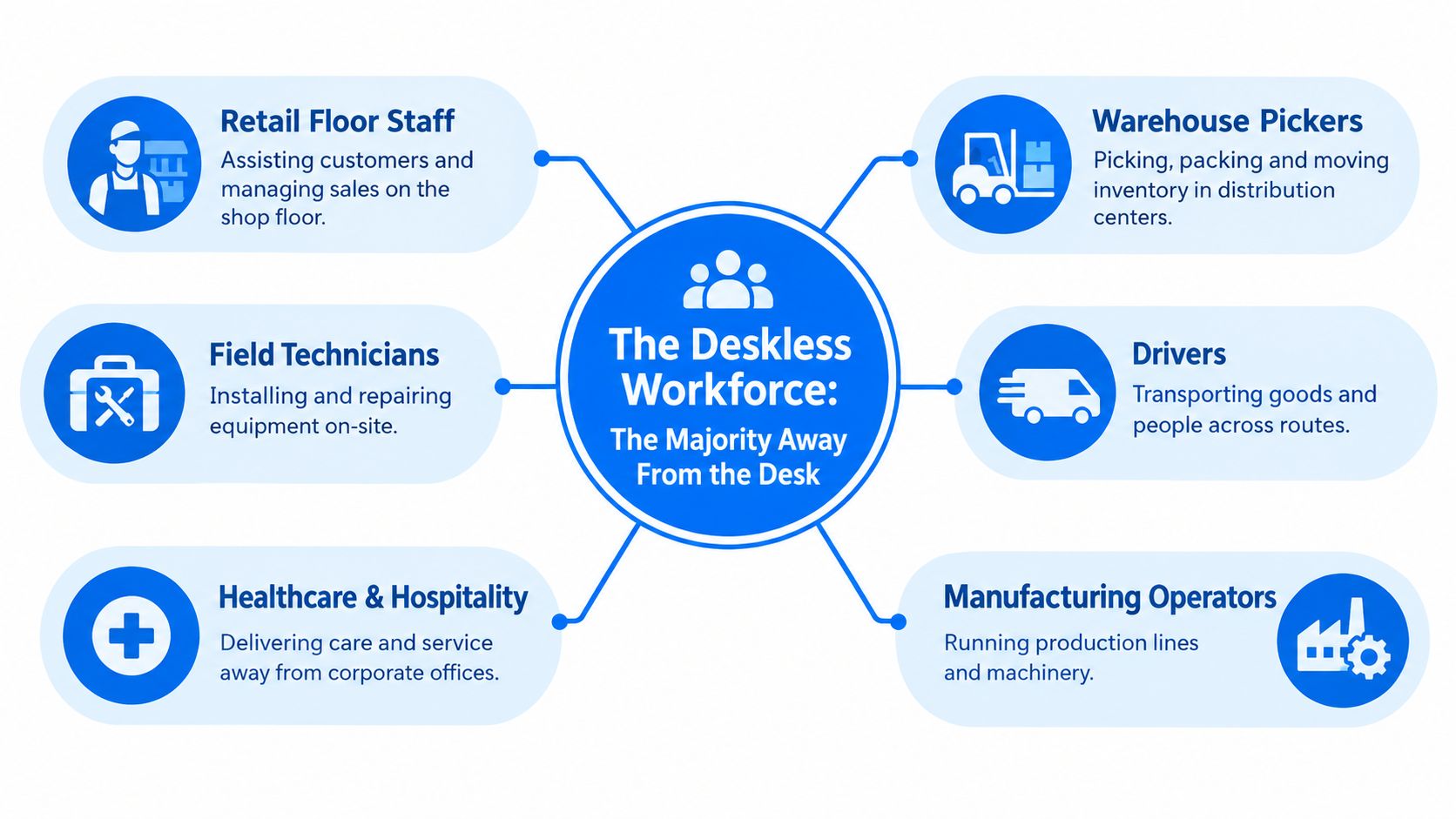
These employees are often the first customer touchpoint and the last to receive a corporate update. Many don’t have assigned corporate email, persistent desktop access, or a reliable desk phone. That makes conventional employee engagement programs structurally weak. An email campaign can’t help someone who can’t check Outlook during a shift, and an intranet article is irrelevant if a worker can’t find it while serving a customer or repairing equipment.
The operational answer isn’t just to publish more content. Technology, communication, and engagement are one design problem. If a message doesn’t fit a pocket screen, if scheduling software ignores shift realities, and if a feedback loop doesn’t survive a busy break room, the program fails regardless of budget.
A useful starting point is Turn On Work’s coverage of workforce experience, which treats employee experience as connected to the systems people use to communicate, learn, complete tasks, and get help. That connection is especially important for deskless employees because a small access failure can become a missed shift, an uncompleted safety task, or inconsistent customer service.
Why the old employee experience model breaks
Office-first programs usually assume that employees have time, connectivity, privacy, and a predictable place to log in. Deskless workers operate under different constraints:
- Time is fragmented. They need information between tasks, before shifts, or during manager huddles.
- Access varies. A personal phone, shared kiosk, or supervisor cascade may be the only practical route.
- Relevance must be immediate. A store associate needs store and role information, not a general corporate feed.
- Managers carry the last mile. Supervisors translate policy into action when technology can’t provide enough context.
The rest of this guide focuses on the practical choices that follow from those realities, including platform categories, channel comparisons, AI guardrails, and a rollout checklist.
Scale, Sectors, and the Technology Gap
The deskless workforce is the global majority, and its work happens on floors, routes, sites, wards, plants, and customer locations. Industry benchmarks commonly place this group at about 80% of the global workforce, or roughly 2.7 billion people, as reported in the Boston Consulting Group frontline labor report and the Quinyx global deskless workforce report.
That label covers very different operating conditions. Retail and food service employees may share devices or use personal phones. Warehouse and manufacturing teams work around noise, machinery, and weak connectivity. Drivers and field technicians need route-aware information between locations. Healthcare and hospitality staff need discreet, fast access without leaving patients or guests.
| Sector | Share of Deskless Workforce | Typical Device Access |
|---|---|---|
| Retail | A major deskless sector | Personal smartphone, shared terminal, manager device |
| Manufacturing | A major deskless sector | Shared kiosk, rugged device, personal smartphone |
| Logistics and transportation | A major deskless sector | Personal smartphone, handheld scanner, vehicle device |
| Healthcare | A major deskless sector | Personal smartphone, shared workstation, clinical device |
| Hospitality and food service | A major deskless sector | Personal smartphone, shared terminal, manager cascade |
| Construction and field services | A major deskless sector | Personal smartphone, rugged mobile device, offline materials |
The technology gap is equally broad. Historically, only about 1% of enterprise software spending was built for deskless employees, according to BCG’s analysis. That imbalance left many teams with paper forms, group texts, bulletin boards, and desktop systems that assume corporate email access.
Why scale creates an operating problem
Company-wide distribution does not guarantee shift-level receipt or understanding. Leaders may know that a policy was published while lacking evidence that a specific location, role, language group, or shift acted on it.
The operating costs are direct:
- Crisis communication slows down when supervisors must repeat headquarters messages.
- Policy execution varies when workers receive different versions through informal channels.
- Operational data weakens when paper handoffs and manual updates conceal stalled work.
- Support demand rises when employees cannot find schedules, procedures, pay information, or answers.
The right response is an operating design, not a broad engagement campaign. Use mobile-first access for workers on personal or shared devices, target messages by role and shift, and give managers a clear checkpoint for questions and exceptions. In 2026, deskless workforce technology should fit the work itself, including location, connectivity, task flow, and the information employees need at the moment of action.
Core Technology Categories for Deskless Workers in 2026
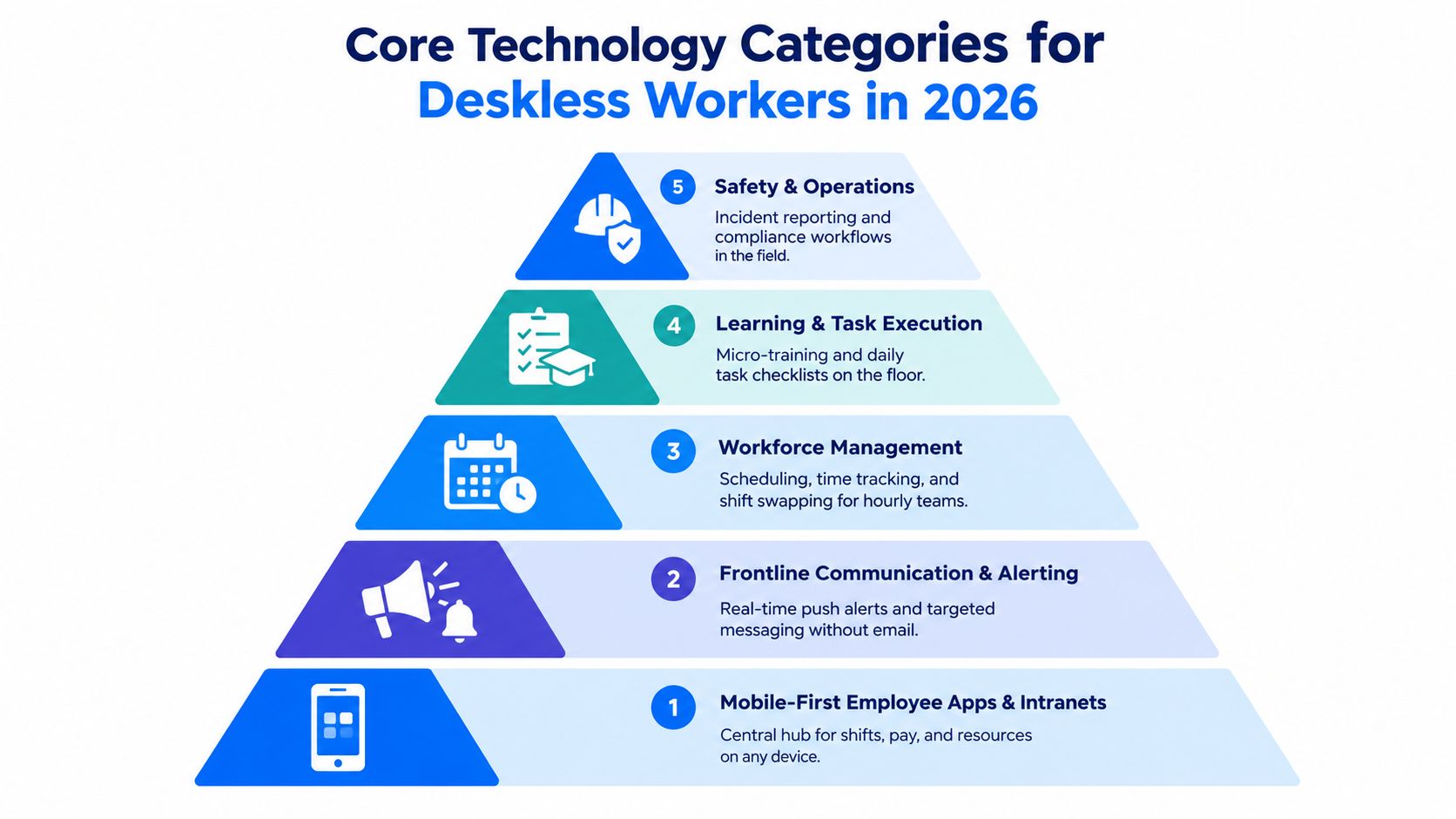
A practical deskless workforce technology stack combines five connected capabilities: mobile access, frontline communication, workforce management, learning and task execution, and feedback. Each category should work on a personal or shared device, tolerate weak connectivity, support role and language differences, and produce useful usage data.
The five layers of a workable stack
Mobile-first employee apps and intranets form the access layer. Workers should be able to view schedules, policies, payslips, benefits information, announcements, and support resources without hunting through a desktop portal. A mobile-first experience isn’t just a smaller website. It should prioritize touch navigation, short content, clear search, and low-friction authentication.
Frontline communication and alerting deliver information according to urgency and role. A safety alert needs a different treatment from a culture story. Push notifications, targeted feeds, SMS fallback, digital signage, and manager reinforcement should work together rather than compete.
Workforce management connects schedules, time, attendance, shift swaps, tasks, and staffing needs. The employee experience meets operations here. A scheduling tool that doesn’t reflect availability, location, skills, or last-minute changes will create frustration even if the app looks polished.
Learning and task execution put onboarding, procedures, checklists, and micro-training into the flow of work. The platform should connect what workers learn with what they must do on the floor, route, site, or line.
Feedback, recognition, and surveys provide the listening layer. Pulse questions, suggestions, peer recognition, and manager follow-up should be short and actionable. Deskless employee engagement suffers when organizations ask for feedback but don’t show what changed.
Four tests before you buy
Use these tests during demonstrations, not after implementation:
- Device test: Can a worker use the core workflow on a personal phone, shared kiosk, or company device?
- Connectivity test: What still works offline or on weak signal, and how does synchronization behave?
- Relevance test: Can administrators target content by role, location, shift, language, and employment status?
- Measurement test: Can leaders distinguish delivery, reading, acknowledgement, action, and repeated support requests?
A connected frontline superapp can reduce tool switching by bringing several of these workflows into one workspace. But integration matters more than branding. Workers won’t tolerate repeated logins and overlapping notifications from disconnected vendors.
Skedulo’s research found only 6% of organizations relied entirely on digital processes for deskless work, while 44% used paper-based processes half the time or more, and only 6% described their workforce as very autonomous, according to its State of Deskless Work research. Those findings support a clear priority: replace paper handoffs and give workers practical control over schedules, tasks, and information before adding advanced engagement features.
Comparing Channels and Platforms for Frontline Communication
A retail associate using a personal phone and a warehouse picker using a shared kiosk need different channel support. The right mix depends on device access, connectivity, shift routines, privacy requirements, manager behavior, and the systems holding schedule and employee data.
The comparison below is an editorial buying guide. Treat pricing as a vendor-validation issue, not a benchmark. Vendors structure contracts differently, and the available evidence does not establish reliable per-employee prices or minimum seat tiers.
| Channel | Device and Connectivity Fit | Shift-Worker Suitability | Targeting and Feedback | Integration and Pricing Signal |
|---|---|---|---|---|
| Dedicated employee experience app | Strong on personal or company smartphones, confirm weak-signal and offline behavior | Strong for schedules, news, learning, recognition, and self-service | Usually supports role-based feeds and two-way interaction | Validate HRIS, payroll, WFM, identity, licensing, and implementation costs |
| SMS and WhatsApp messaging | Broad reach on personal devices, dependent on mobile service and consent | Strong for urgent or short messages, weak as a full knowledge system | Good for replies, limited for structured feedback and history | Check privacy, opt-in, retention, international delivery, and message costs |
| Modern mobile intranet | Works well if responsive and easy to authenticate | Suitable for reference content, less effective for time-sensitive tasks unless integrated | Depends on publishing, targeting, search, and feedback features | Validate identity, HRIS, content governance, and mobile management costs |
| Collaboration suite for frontline tiers | Useful where workers already have supported accounts and devices | Strong for team coordination, variable for broad self-service | Strong conversations, but information can become fragmented | Check frontline licensing, account provisioning, identity, and WFM integration |
| WFM platform with news and task feeds | Strong where workers already use the scheduling system | Strong for shift, task, attendance, and operational messages | Good for role and schedule context, usually narrower for culture content | Validate HRIS, payroll, task, and analytics integration, plus module costs |
Microsoft and Forrester reported that frontline Microsoft Teams usage grew by 400% from March 2020 to November 2021, with particularly strong growth in healthcare, financial services, and media and communications, as documented in the Frontline Workers report. The example supports collaboration suites as a serious option, but adoption does not show that a suite can replace a purpose-built employee experience platform.
Choose the channel by job to be done
Use SMS or push when a message requires quick attention. Use an employee app for schedules, payslips, policy access, recognition, and information workers need to find again. Use a WFM platform for actions tied to shifts and tasks. Use a mobile intranet for governed reference content. Use collaboration tools when teams need conversation and local coordination.
For many organizations, the practical design pairs an employee app with workforce management software. An employee communication platform can support mobile access and multi-channel communication, while WFM software manages schedules, time, and task execution. Review an employee communication tools comparison to assess the communication layer separately from operational workflow.
How to Communicate With Deskless Employees Without Corporate Email
To reach employees without company email, use a layered communication model. Put urgent information on push notifications or SMS, persistent information in a mobile app, visible reminders in physical spaces, and interpretation with frontline managers.
A useful channel plan looks like this:
- Push notifications for critical updates. Keep the message short, identify the action, and state who needs to respond.
- An in-app news feed for durable information. Store policies, schedules, payslips, benefits resources, recognition, and local updates where workers can search later.
- SMS or WhatsApp as a fallback. Use these channels for urgent reach when app installation or login isn’t reliable. Apply consent, privacy, and retention controls.
- Manager cascades for context. Supervisors reinforce what the message means for the current shift during pre-shift meetings or handovers.
- Signage and kiosks for shared visibility. Use break-room screens, noticeboards, and printed cards when device access isn’t consistent.
The channel should follow the message, not the preference of headquarters. Recent coverage of frontline internal communication cites 9% of non-desk employees as very satisfied with internal communication, 38% rating it fair or poor, and 63% of employees considering leaving saying poor internal communication contributed to that decision. The same source reports frontline workers spent 376 hours per year searching for, waiting on, or redoing tasks because information was inaccessible, while 71% relied on personal devices or unsanctioned apps.
Those figures point to an operational problem: workers lose time when information is hard to find, not merely when leaders publish too little.
Target messages by worker context
Replace broad email groups with attributes such as:
- Role: cashier, nurse, driver, technician, supervisor.
- Location: site, store, ward, route, region.
- Shift: current, upcoming, overnight, weekend.
- Language: preferred language and translation needs.
- Work status: active, new hire, leave, or contractor where appropriate.
Build two-way loops into the same system. Use pulse questions, suggestion workflows, town-hall Q&A, and manager follow-up rather than reply-all chains. Track response-time service levels by channel, acknowledgement rates for safety alerts, unresolved questions, and quarterly channel audits. Retire channels that create noise without helping workers act.
Where AI Helps Frontline Workers and Where Humans Must Stay in the Loop
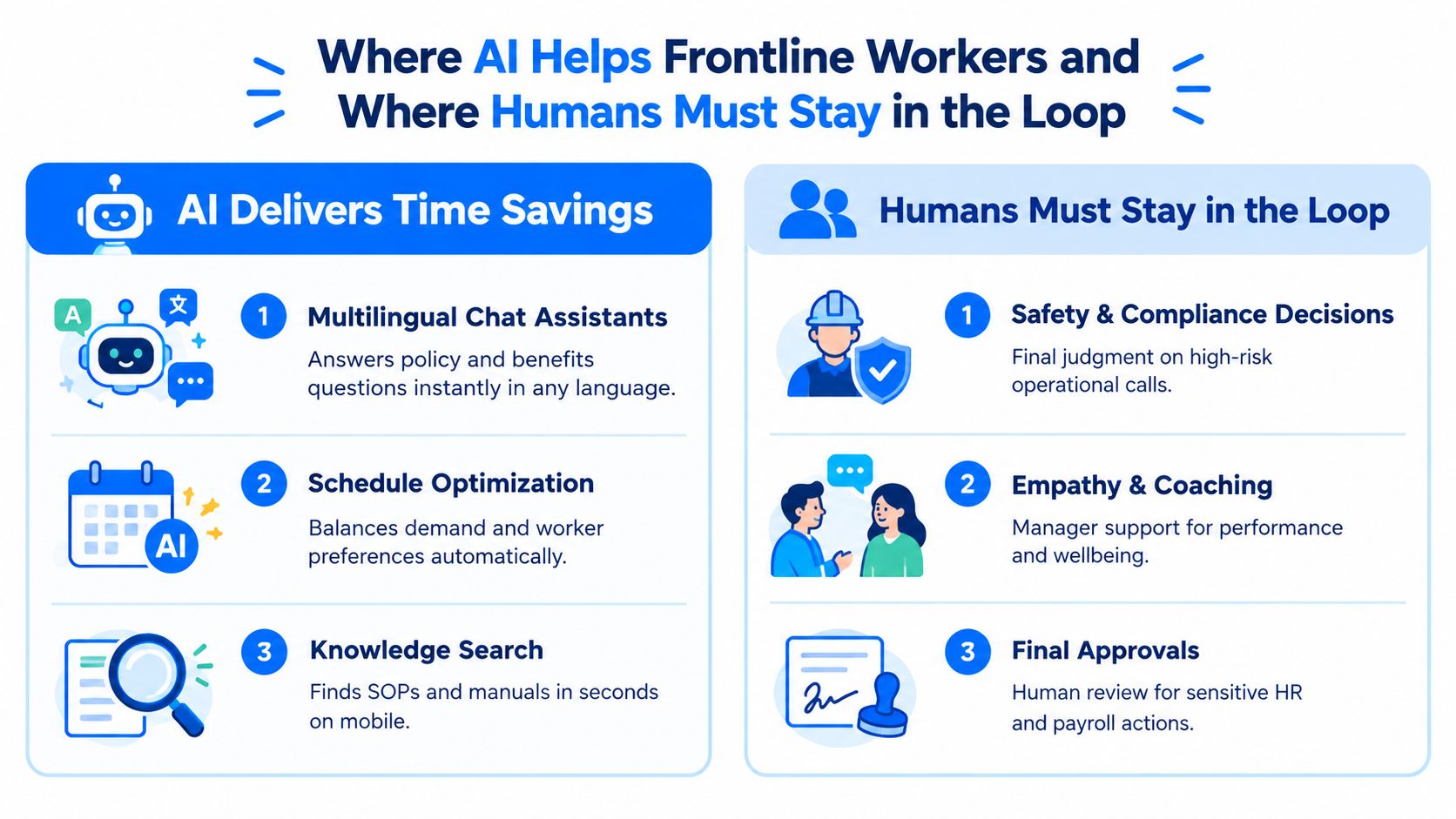
AI earns a place in deskless operations when it removes search time, translation work, scheduling friction, and routine administration. It should support the supervisor and compliance owner, not replace the people accountable for local decisions.
BCG’s 2026 AI at Work reporting says 74% of frontline employees are regular AI users globally, and 42% of frontline regular users save eight hours or more each week, equivalent to a full workday. Yet 66% receive limited or no guidance on where to reinvest that time, according to BCG’s AI at Work analysis. Leaders must decide which work benefits from that capacity, then set clear human checkpoints before deployment.
Good uses for AI tools for frontline workers
- Policy and benefits assistants: Answer routine questions from an approved knowledge base and route exceptions to a person.
- Translation: Convert safety alerts, procedures, and manager content into supported languages. Require human review for high-risk wording.
- Knowledge search: Find the relevant SOP, checklist, or manual on a mobile device instead of sending workers through folders or colleague networks.
- Schedule support: Identify conflicts, suggest coverage, and surface worker preferences for manager approval.
- Handover summaries: Turn long notes into clear actions, owners, and unresolved issues.
Turn On Work’s practical AI in HR use cases distinguishes routine automation from decisions that require judgment.
Human checkpoint: Let AI recommend, summarize, translate, or retrieve. Keep humans responsible for decisions involving safety, compliance, pay, discipline, wellbeing, or employment status.
A simple decision rule
Approve an AI output when its source is approved, the action can be reversed, and an error has limited consequences. Require human review when the output affects safety, legal compliance, payroll, performance action, personal data, or a worker’s access to shifts.
Before deployment, verify:
- Consent and notice: Workers understand what the tool does and what data it uses.
- Data governance: Conversations do not flow into public or poorly governed models.
- Data residency: Regulated operations can choose an appropriate storage and processing arrangement.
- Audit trails: Administrators can review prompts, source content, approvals, and changes.
- Escalation paths: Workers can reach a manager without getting trapped in a chatbot.
- Content ownership: Compliance and operational teams own the source material.
AI is useful in a deskless workforce program when it shortens the path from question to safe action. Pair every automated recommendation with a named owner, an escalation route, and a review point. Without that operating design, an automated answer becomes an unaccountable decision.
Adoption Playbook and the TurnOnWork Evaluation Checklist
A deskless workforce rollout succeeds when it fixes one operating problem before expanding. Start with a single site, shift, or role. Measure actual use, remove friction, and scale only after workers and supervisors can complete the target workflow during a normal shift.
A practical rollout sequence
- Choose a contained pilot. Select a location or shift with a defined problem, such as missed updates, paper task handoffs, schedule confusion, or slow support.
- Map the worker journey. Record how employees receive schedules, find procedures, report issues, swap shifts, complete training, and request help. Mark every handoff, login, duplicate entry, and manager dependency.
- Configure role-based access. Use job, location, shift, language, and manager relationships to show relevant content without flooding workers with messages.
- Prepare supervisors. Give managers scripts, escalation routes, dashboard access, and time to reinforce the system during existing huddles. Adoption drops when supervisors cannot answer basic questions.
- Instrument usage from day one. Track active use, message reach, acknowledgement, task completion, support questions, and failed logins.
- Review worker feedback weekly. Remove unnecessary steps before adding features. A shorter workflow usually beats a larger feature set.
- Scale only after the workflow works. Expand by site, role, or region using documented lessons and named owners.
Measure behavior, not sentiment alone. Track 30-day active rate, reach ratio, time to acknowledge safety alerts, ticket deflection in frontline support channels, completion of required tasks, and the quality of manager follow-up. Keep surveys short, then assign each response to an owner and a concrete action.
The TurnOnWork evaluation checklist
Use a workforce experience platform evaluation to test the operating fit, not just the feature list. This is a TurnOnWork editorial model, not an established industry standard. During a live proof of concept, score each item as pass, needs evidence, or fail:
- Mobile access: Core tasks work on personal and shared devices.
- Offline behavior: Workers can continue essential work when connectivity drops.
- Identity: SSO works for employees without corporate email accounts.
- Access control: Role-based permissions keep irrelevant or sensitive information away from the wrong audience.
- Language support: Content and navigation match the workforce’s language needs.
- Data use: Administrators can view active users, reach, acknowledgement, and action without invasive surveillance.
- Integration: The platform connects with HRIS, WFM, payroll, LMS, ticketing, and identity systems.
- Device policy: BYOD and company-issued device rules define privacy boundaries clearly.
- Cost model: Compare total cost per active monthly user, implementation, integrations, support, and inactive accounts instead of reviewing seat price alone.
- Governance: Confirm data residency, retention, auditability, security reviews, and export rights.
A deskless employee experience platform should connect to the systems that already govern work. It should not create a second schedule, duplicate employee records, or require managers to update the same task in multiple places. Retire legacy SMS blasts only after the replacement demonstrates reliable reach and acknowledgement across the affected roles.
When to use a partner
Bring in an external implementation partner when the program covers multiple countries, complex HRIS and payroll environments, union or regulatory requirements, or several inherited communication channels. Build internal capability when the pilot is contained, workflows are stable, and an accountable product owner can work directly with operations and managers.
Negotiate contract terms around implementation milestones, data export, uptime and support commitments, integration responsibilities, change-control costs, security obligations, data residency, audit access, renewal increases, and exit assistance. A vendor demo shows system capability. A live shift pilot shows whether workers can use it.
Deskless Workforce FAQs
What is a deskless workforce?
A deskless workforce consists of employees who perform their main duties away from a fixed corporate desk. It includes frontline workers in retail, healthcare, manufacturing, logistics, transportation, hospitality, construction, and field services.
What technology do deskless workers need in 2026?
They need mobile-first access to communication, schedules, time and attendance, tasks, learning, knowledge, feedback, recognition, and employee self-service. The technology should support personal or shared devices, weak connectivity, role-based access, multiple languages, and measurable usage.
How can companies reach employees without company email?
Use layered channels. Send urgent alerts through push notifications or SMS, keep durable information in a mobile employee app or intranet, reinforce important messages through managers, and use signage or kiosks where device access is limited.
Should a company use an employee app, SMS, or an intranet?
Use an employee app for persistent self-service and engagement, SMS for urgent fallback communication, and an intranet for governed reference content. Many organizations need an app paired with workforce management software for schedules and operational tasks.
How can AI support deskless and frontline workers?
AI can answer routine policy questions, retrieve procedures, translate content, summarize handovers, and suggest schedule options. Human managers and compliance owners should approve high-risk decisions, sensitive communications, payroll actions, and safety-related responses.
What should deskless workforce software include?
Look for mobile access, offline capability, role-based targeting, multilingual support, secure authentication without corporate email, integrations with HRIS and workforce management systems, task and learning workflows, feedback tools, analytics, governance, and clear escalation to human support.
How should companies measure deskless employee engagement?
Measure whether employees can access and act on information. Useful indicators include active use, message reach, acknowledgement, task completion, support deflection, feedback participation, schedule self-service, and manager follow-up. Pair these operational measures with focused listening rather than relying on survey scores alone.
What is the biggest mistake in deskless workforce management?
The biggest mistake is treating deskless employees like office workers with fewer devices. A successful deskless workforce strategy starts with the shift, the role, the location, the manager, and the task. Technology follows that operating reality.
If your organization still relies on email, paper handoffs, or disconnected scheduling and communication tools, start with one frontline workflow this quarter. Map how workers receive information and complete the task today, run a live mobile pilot with supervisors and employees, and use the evaluation checklist above to decide what deserves wider investment.