Large markets rarely form around category hype alone. They form because enterprises have a persistent operating problem, and workforce experience has become one.
In practice, buyers comparing this category often look at platforms that already combine communications, engagement, and operations in one hub, such as HubEngage.
For many organizations, that problem is fragmentation across communication tools, HR systems, scheduling apps, learning platforms, task management, and local workarounds. The cost shows up in missed messages, uneven onboarding, slower manager response to engagement issues, and inconsistent execution across stores, sites, branches, plants, and care settings. Frontline and distributed teams feel this first because they are least likely to work inside a single desktop system for the full day.
A workforce experience platform brings those disconnected workflows into one operational layer for employees and managers. It connects communication, HR access, training, task execution, knowledge delivery, listening, and analytics in the same environment, rather than forcing workers to move between point solutions that were purchased at different times for different purposes. Companies evaluating this category are usually trying to solve a business coordination problem, not just modernize the employee interface. Teams exploring a workforce platform provider focused on employee communication and operations are often responding to that exact gap.
The strategic value is operational ROI. When communication, HR entry points, and frontline tasks run through a unified platform, organizations can reduce tool switching, improve message reach, shorten time to productivity, and increase execution consistency at the local level. That matters more than interface design alone. For CIOs and CHROs, the category is increasingly about running a distributed workforce with fewer gaps between corporate intent and what happens on the shift.
Key Takeaways
- A workforce experience platform serves as the operational layer between enterprise systems and daily work. It connects communication, engagement, HR access, learning, and execution in one environment.
- The category is growing because fragmented tools create measurable workflow loss. The cost shows up in missed messages, slower onboarding, inconsistent compliance, and uneven task completion.
- Frontline and distributed workforces have the clearest ROI case for consolidation because access, timing, and manager coordination matter more when work is mobile and location-based.
- AI adds value when it improves relevance, search, and workflow routing. Feature volume matters less than whether the platform reduces friction in high-frequency employee tasks.
- Buyers should assess operational fit and integration depth before feature count. A broad interface without strong connections to HRIS, scheduling, and task systems will not solve the coordination problem.
A strong workforce experience platform does not replace every system of record. It connects those systems to the flow of work so employees and managers can act faster and with fewer errors.
The Rise of the Workforce Experience Platform
This category is still expanding, though published growth rates vary by source. The signal matters less as a headline number than as evidence of a buying shift. Organizations are no longer treating employee communication, HR self service, training, and task execution as separate software decisions. They are starting to buy for coordination.
That shift comes from a practical failure in the legacy stack. A message can be sent in one tool, acknowledged in another, acted on in a third, and measured nowhere in a way leaders can tie back to execution. For desk-based teams, that creates inefficiency. For frontline and distributed teams, it creates operating risk because the work happens across shifts, sites, and mobile devices where attention is limited and delays have immediate cost.
What a Workforce Experience Platform is
A workforce experience platform brings several layers of employee interaction into one system:
- Communication for news, updates, campaigns, and manager messaging
- Engagement for surveys, recognition, feedback, and sentiment collection
- HR access for policies, onboarding steps, payroll and benefits entry points, and self service
- Operational enablement for checklists, training, knowledge delivery, scheduling, and task execution
- AI and analytics for search, personalization, orchestration, and insight across the employee journey
The category matters because employees do not experience work by software category. They experience it through moments that require action. Read the update. Find the policy. Complete the task. Ask the manager. Confirm the shift. If those actions sit across disconnected systems, completion rates fall and managers spend more time compensating for the gaps.
This is why the category is gaining traction with CIOs, CHROs, and operations leaders at the same time. It sits between systems of record and daily execution. A system of record stores employee data. A workforce experience platform distributes that data, content, and workflow in a form employees can use during the workday.
The rise of this category reflects a broader change in buying criteria. Leaders are asking which platform can close the gap between corporate communication, HR processes, and frontline execution. That lens is especially relevant for organizations evaluating a workforce platform provider focused on employee communication and operations, where the value comes from reducing tool switching and improving local execution, not from adding another isolated app.
Why Companies Are Moving to a Unified Platform
Companies rarely choose fragmentation as a strategy. It usually emerges through separate buying decisions made by HR, internal communications, operations, IT, and learning teams over several years.
The result is a stack of point solutions that each solve a narrow problem but perform poorly across the full workday. Communications tools distribute updates. HR systems store employee data. Task applications manage execution. Knowledge tools hold policies and procedures. Scheduling often sits elsewhere. For corporate employees, that fragmentation is inefficient. For frontline and distributed teams, it creates direct operational loss because work depends on timing, mobility, and fast manager follow-up.
A store associate who misses a product update, cannot find the latest procedure, and completes a task late is not facing three separate software issues. The organization is absorbing one execution problem created by disconnected systems.
The legacy stack creates four operational failures
The first failure is context switching. Employees must remember which system handles each step. News appears in one app, policies in another, learning in a third, and shift information somewhere else. Each extra handoff increases the chance that a message is missed or an action stalls.
The second is uneven experience quality. Desk-based employees can often work around slow logins, cluttered interfaces, and multiple tabs. Frontline and hourly workers usually cannot. If the experience is not mobile, fast, and relevant to role and location, adoption drops quickly and managers revert to informal workarounds such as printouts, group texts, or verbal relays.
The third is data fragmentation. A survey tool may show declining sentiment, but leaders still need to determine whether the issue stems from poor communication reach, weak onboarding, manager inconsistency, scheduling friction, or lack of access to knowledge. Separate systems produce signals, but they rarely provide a shared view of cause and effect.
The fourth is uneven workforce coverage. Many HR technology environments still reflect the needs of office-based employees more than the realities of shift-based, mobile, or distributed work. That gap matters because the coordination burden is highest in roles where employees are away from desks, change locations, or have limited time for administrative tasks.
Why the unified model is winning
A unified workforce experience platform changes how work is coordinated, not just where content lives.
| Legacy approach | Unified platform approach |
|---|---|
| Separate tools for comms, HR access, learning, and tasks | One employee entry point across common work moments |
| Static publishing | Personalized, role-aware delivery |
| Surveys detached from operations | Feedback connected to workflow and follow-up |
| Office-first design | Mobile-first access for frontline and distributed teams |
| Multiple dashboards | Shared analytics across engagement and execution |
That shift matters because companies are now evaluating platforms against business processes rather than feature categories. The question is less about whether a tool includes an intranet, survey, or recognition module. The better question is whether employees and managers can complete high-frequency tasks with fewer steps, less confusion, and better visibility.
A useful buying threshold is simple. If employees need several systems to complete routine work, the organization has introduced avoidable friction into execution.
The ROI case is often strongest outside headquarters. Retailers need associates to receive updates, complete tasks, access product guidance, and get recognition without leaving the floor for long. Healthcare organizations need staff to see shift changes, compliance reminders, and care protocols in the same mobile flow. Field service teams need technicians to access procedures, forms, alerts, and manager communication without switching between disconnected apps.
In each case, the platform decision affects labor productivity, compliance accuracy, speed to execute, and manager span of control. That is why unified platforms are gaining traction. They give companies a way to connect communication, HR access, and operational execution in one system of engagement, while keeping systems of record in place.
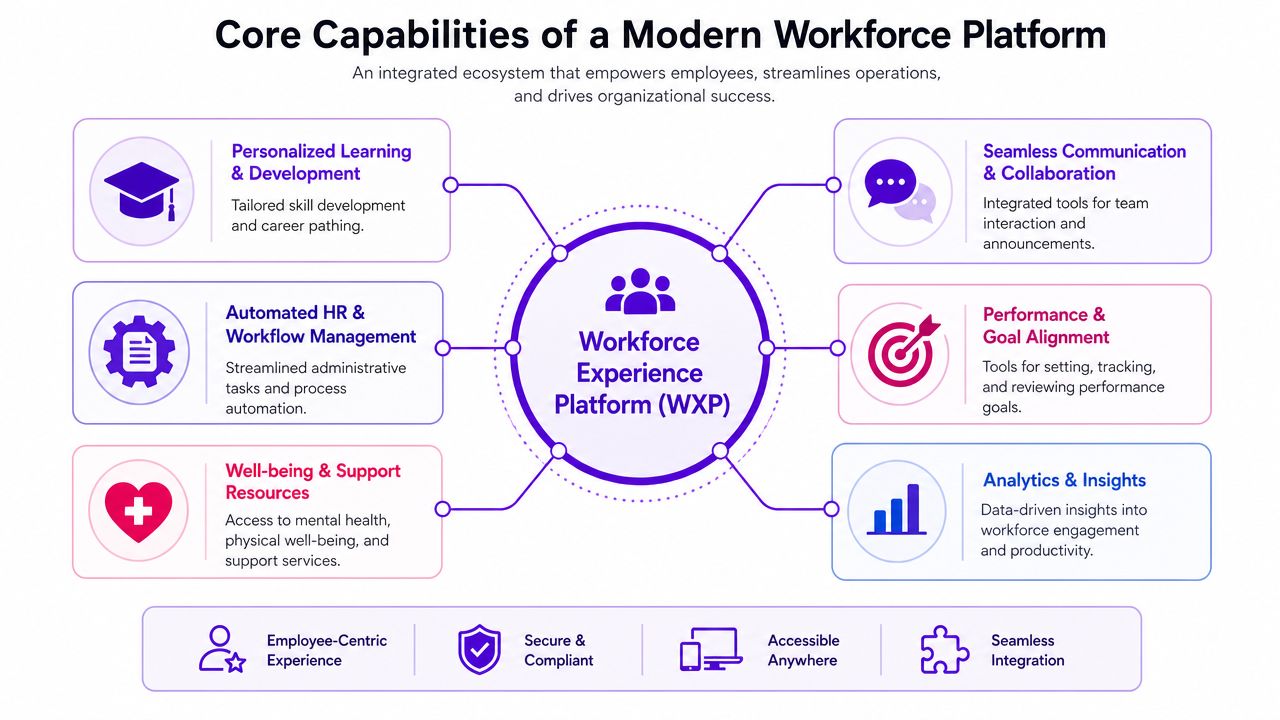
Core Capabilities of a Modern Workforce Platform
The best platforms don’t just bundle features. They connect capabilities that reinforce one another.
A useful way to evaluate the category is through three pillars: communication and engagement, operations and enablement, and intelligence and personalization. When those pillars work together, the platform shifts from a content destination to a work system.
Communication and engagement
This pillar starts with what many leaders recognize first: a central place for company news, updates, leadership messages, and team communication. But a modern workforce experience platform goes beyond publishing.
It should also support:
- Two-way feedback through comments, reactions, manager check-ins, and pulse surveys
- Recognition and social reinforcement so wins, values, and effort are visible
- Audience segmentation by role, location, language, team, or shift
- Campaign orchestration across mobile, email, app notifications, and collaboration tools
That last capability is where AI is starting to matter. AI-powered orchestration transforms internal communications from generic broadcasting into personalized, real-time interactions by ensuring the right employee receives the right message at the right time in the right channel with the right context, leading to higher engagement rates, as described in Firstup’s analysis of AI and the employee experience.
Operations and enablement
Thus, the category separates itself from a traditional intranet.
Operational capabilities often include mobile onboarding, microlearning, task management, digital checklists, knowledge articles, forms, scheduling visibility, and manager workflows. These functions are particularly important for frontline, shift-based, and distributed teams because work happens through execution, not just communication.
A retail associate might use the platform to review a promotion update, complete a merchandising checklist, finish a short training module, and acknowledge a safety message before opening. A hospitality employee might use it to check shift notes, receive a housekeeping standard update, and submit a maintenance issue. In both cases, communication and operations are part of the same experience.
Intelligence and personalization
The third pillar is the difference between a portal and a platform.
AI knowledge access, federated search, workflow recommendations, journey automation, and analytics help the system adapt to the employee instead of requiring the employee to adapt to the system. The point isn’t novelty. The point is less effort.
Look for intelligence in these forms:
- Universal search across policies, training, FAQs, tasks, and documents
- Personalized homepages based on role, tenure, location, or manager status
- Automated journeys for onboarding, internal mobility, compliance, or return-to-work moments
- Behavior and sentiment insight that helps teams spot friction before it grows
A platform becomes materially more valuable when integrations make these capabilities useful. HRIS, ITSM, LMS, payroll, scheduling, and collaboration platforms all need to feed the experience layer. Without that, AI recommendations are shallow and self-service breaks quickly.
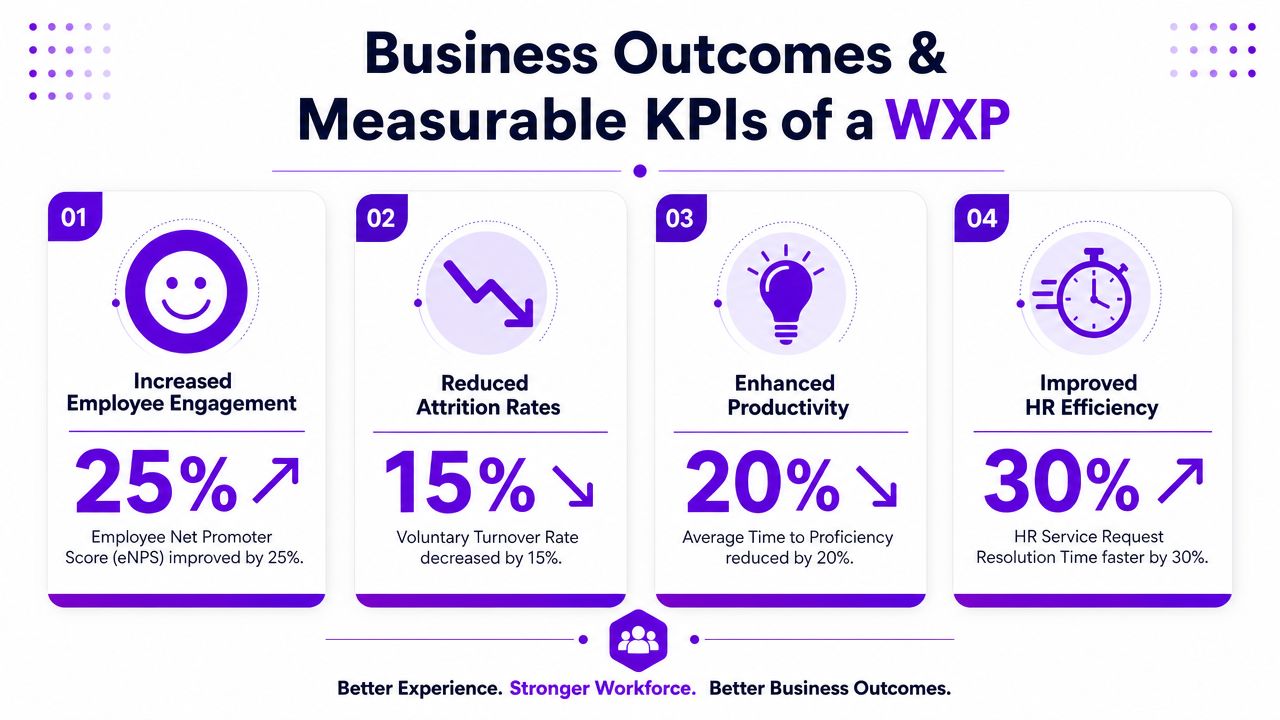
Business Outcomes and Measurable KPIs
Executive approval usually depends on measurable operating impact. A workforce experience platform earns budget when it reduces service costs, shortens time spent on low-value admin work, and improves execution across distributed teams.
The strongest ROI cases tend to appear in four areas: IT efficiency, HR service efficiency, workforce productivity, and retention risk. The common thread is consolidation. When communication, HR transactions, knowledge access, and task execution sit in separate systems, employees spend more time switching tools and managers lose visibility into what gets completed.
IT efficiency and digital friction
Digital friction shows up first in service operations. Support tickets rise, device issues interrupt work, and employees stop trusting the systems they are told to use.
HP states that a workforce experience platform can reduce help desk tickets by 30 to 50 percent and device downtime by up to 40 percent through AI-driven predictive analytics and proactive optimization. For CIOs, that is a service desk metric. For operations leaders, it is recovered labor time, fewer interruptions during shifts, and less manager time spent troubleshooting local issues.
A 2024 pilot review of HP’s Workforce Experience Platform also showed an improvement of over 70 percent in Net Promoter Customer score. That result matters because it connects technical performance to employee perception of the workplace systems they rely on every day.
HR efficiency and self-service adoption
HR teams often carry unnecessary service volume because policy content, forms, case management, and communications are spread across disconnected tools. The problem is not only content quality. It is access.
Platforms that connect HRIS, ITSM, LMS, and workflow systems into one employee layer often reduce repetitive support demand because employees can find answers and complete common transactions without opening a ticket. That shifts measurement away from soft sentiment alone and toward operational indicators that a CHRO can defend in a budget review.
Useful metrics include:
- Support ticket volume
- Resolution time
- Search success and self-service completion
- Content usage by employee segment
- Repeat issue rates
This is also where adoption data becomes more valuable than page views. If an employee reads an update but still cannot complete the related task, the experience is failing operationally. Teams tracking employee engagement strategies and workforce communication practices should connect engagement metrics to self-service completion, not treat them as separate programs.
Productivity and execution quality
Productivity gains are most credible when they are tied to specific workflows. A platform should reduce the time required to find an answer, complete a recurring task, finish required training, or confirm compliance at the point of work.
That matters more for frontline and distributed workforces than many HR business cases acknowledge. In these environments, the cost of fragmented systems is not just slower communication. It is inconsistent store execution, missed acknowledgments, incomplete checklists, uneven onboarding, and extra supervisor follow-up across locations.
A practical KPI set often includes:
| Outcome area | Useful KPI |
|---|---|
| Productivity | Time to complete common tasks, search success, app adoption |
| Service efficiency | HR tickets, IT tickets, self-service usage |
| Engagement | Survey participation, recognition activity, sentiment trend |
| Operations | Checklist completion, training completion, compliance acknowledgments |
A platform that improves both employee access and management visibility usually produces stronger results than a communications tool or portal alone, because it connects information to action.
Retention and frontline stability
Retention analysis is strongest when it focuses on the employee populations with the highest operational volatility. For frontline teams, poor experience design often means missed updates, unclear task priorities, limited access to support, and avoidable frustration during basic moments like shift start, onboarding, or policy changes.
Those problems affect more than morale. They influence absenteeism, manager workload, ramp time, and consistency at the location level. As noted earlier, organizations that engage frontline employees effectively tend to see better profitability and lower turnover. A workforce experience platform contributes when it gives these employees one place to receive updates, complete work, get support, and confirm understanding without bouncing between point solutions.
That is the KPI story executives care about. Lower service cost, faster issue resolution, higher task completion, stronger compliance, and more stable frontline staffing.
Workforce Experience Use Cases in Action
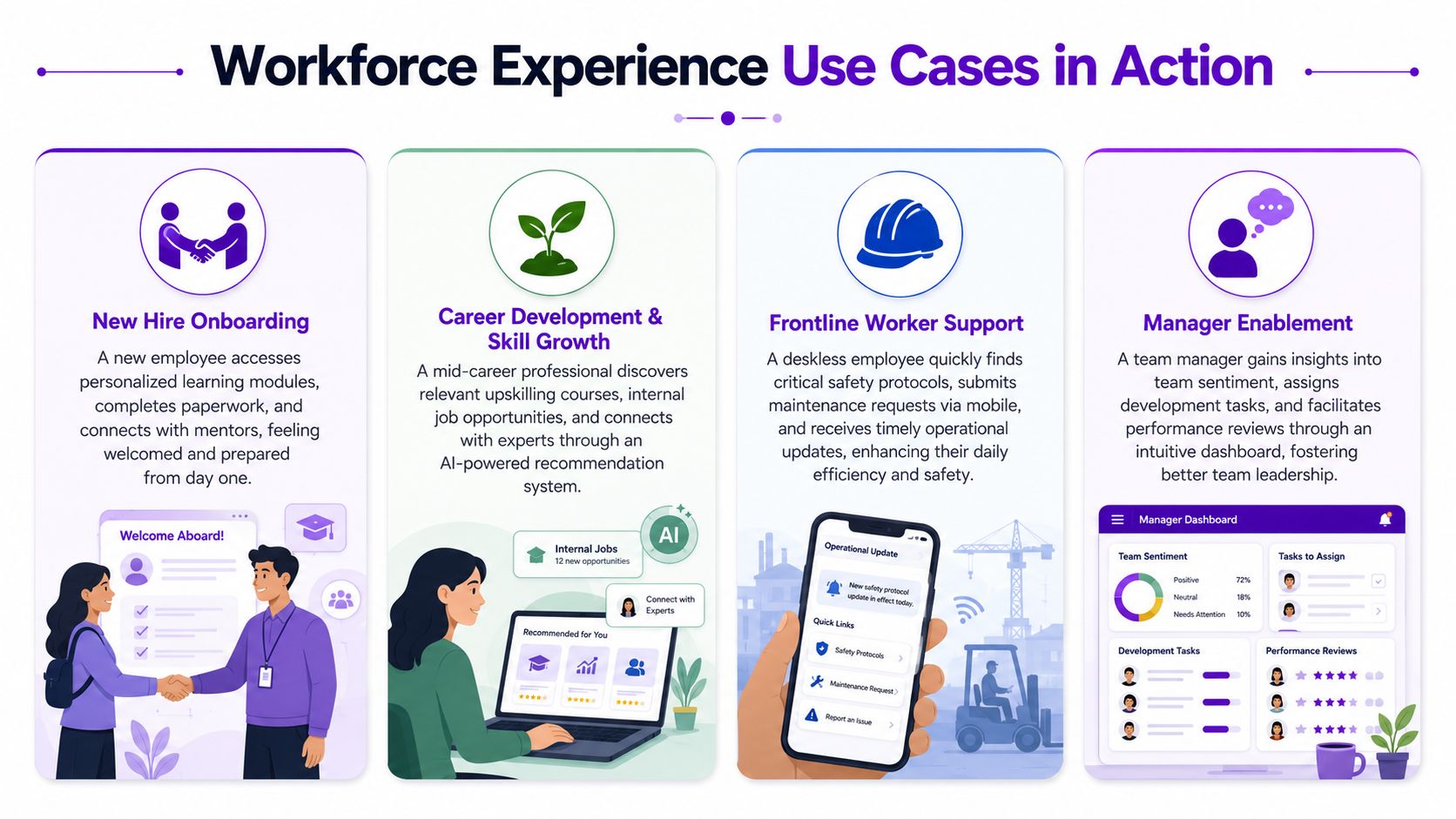
Organizations see the category most clearly in day-to-day execution. The platform matters when it reduces the number of systems employees must check to get information, complete work, and confirm that the work was done.
Frontline retail and service teams
For frontline teams, the platform becomes the operating layer for the shift. A store associate opens one mobile app and sees the opening checklist, a campaign update for that location, a short product lesson, and any urgent manager communication. Later in the day, the same app is used to confirm merchandising tasks, report a facility issue, and acknowledge a policy change.
That design choice has direct operational value. It cuts time lost switching between communications tools, task apps, printed binders, and HR portals that were never built for shift-based work. It also gives managers a clearer record of completion, exceptions, and unresolved issues at the location level. For distributed employers, that combination often matters more than adding another engagement feature.
Hybrid knowledge workers
Hybrid employees usually have access to many systems already. The failure point is coordination across them.
A stronger platform reduces that fragmentation by bringing together team updates, location-specific policy changes, learning recommendations, search, recognition, and manager communication in one experience. The value is not a prettier homepage. The value is fewer dead ends. Employees can find a form, watch a recorded town hall, complete a task, and follow up on a request without guessing which system owns the next step.
That has a measurable effect on execution quality. Search improves. Requests reach the right destination faster. Managers spend less time redirecting employees to the correct tool or document.
Distributed healthcare, field, and compliance-heavy work
Healthcare teams, field technicians, transportation crews, and public sector staff work under time pressure and procedural constraints. In these environments, the platform must support action in the moment, not just communication.
A nurse may need unit-specific updates, policy acknowledgments, and quick access to procedures during the same shift. A field worker may need a safety checklist, a location alert, and proof of training before starting a job. A transit supervisor may need to push an urgent notice, assign follow-up tasks, and verify completion across multiple sites.
The category distinguishes itself from a traditional intranet or employee app. The business case rests on connecting communications, knowledge, learning, and task execution so organizations can maintain consistency across many locations and roles.
SMB teams that need one system, not a stack
Smaller companies often feel the cost of disconnected tools earlier because they have fewer specialists to manage handoffs between HR, operations, and internal communications.
A unified platform can combine onboarding, announcements, policies, recognition, learning, and basic workflow in one system. That reduces administrative overhead and gives employees a clearer experience from day one. It also limits the common SMB pattern of buying separate tools for messaging, documents, surveys, and training, then relying on managers to stitch the process together manually.
For additional examples of how communication, recognition, and day-to-day execution connect, Turn On Work’s employee engagement coverage offers useful context.
How to Choose the Right Platform A Buyer Checklist
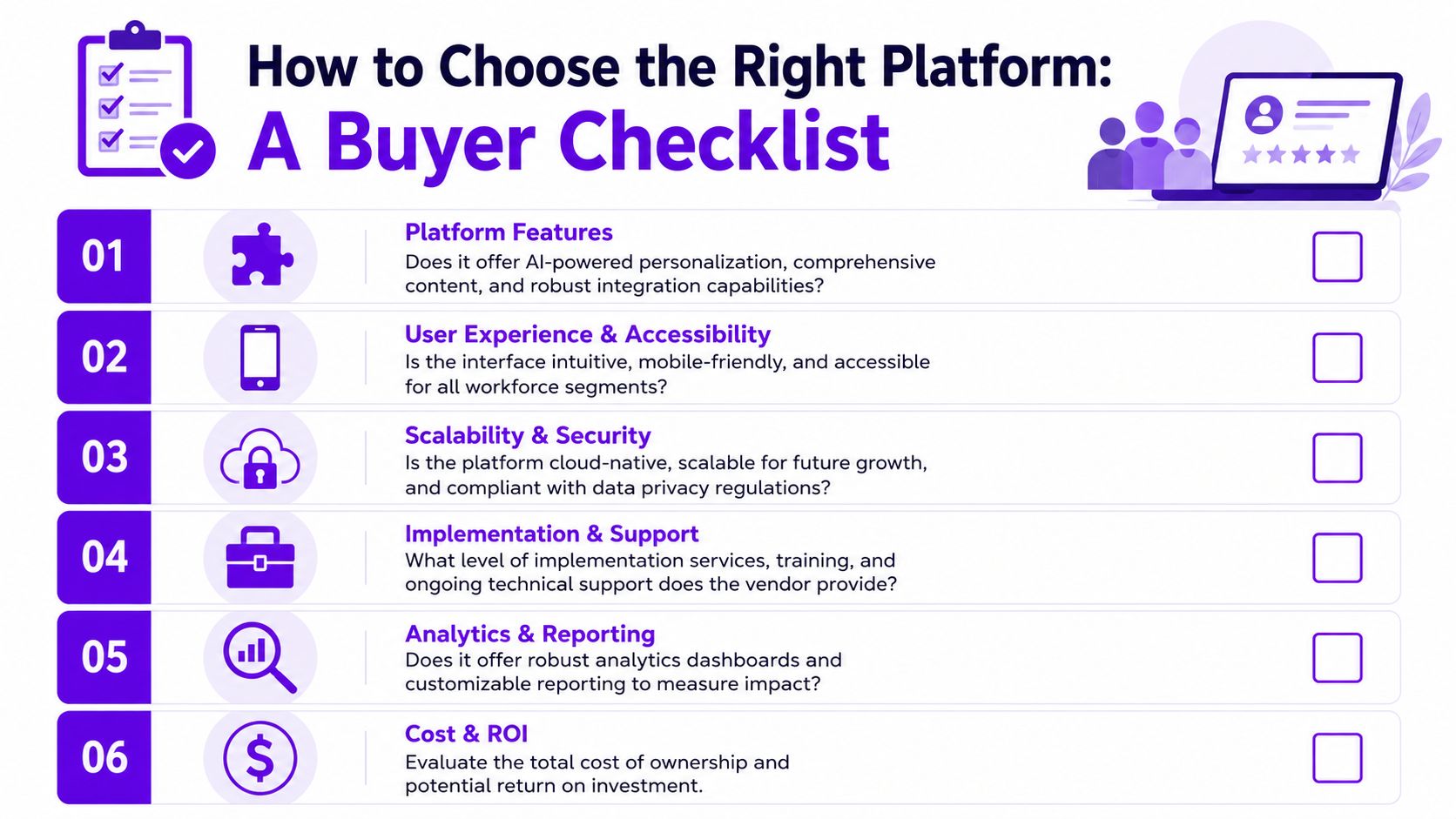
Many platforms claim to improve employee experience. The serious buying question is narrower: which one fits your workforce model, system environment, and operating priorities?
The checklist below works best when buyers use it during demos, reference calls, and pilot planning.
Evaluate the user experience first
If the platform fails here, the rest won’t matter.
- Mobile-first design: Can hourly and frontline employees complete key actions comfortably on a phone?
- Speed to action: How many taps does it take to find a schedule update, policy, task, or learning module?
- Accessibility: Does the experience support diverse languages, accessibility needs, and low-friction navigation?
A responsive web page isn’t always enough. For deskless populations, native mobile quality, notifications, and offline resilience often make the difference between use and abandonment.
Test integration depth, not just logos on a slide
Vendors often advertise many integrations. Buyers should verify what those integrations do.
Ask whether the platform can connect with your HRIS, payroll, ITSM, LMS, scheduling, and collaboration environment in ways that support real workflows. It should pull profile and org data, trigger journeys, support search, and send actions back when appropriate.
A useful vendor question is simple: what employee action becomes easier because of this integration?
Demand analytics tied to decisions
A good dashboard isn’t enough. Leaders need analytics that support action across segments.
| Buyer question | Why it matters |
|---|---|
| Can we segment by role, location, tenure, or manager? | Workforce experience problems rarely appear evenly |
| Can we connect sentiment to operational patterns? | Surface root causes instead of isolated signals |
| Can managers see what they need without data overload? | Adoption depends on local usefulness |
Check governance, security, and vendor maturity
Security reviews are standard, but governance discipline is just as important.
- Content governance: Who owns communications, policies, and knowledge freshness?
- Permission model: Can the platform support role-based and location-based targeting?
- Vendor roadmap: Is the provider building toward unified experience, or assembling adjacent modules?
- Support model: What happens after launch when adoption stalls, content ages, or integrations change?
For broader analysis of workforce technology categories and buyer priorities, Turn On Work tracks this market with a practical lens.
Your Implementation and Integration Strategy
A workforce experience platform succeeds or fails in implementation, not in vendor demos. The hard part is not turning the software on. It is deciding which workflows, managers, data sources, and governance rules will make the platform useful enough to replace fragmented habits across HR, communications, operations, and frontline teams.
Start with one operating problem that has a clear business owner and visible employee friction. Good candidates include onboarding that breaks across HRIS and learning systems, store or field communication that never reaches the right shift, manager updates scattered across email and chat, or routine HR questions that still depend on local workarounds. For frontline and distributed workforces, this focus matters even more. They often experience fragmentation more acutely because communication, scheduling, tasks, and support live in separate tools with inconsistent access rules.
A practical rollout usually follows five stages:
- Define the target moment and success criteria by role, location, or employee segment
- Connect systems and map data flows across HR, IT, communications, and operations
- Set content ownership and governance rules so policies, knowledge, and journeys stay current
- Pilot with a contained workforce group where leaders can observe behavior change directly
- Scale based on adoption and workflow evidence rather than broad launch timing
Integration determines whether the platform reduces work
A workforce experience platform creates value when it becomes the action layer across existing systems, not another destination employees have to check. That means connecting the platform to HRIS, payroll, ITSM, learning, scheduling, and collaboration tools in ways that match real work patterns.
As noted earlier, effective integrations are a major driver of lower HR support volume and better self-service. The larger point is operational. When a frontline supervisor can receive a policy update, confirm team completion, launch a task, and route an exception without switching across four systems, the platform starts to remove coordination cost. That is the ROI many HR articles miss. Unified experience matters because it compresses the distance between communication and execution.
The design question for each integration is straightforward: does this connection reduce employee effort, manager follow-up, or administrative rework?
Common implementation failures
Several patterns show up repeatedly in underperforming deployments:
- The use case is too broad at launch. Teams try to replace every disconnected tool at once, which slows decisions and dilutes accountability.
- Integrations replicate broken processes. Employees get one more interface, but approvals, searches, and handoffs still fail in the background.
- Frontline requirements arrive late. Shared devices, intermittent connectivity, language needs, and shift-based targeting cannot be treated as edge cases.
- Managers are not built into the rollout. If team leaders do not use the platform in weekly routines, adoption plateaus quickly.
- Content ownership is unclear. Trust drops when policies, announcements, and knowledge articles conflict across channels.
Governance should be set early, especially if the platform handles employee profiles, sentiment inputs, personalized journeys, or location-based targeting. Security review is only one part of that work. Data retention, audience permissions, consent practices, and content stewardship also need clear decisions. Teams that want a benchmark for documenting these controls can review an example of a workforce technology privacy policy.
The strongest implementations are disciplined rather than flashy. They connect the right systems, focus on a narrow operating problem first, and treat adoption as a management and process design effort, not a communications campaign.
Workforce Experience Platform FAQs
What is the difference between a workforce experience platform and a traditional intranet
A traditional intranet is usually a publishing destination. It organizes news, documents, and links.
A workforce experience platform goes further. It combines communication, engagement, self-service, learning, and operational workflows in one experience layer. It’s interactive, personalized, and designed to support actions, not just reading.
How does a workforce experience platform fit with an HRIS
The HRIS remains the system of record for employee data, transactions, and core HR processes. The workforce experience platform sits on top as the experience layer.
In practice, the HRIS stores the truth. The platform makes that truth easier to access and act on through communication, search, journeys, tasks, and self-service.
Is a workforce experience platform only for large enterprises
No. Large enterprises often feel the pain of fragmentation because they have many tools and many workforce segments.
SMBs can benefit too, often for the opposite reason. They may need one platform that handles communication, onboarding, recognition, and basic enablement without adding operational complexity. Smaller companies are also buying this category because they need one platform rather than a stack.
What features matter most for frontline and distributed teams
Mobile usability matters first. If the experience isn’t fast and intuitive on a phone, adoption usually struggles.
After that, the most useful capabilities tend to be targeted communications, task execution, digital checklists, training, scheduling visibility, manager updates, and knowledge access in the flow of work.
How do companies measure ROI
The cleanest approach is to tie ROI to a few operating outcomes rather than trying to monetize every interaction.
Common measures include support ticket volume, self-service usage, device and workflow friction, training completion, communication reach, task completion, and retention indicators for key workforce groups. The best KPI mix depends on whether the platform is solving a communication problem, an HR service problem, a frontline execution problem, or all three.
Should companies replace all point solutions at once
Usually not. A staged approach is safer.
Many organizations get better results by first unifying high-friction moments such as onboarding, frontline communication, or employee self-service. Once adoption grows and integrations stabilize, they can decide which point solutions still add distinct value and which ones can be retired.
For more analysis from practitioners and category observers, Turn On Work also publishes perspectives from contributors such as the HubEngage author archive.
If you’re evaluating workforce technology through the lens of communication, engagement, AI, and operations together, Turn On Work offers practical analysis, buyer guidance, and category coverage built for distributed, frontline, hybrid, and office-based teams.