Don’t choose a mobile LMS because its demo looks good on a phone. For frontline compliance training in 2026, shortlist Schoox, ExpertusONE, Axonify, EdApp, TalentLMS, Absorb LMS, and Cornerstone, then test the same mandatory course on workers’ actual devices. The best mobile learning management system is the one that preserves trustworthy completion records, supports shift-based access, and doesn’t exclude employees with older phones or weak connectivity.
- Test records, not just playback. Downloading a safety video doesn’t prove that an offline assessment will synchronize correctly.
- Treat the seven platforms as a shortlist. Product capabilities, packaging, and prices need current vendor verification.
- Make managers part of selection. Site leaders must be able to assign, chase, and verify required training.
- Budget for equitable access. Personal phones aren’t a substitute for a device, data, and accessibility policy.
- Choose on pilot results. A polished feature list isn’t evidence that training will work on the shift floor.
What Is a Mobile LMS and Which Platforms Fit Frontline Compliance
A mobile LMS is a learning management system designed to deliver, administer, and track training on phones and tablets. For frontline compliance, prioritize a mobile-first experience that works on supported low-spec devices, preserves assessment evidence through connectivity interruptions, and connects assignments and reminders to employees’ working patterns.
A mobile-responsive desktop course isn’t necessarily frontline-ready. Ask whether a worker can sign in without depending on a company inbox, resume an interrupted assessment, and get help without leaving the shift supervisor to troubleshoot passwords.
For onboarding, apply the same access tests used when evaluating onboarding software for frontline and deskless teams. Employee compliance training shouldn’t require workers to learn a second, unrelated access process immediately afterward.
Define the records before comparing products
Use these terms consistently in procurement and demonstrations:
- Offline completion: A learner finishes an eligible activity without a network, and the system preserves the evidence needed for later synchronization.
- Certification record: An identifiable worker’s training or assessment history, including relevant completion, expiry, course-version, and change information.
- Shift-aware reminder: A notification delivered according to working patterns and approved training windows, rather than an indiscriminate email schedule.
The evidence doesn’t justify claiming that mobile delivery automatically teaches better. A controlled organizational-training study found no statistically significant learning-effectiveness difference between face-to-face instruction, conventional e-learning, and mobile learning.
The stronger operational argument is access. A workplace mobile-learning review reports learning while traveling for business (32%), commuting (24%), at home (26%), and in the office or elsewhere (18%), and cites a 12% higher compliance-training completion rate with mobile learning. Those findings aren’t a forecast for your workforce, and they aren’t a reason to expect hourly staff to train outside approved working time.
Quick picks for frontline compliance training
These are buyer hypotheses to investigate, not verified product ratings. Current vendor documentation and commercial terms haven’t been independently checked for every platform, so the table deliberately leaves unsupported capabilities unconfirmed.
| Platform | Positioning to verify | Offline access | Certification tracking | Pricing visibility |
|---|---|---|---|---|
| Schoox | Mobile-first learning for frontline staff | Documentation check required | Workflow verification required | Current terms unverified |
| ExpertusONE | Enterprise mobile access with large-scale administration | Vendor describes downloads and offline sync | Expiry and audit workflow unverified | Current terms unverified |
| Axonify | Short, repeated microlearning for frontline retention | Verification required | Recertification verification required | Current terms unverified |
| EdApp | Mobile authoring and delivery for smaller teams | Verification required | Workflow verification required | Current terms unverified |
| TalentLMS | Simple administration for smaller training teams | Verification required | Workflow verification required | Current terms unverified |
| Absorb LMS | Compliance reporting across multiple locations | Verification required | Workflow verification required | Current terms unverified |
| Cornerstone | Compliance training inside a broader HR suite | Verification required | Workflow verification required | Current terms unverified |
This mobile LMS software comparison covers different buying situations, not a descending ranking. An unverified cell stays open until current vendor documentation and a practical demonstration resolve it.
Frontline Compliance Criteria and the Fit Score
A frontline-ready compliance LMS must preserve offline evidence, maintain certification history, respect shift patterns, support the workforce’s devices and languages, and expose gaps by role and location. Assess those requirements before considering engagement features.
The Turn On Work Frontline Compliance Fit Score is an editorial model, not an industry standard. Score each criterion 0 when the requirement fails, 1 when it works with a material restriction, and 2 when your field test demonstrates it, for a maximum of 10. Keep untested criteria unscored rather than treating missing evidence as a product failure.
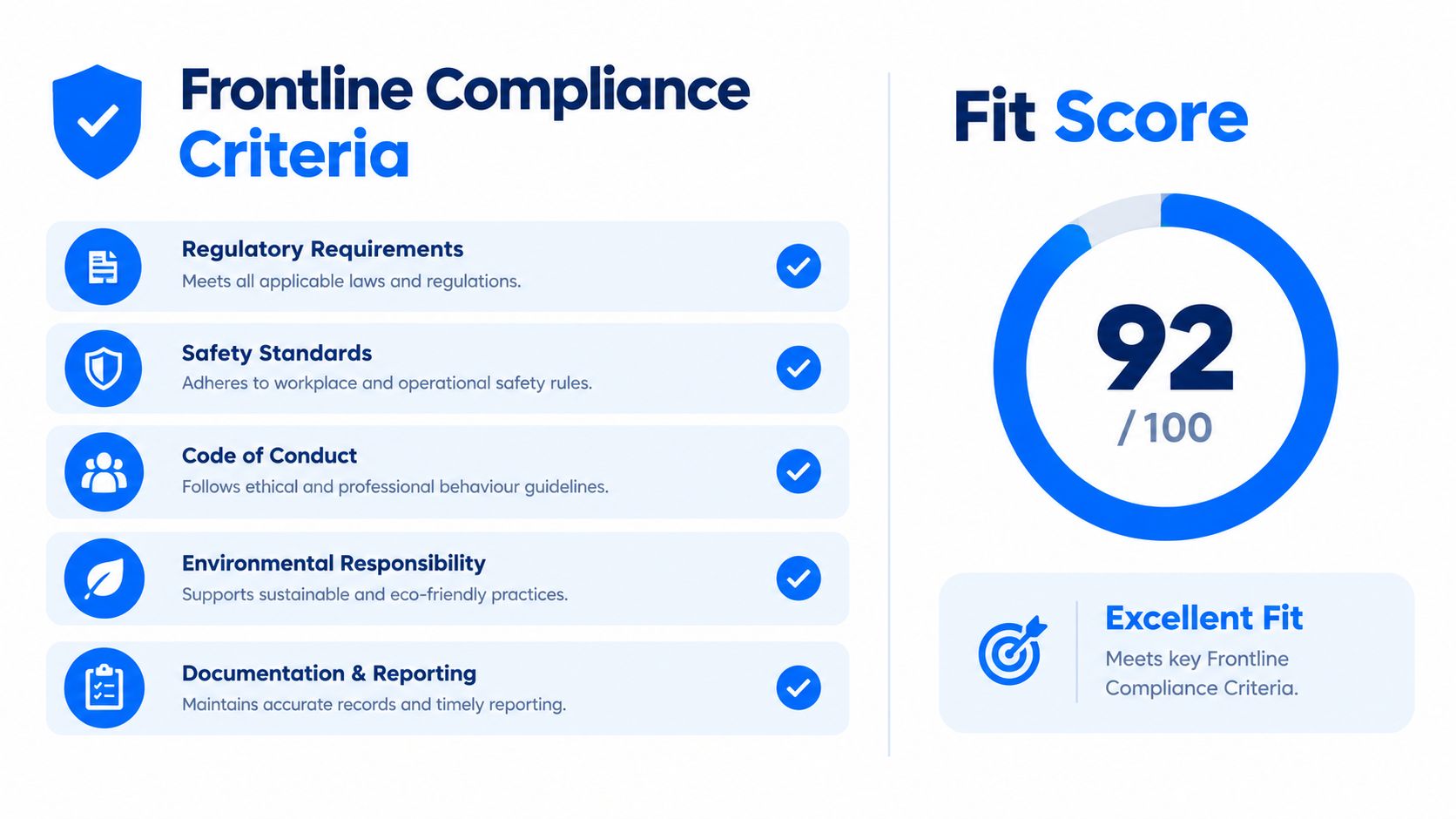
The illustration is conceptual. Its displayed score isn’t a platform assessment and doesn’t use the editorial model’s scale.
Frontline compliance criteria and what to verify
| Criterion | What to verify | Red flag |
|---|---|---|
| Offline completion and sync | Download, offline assessment, and reconnection without duplicate or lost records | No durable completion evidence before reconnection |
| Certification expiry and audit trail | Expiry alerts, timestamps, and exportable worker history | Records change without a visible log |
| Shift-aware reminders | Notifications tied to scheduled shifts and approved learning windows | Reminders depend on desktop login |
| Device and language support | Oldest supported Android and iOS devices, translation, captions, and screen readers | Latest-device or desktop dependency |
| Reporting by role, site and device | Segmented completion and assessment results | Aggregate logins presented as compliance evidence |
Mobile-learning adoption research identifies unreliable wireless access, small screens, slow downloads, limited processing power, restricted storage, short battery life, and difficult document handling as practical barriers. These are reasons to test the complete workflow, not merely ask whether an app exists.
Connect assessments to frontline competency mapping so the record represents the task employees must perform.
Operational distinction: Offline content consumption isn’t offline evidence of competence. Verify worker identity, assessment integrity, and the completion record that survives synchronization.
For a hypothetical warehouse platform, scores of 1, 2, 1, 2, and 1 produce 7 out of 10. If the offline restriction means supervisors can’t verify pending assessments until reconnection, the rollout needs a clear rule for workers awaiting authorization.
Don’t let a strong total conceal a critical failure. If a role requires reliable offline evidence and the platform can’t preserve it, reject that deployment configuration regardless of its other scores.
Seven Platform Profiles for Frontline Compliance Teams
The right platform depends on the operating problem, not the longest feature list. These profiles identify what to investigate, the compliance evidence to demand, and the condition that should stop a purchase.
No platform receives a numerical Fit Score without field evidence. Where current primary documentation hasn’t been established, “unverified” describes the evidence status, not the product’s capability.
Schoox
Buying hypothesis: Evaluate Schoox for distributed frontline employee training where site managers need delegated oversight. Treat that positioning as a starting point, not proof of fit.
Compliance feature to prove: Ask the vendor to demonstrate a worker’s assignment, assessment, certification expiry, and exported history across locations. That sequence tests whether mobile access connects to usable compliance administration.
Limitation to check: Confirm offline behavior directly in current product documentation. A marketing reference to offline access doesn’t establish which assessments work offline, how records are timestamped, or how conflicting submissions are reconciled.
Best-fit decision: Keep Schoox on the shortlist if multi-location governance is central. Skip it for the proposed deployment if the vendor can’t document and demonstrate your required offline workflow.
ExpertusONE
Documented starting point: The ExpertusONE Learn On the Go page describes downloadable content, offline sync, mobile observational assessments, attendance support, geofencing, and scheduling tools. That supports investigating it for enterprise mobile learning administration.
Compliance feature to prove: Test whether an observational assessment connects to an identifiable worker, a specific requirement, and an exportable history. Mobile observation could be useful for task-based evidence, but the resulting record still needs inspection.
Limitation to check: The cited page doesn’t establish offline conflict resolution, immutable history, certification expiry rules, or exact package inclusion.
Best-fit decision: Consider ExpertusONE when instructors and managers need mobile workflows alongside learners. Skip it if the proposed configuration can’t preserve the evidence your assessment process requires.
Axonify
Buying hypothesis: Investigate Axonify when repeated knowledge reinforcement is a higher priority than publishing a large course catalog. Don’t assume reinforcement and formal recertification are interchangeable.
Compliance feature to prove: Ask administrators to assign a mandatory requirement, distinguish practice from a qualifying assessment, and show the next recertification obligation. A knowledge-strength dashboard shouldn’t substitute for a certification record.
Limitation to check: Establish whether reinforcement activities can support your required intervals without accidentally resetting or obscuring formal expiry dates. Offline assessment handling remains unverified here.
Best-fit decision: Retain Axonify if the operating problem includes maintaining knowledge between formal training events. Skip it if the demonstration can’t clearly separate practice, completion, and certification.
Use the same distinction when comparing microlearning platforms for frontline teams.
EdApp
Buying hypothesis: Evaluate EdApp as a candidate for mobile course creation and delivery with a small administration team. Confirm the current product name, package, and contracting entity before requesting a proposal.
Compliance feature to prove: Have an administrator build a mandatory lesson, assign it by site, revise it, and retrieve the earlier completion history. The strongest evidence is a working version-control and assignment process, not an attractive lesson template.
Limitation to check: Verify offline assessment eligibility, reporting exports, and how translated versions relate to the approved source course. Don’t infer that a mobile authoring workflow includes complete certification management.
Best-fit decision: Keep it under consideration when course production capacity is the bottleneck. Skip it if administrators can’t maintain traceable mandatory-course versions.
TalentLMS
Buying hypothesis: Investigate TalentLMS when a smaller training team needs manageable administration. “Simple” should mean fewer operational steps, not fewer controls.
Compliance feature to prove: Build a required course, assign it to different locations, trigger a reminder, and export an individual’s history. Record how much manual work the administrator performs.
Limitation to check: Verify which content types support offline use and whether certification expiry, role-based assignment, and reports are available in the quoted package. Current capabilities and pricing aren’t independently verified here.
Best-fit decision: Consider TalentLMS when administrative capacity is limited and requirements are clearly bounded. Skip it if routine compliance maintenance depends on repeated spreadsheet reconciliation.
Absorb LMS
Buying hypothesis: Evaluate Absorb LMS where central teams need visibility across multiple locations. Reporting is the hypothesis to prove, not an established advantage in this comparison.
Compliance feature to prove: Request a report showing overdue requirements by worker, role, site, and course version. Then export the underlying records and reconcile them with the manager’s view.
Limitation to check: Inspect permissions, offline synchronization, and whether site managers can act on exceptions without seeing unrelated employee information. A dashboard alone doesn’t establish audit readiness.
Best-fit decision: Keep Absorb LMS in contention when reporting and delegated administration dominate the requirements. Skip it if managers can see overdue training but can’t reliably resolve or explain it.
Cornerstone
Buying hypothesis: Investigate Cornerstone when learning must fit a broader HR technology environment. Existing HR infrastructure is a reason to test integration, not waive testing.
Compliance feature to prove: Demonstrate how a role change creates a training obligation, how completion returns to the relevant record, and how historical certification evidence remains accessible.
Limitation to check: Establish which workflows belong to the proposed configuration and which require additional modules, integration work, or administrator intervention. Keep software scope separate from implementation promises.
Best-fit decision: Consider Cornerstone when HR-data alignment outweighs a lightweight standalone deployment. Skip it if the integration demonstration stops at a presentation rather than a working sandbox transaction.
How to Run a Field Test Before You Commit
A field test on real devices, connections, and shifts tells you more than a vendor-led demonstration. Use the same course and acceptance criteria across candidates so you’re comparing operational results rather than sales presentation quality.
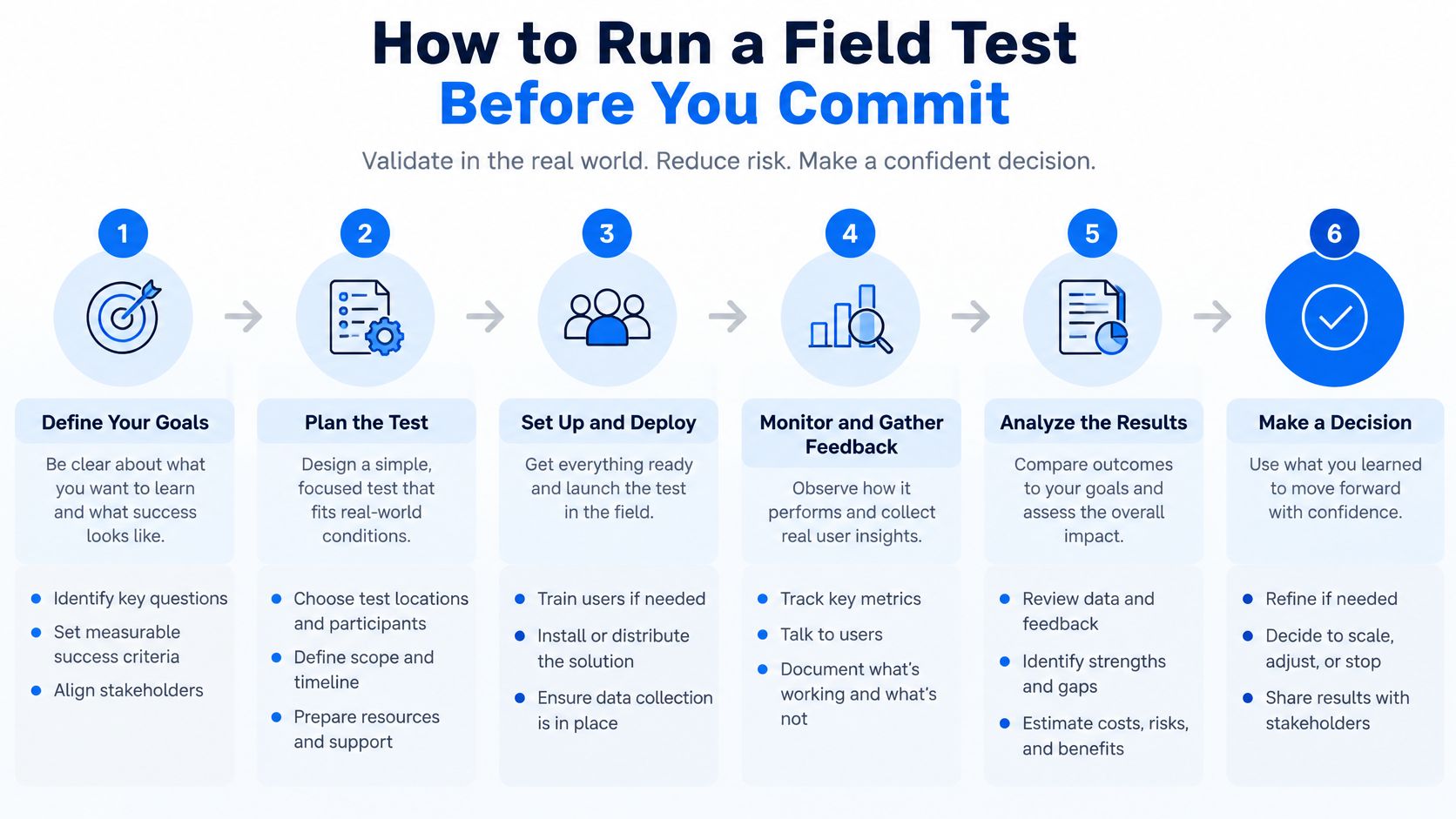
Run the device and record tests
-
Inventory actual access. Record supported devices, operating systems, personal phones, shared tablets, and available storage. Include employees who need an employer-provided alternative.
-
Load the heaviest lesson. Use the oldest supported device and measure download and launch behavior. Test the course you’ll deploy, including its documents and assessments.
-
Interrupt the connection. Check login, download, resume, assessment submission, and synchronization at a weak-signal location. Record what the learner sees when a transaction fails.
-
Create a controlled record conflict. In a sandbox, use separate devices to submit conflicting activity for the same test learner. Inspect timestamps, reconciliation rules, duplicate handling, cache expiration, and the manager’s final report.
-
Include different access needs. Recruit a screen-reader user, a non-native speaker, and someone using a shared device. Evaluate navigation, captions, terminology, and account separation, supported by a plan for addressing language barriers in the workplace.
-
Test learning and task performance. Define a job-specific outcome, build short task-linked activities, run baseline and post-training assessments, and segment results by role, location, device, connectivity, and access. This evaluation approach is informed by mobile-learning achievement research, not a promise of enterprise ROI.
-
Set release gates before scaling. Agree acceptable crash behavior, median content-load time, offline-sync success, assessment submission reliability, and support demand. Site managers should review the evidence and own the escalation process.
Follow the obligation through renewal
Turn On Work recommends covering at least one recertification cycle for the tested course. If procurement deadlines make that impractical, use a sandbox to exercise expiry and renewal, then retain a live renewal checkpoint before wider expansion.
Measure assessment score, observed task accuracy, time-to-proficiency, repeat attempts, and manager-confirmed behavior. Logins tell you someone opened the system, not whether they can perform the task.
A platform passes when the worker, supervisor, and administrator can explain the same completion record without reconstructing it from screenshots.
Pricing Models and Hidden Costs to Compare
Compare the full deployment cost, not just the licence. The following are contract questions and possible exposures, not verified charges from any shortlisted vendor.
Mobile LMS cost components and questions to ask
| Cost component | Question to ask the vendor | Common surprise to check |
|---|---|---|
| Per-user licence | Are inactive, part-time, or seasonal workers billed? | Shift-worker seats counted at full price |
| Offline or mobile tier | Is offline access included or an add-on? | Required workflow above the base plan |
| Authoring and content | Are authoring, content libraries, and translations included? | Separate content or language charges |
| Certification and reporting | Are expiry alerts and audit exports standard? | Required reporting in another tier |
| Integrations | Which HR and scheduling connections avoid custom work? | Custom work for shift data |
| Implementation | What does onboarding cover across sites? | Additional site setup services |
| Devices | Can workers use personal phones, and what alternatives are supported? | Employer devices needed for excluded workers |
Compare the cost of operating the system
For a mobile compliance training software pricing comparison, request written proposals against the same workforce profile and workflow. No current vendor prices are verified here, so an affordable mobile LMS for small and medium businesses can’t be identified from headline pricing alone.
Ask who maintains integrations after role, location, or scheduling changes. Include accessibility testing, translation review, supervisor training, and support coverage in the implementation budget.
A frontline tech stack audit can help identify which systems should supply employee and shift data. Avoid paying administrators to reconcile information the integration was supposed to move.
BYOD isn’t automatically the cheapest equitable route. It may reduce employer device purchasing, but it doesn’t reduce software licence costs by itself, and it can transfer data, storage, battery, and privacy burdens to workers.
Research on AI- and IoT-enabled mobile learning flags unequal access, privacy, bias, and linguistic adaptability as unresolved challenges. Require a supported alternative for workers whose personal phones aren’t suitable.
For AI-assisted authoring or translation, budget human review. Don’t allow an automatically generated lesson to become the approved safety instruction without a named subject-matter owner.
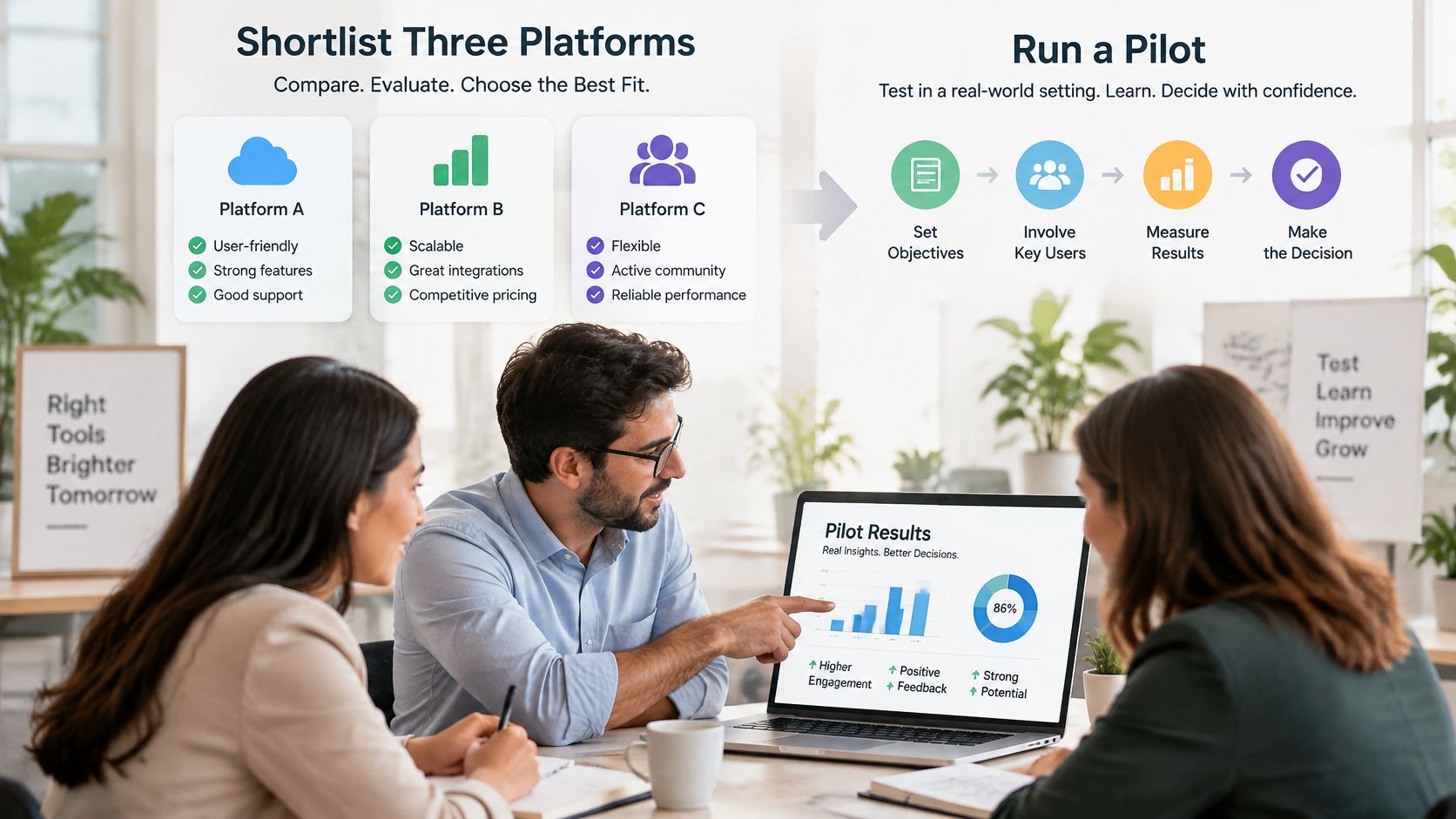
Shortlist Three Platforms and Run a Pilot
No single platform is the best mobile LMS for every frontline team. Shortlist by operating situation, then use observed results to choose.
| Situation | Criteria to weigh most | First test to run |
|---|---|---|
| Warehouse or manufacturing with shared devices | Offline sync, shared-device login, audit trail | Shared-tablet sync after a shift |
| Hourly retail or hospitality on personal phones | Low-spec support, languages, reminders | Load on the oldest team phone |
| Multi-site healthcare or construction with weak connectivity | Offline evidence, expiry alerts, site reporting | Assessment submission without signal |
| Small team with limited mandatory courses | Simple administration, total cost, clear pricing | Build and assign the complete course |
| Enterprise with an existing HR suite | HR integration, role reporting, certification history | Representative HR-data sync in a sandbox |
Pair lessons with purposeful follow-up. A workplace microlearning experiment involving 122 employees found that knowledge-focused interventions and prompts improved declarative knowledge, while prompt-based and combined interventions supported strategy use and goal achievement over time.
Turn On Work’s Training and Knowledge coverage treats that lesson-and-reminder schedule as an operational design decision. HR owns requirements, communications teams clarify the message, managers provide time and follow-up, and technology teams protect the records.
For frontline teams, training works better when employees can easily access learning materials and receive timely updates. A mobile employee learning platform like HubEngage can help organizations deliver bite-sized training content and keep distributed workers connected. The LMS should still maintain the official compliance and certification records.
Select the system your managers can operate and your least-connected employees can use, not the one with the most persuasive demo.
Mobile LMS FAQs
Is a mobile LMS better than classroom training?
Not on learning effect alone. The controlled study discussed earlier found no significant difference between delivery formats. Mobile learning’s practical advantage is access for distributed and shift-based staff.
Does offline completion count as proof of competence?
Only when identity, assessment integrity, and completion evidence survive synchronization. Apply the offline criterion in the Fit Score rather than accepting video playback as proof.
Can frontline workers use personal phones for compliance training?
Yes, with appropriate security, accessibility, approved learning time, and a clear device-and-data policy. Provide another route for employees whose phones or connectivity aren’t suitable.
How many platforms should a team shortlist?
Turn On Work recommends three. Test each with the same course, workforce scenarios, and acceptance criteria.
How long should a pilot run?
The editorial recommendation is at least one recertification cycle for the tested course. The field-test guidance explains how to handle longer renewal periods.
Are the prices and capability cells verified?
No current prices are verified. Capability cells explicitly identify verification gaps; ExpertusONE’s documented mobile functions are distinguished from untested workflows. Obtain current documentation and written terms before buying.
Choose three candidates, send each vendor the same course and acceptance checklist, and book a pilot with a site manager, an accessibility participant, and workers using your oldest supported devices. Require an exported completion history and a completed cost worksheet before the purchasing decision. Buy the platform that passes those tests.