
The fastest way to frustrate a floor manager, a remote supervisor, and an HR partner at the same time is to make them hunt the same answer in three different places. One policy lives in a drive folder, the latest SOP is in a chat thread, and the “real” process is what somebody remembers from last quarter’s training. That’s why an internal knowledge base has to work like an operational system, not a document dump, especially in distributed workplaces where communication, HR tech, AI, and frontline execution all collide. For a broader view of how employee communication shapes that experience, see Turn On Work’s internal communications trends coverage.
A useful knowledge base does more than store information. It gives employees a single place to find the right process, policy, and answer fast enough to keep work moving. It also gives operations leaders a way to see where confusion keeps showing up, which is what turns knowledge from a static library into a service layer.
Introduction to Internal Knowledge Base
Hybrid and frontline teams don’t struggle because they lack documentation. They struggle because the documentation is scattered, stale, and written for the person who authored it, not the person who needs it at 7 a.m. on a sales floor or in a warehouse aisle. In that environment, the internal knowledge base becomes the bridge between employee communications, HR systems, AI search, and the reality of day-to-day work.
A practical approach starts with use cases, not pages. If field technicians need a lockout procedure, if retail managers need shift-change guidance, and if HR needs a consistent benefits answer, those are three different workflows that deserve clear, searchable content. That’s the difference between a reference shelf and a working system.
Practical rule: If employees can’t find the answer in the tool they already use, the knowledge base is part of the problem, not the solution.
The strongest internal knowledge bases are built around the questions people ask, then organized so those answers stay trustworthy as processes change. That means the platform, the taxonomy, the governance model, and the capture workflow all matter at once. When those pieces work together, the knowledge base supports better communication, faster resolution, and less friction across HR, operations, and frontline teams.
Understanding Impact on Workforce Experience
A well-structured internal knowledge base can deflect 20% to 40% of inbound support tickets, and mature deployments can reach 50% or higher according to support and knowledge-base benchmark data. That matters because every avoided ticket is time returned to HR specialists, managers, and help desk staff who would otherwise spend the day answering repeat questions. It also changes the employee experience, because people get answers without waiting in a queue.
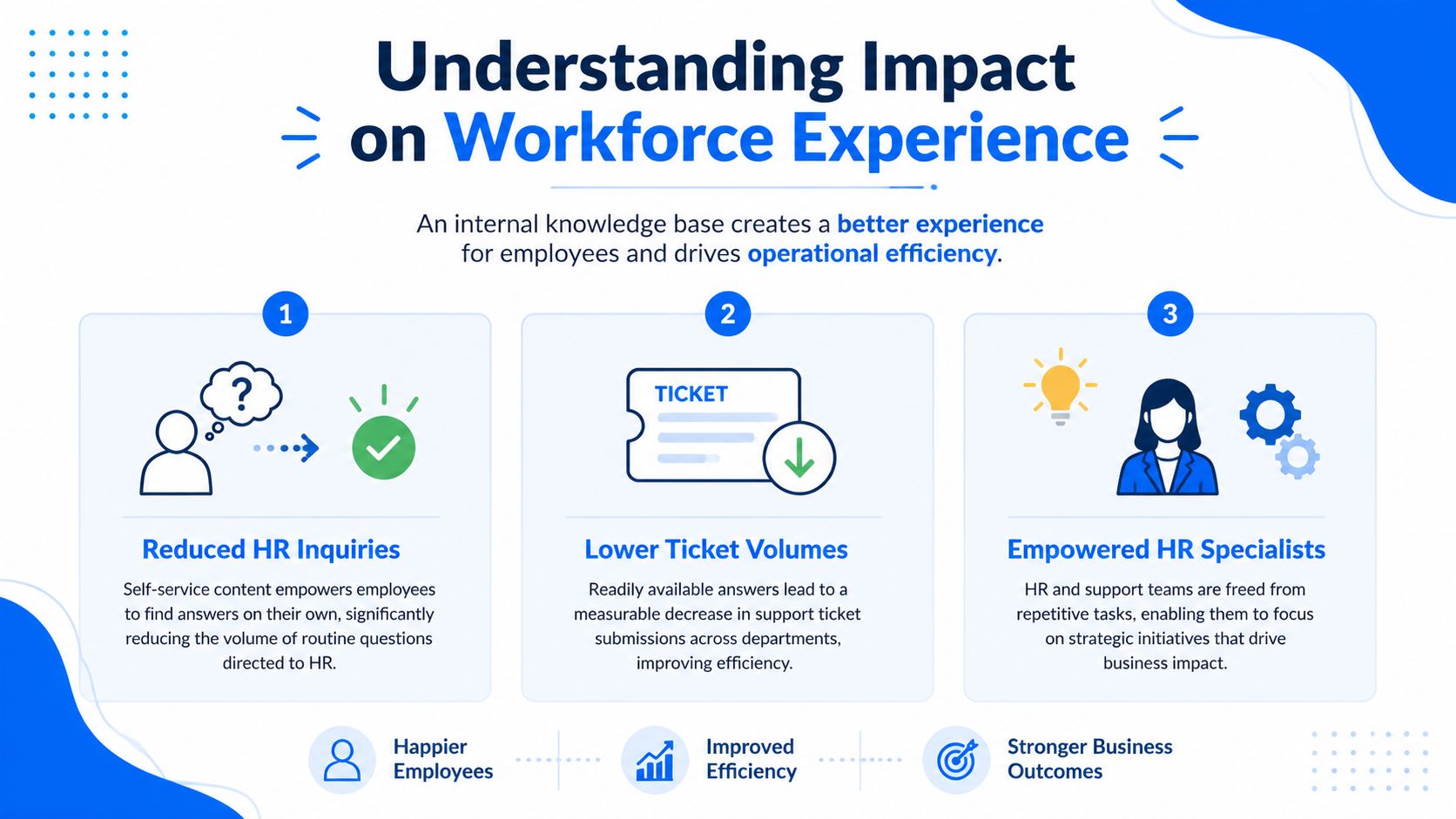
What deflection actually changes
In a manufacturing setting, that kind of self-service can mean fewer onboarding interruptions for line leaders. In a sales team, it means reps don’t have to stop mid-pipeline to ask where the latest pricing or approval rule lives. In retail, it means managers can answer routine policy questions without escalating every issue to HR.
The workforce value shows up in three ways:
- Reduced HR inquiries. People resolve common questions themselves instead of opening another ticket.
- Lower ticket volumes. Support teams spend less time on repetitive requests across departments.
- Increased focus for HR specialists. Specialists can focus on policy design, employee relations, and process improvements.
The key shift is to measure the knowledge base as part of service delivery, not as a static repository. That’s why metrics like self-service rate, article deflection rate, search zero-results rate, and helpfulness scores matter more than raw page views. They connect content quality to labor savings and faster resolution, which is what leaders need to see.
For a useful comparison of how employee experience and workforce experience overlap in practice, the framing in Turn On Work’s workforce experience analysis is a good reminder that knowledge systems affect both sentiment and execution.
A helpful article doesn’t just get read. It prevents a follow-up, a Slack chase, and a second explanation.
Designing Core Components and Taxonomy
A knowledge base becomes harder to use when the structure grows faster than the content quality. The fix isn’t more folders. It’s a small, disciplined taxonomy, clear article types, and status tags that tell people what they’re reading. A strong starting point uses 8 to 12 top-level categories, then standardizes content underneath them, as recommended in internal knowledge base structure guidance.
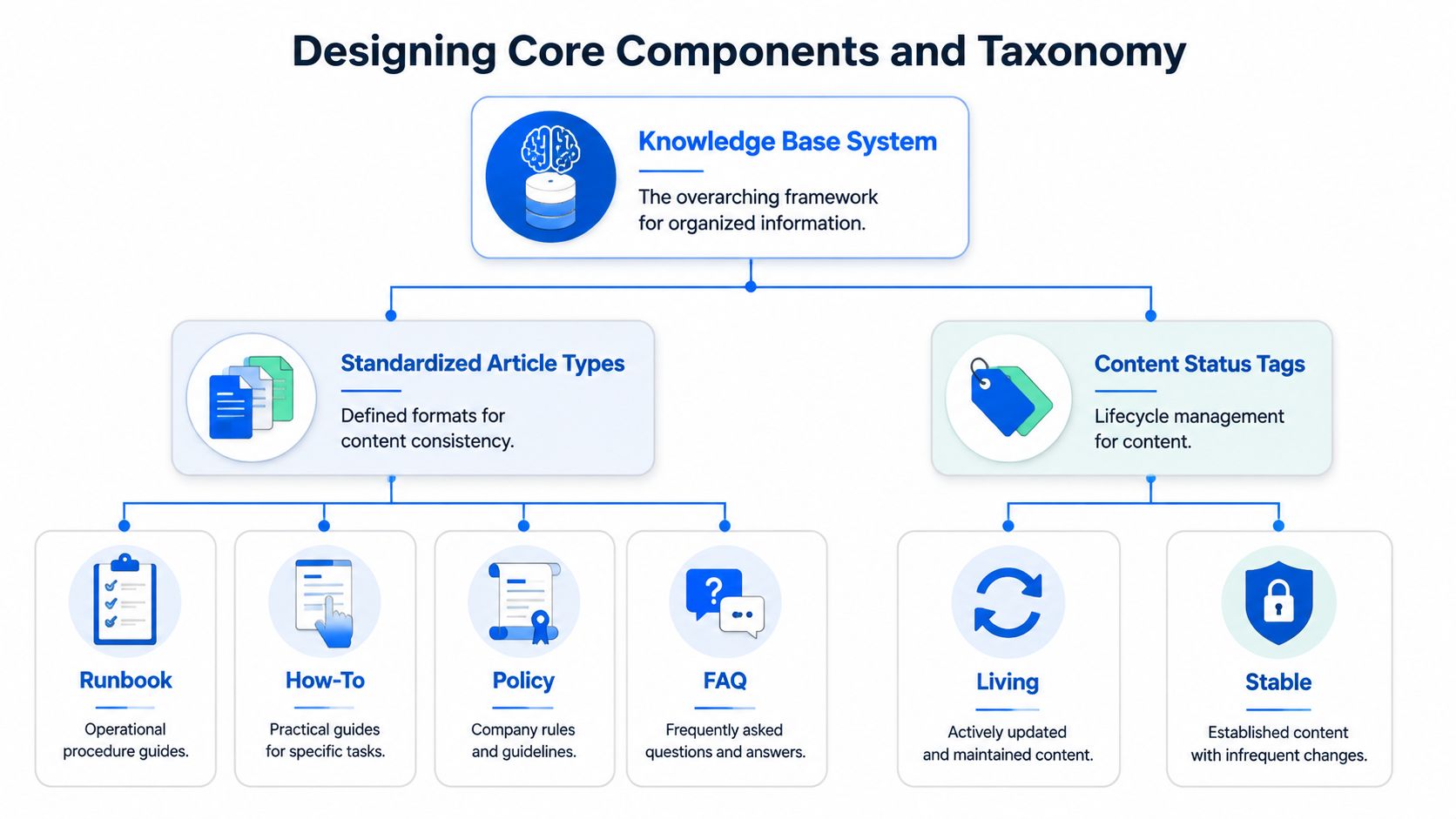
A structure that scales without turning into a maze
A practical category set for most organizations looks like this:
| Category | Article Type | Status Tag |
|---|---|---|
| HR | Policy | Living |
| Operations | Runbook | Stable |
| Support | FAQ | Living |
| Engineering | How-To | Stable |
| Security | Policy | Archived |
The exact labels can vary, but the logic shouldn’t. Function-based categories such as HR, Operations, Support, Engineering, and Security keep browsing intuitive, while article types like Runbook, How-to, Policy, Decision, Onboarding, and FAQ help people know what kind of answer they’re getting before they click.
Status tags are just as important. A Living article needs ongoing review. A Stable one changes less often. An Archived page should still be discoverable, but clearly marked so nobody mistakes it for current guidance.
The best taxonomy also makes room for employee-generated content. A frontline tip can start as a short note, then graduate into an FAQ, then become part of a formal SOP once it’s validated by the right owner. That pipeline matters because frontline employees often know the workaround before headquarters does. When that insight gets tagged and governed properly, it becomes a better standard process instead of a one-off hack.
Establishing Governance and Content Freshness
The hard problem in knowledge management isn’t publishing content. It’s keeping the right content trustworthy when information lives in Google Drive, Notion, Confluence, Slack, email archives, and workflow tools. That gap is why many guides stop at “audit what you have” and never explain how to govern a fragmented system over time, a challenge highlighted in multi-tool knowledge guidance from Dust.
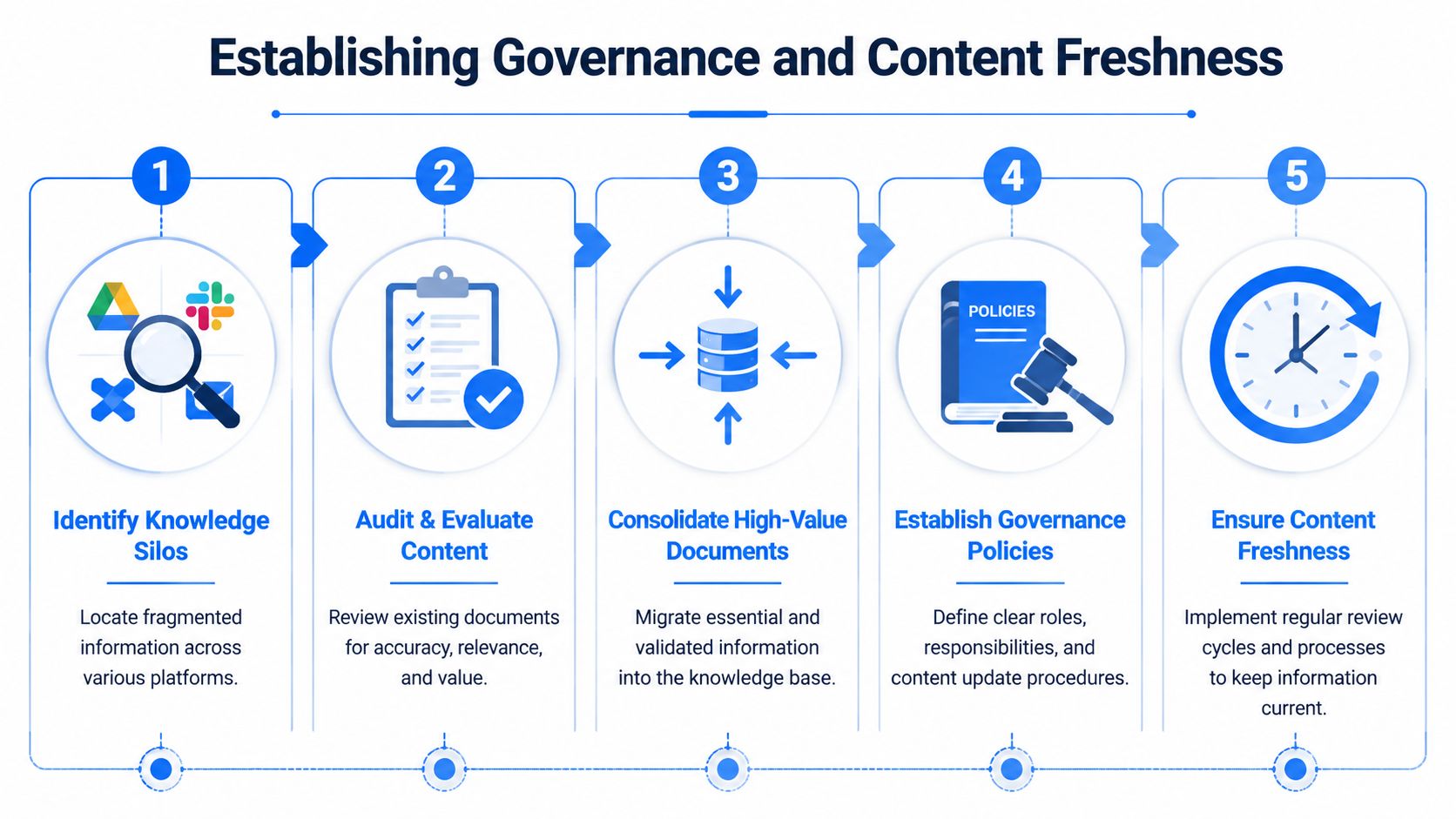
Governance that people can actually follow
Start with an inventory of every place knowledge lives. Then identify which documents are high-value, duplicated, or outdated, and decide what belongs in the internal knowledge base versus what should stay in source systems. That decision point is where rigor is often abandoned, because everything is moved instead of governing what needs a single source of truth.
The best operating model usually includes these steps:
- Identify knowledge silos across drives, chat, and shared workspaces.
- Audit and evaluate content for accuracy and usage.
- Consolidate high-value documents into the knowledge base.
- Assign ownership and permissions so people know who maintains what.
- Schedule freshness reviews for anything marked Living.
A quarterly review cadence works better than ad hoc cleanups because it creates a habit, not a scramble. It also gives frontline teams a structured way to flag what’s outdated, confusing, or missing. For employee listening programs, that feedback loop is especially useful when HR policies change faster than the content team can manually update every page, which is one reason Turn On Work’s employee listening approach fits naturally into knowledge governance.
Trust drops fast when employees find three versions of the same policy. One accurate page beats five barely maintained ones.
The rule is simple. If a document affects how people work today, someone needs to own it today.
Encouraging Adoption and Measuring Success
In active knowledge bases, fewer than 1 in 20 documents are updated in a given month, and the top 1% of contributors create 47% of all content, which shows why participation tends to concentrate unless the workflow is intentionally designed, according to knowledge sharing research. The fix is to make knowledge capture part of work, not an extra task people do after everything else.
Build capture into the daily flow
The most effective teams don’t ask employees to “go document that later.” They capture knowledge where the work happens. That can mean a quick mobile video from a store lead, an AI prompt in chat that drafts a FAQ from repeated questions, or a simple contribution form tied to a completed task. Once the friction drops, participation usually follows.
A good adoption model prioritizes:
- Short capture moments. Let people submit a tip, screenshot, or quick video in under a minute.
- Visible ownership. Every article should have a real maintainer.
- Frontline feedback. Managers and hourly employees need a direct path to flag confusing SOPs.
- Clear measurement. Track self-service rate, search zero-results, article helpfulness, and content freshness together.
That measurement set is more useful than vanity usage metrics because it connects content to outcomes like reduced rework, faster onboarding, and fewer operational errors. If a page gets views but doesn’t reduce follow-up questions, it isn’t doing the job.
The best contribution systems feel like a shortcut for employees, not an extra compliance task.
The adoption pattern can change quickly when documentation overhead disappears and knowledge capture sits inside the tools teams already use. That’s especially true for frontline teams, where a manager’s quick tip often becomes the basis for a better formal process later.
Integrating AI Search and Mobile Access
AI search raises the bar for knowledge quality. The 2025 State of AI at Work report says 82% of knowledge workers use AI tools, but only 53% know how to get value from them, which means employees are already expecting systems that can surface reliable answers, not just documents, as noted in Stravito’s knowledge organization research. In practice, that makes clean, trusted content part of AI infrastructure.
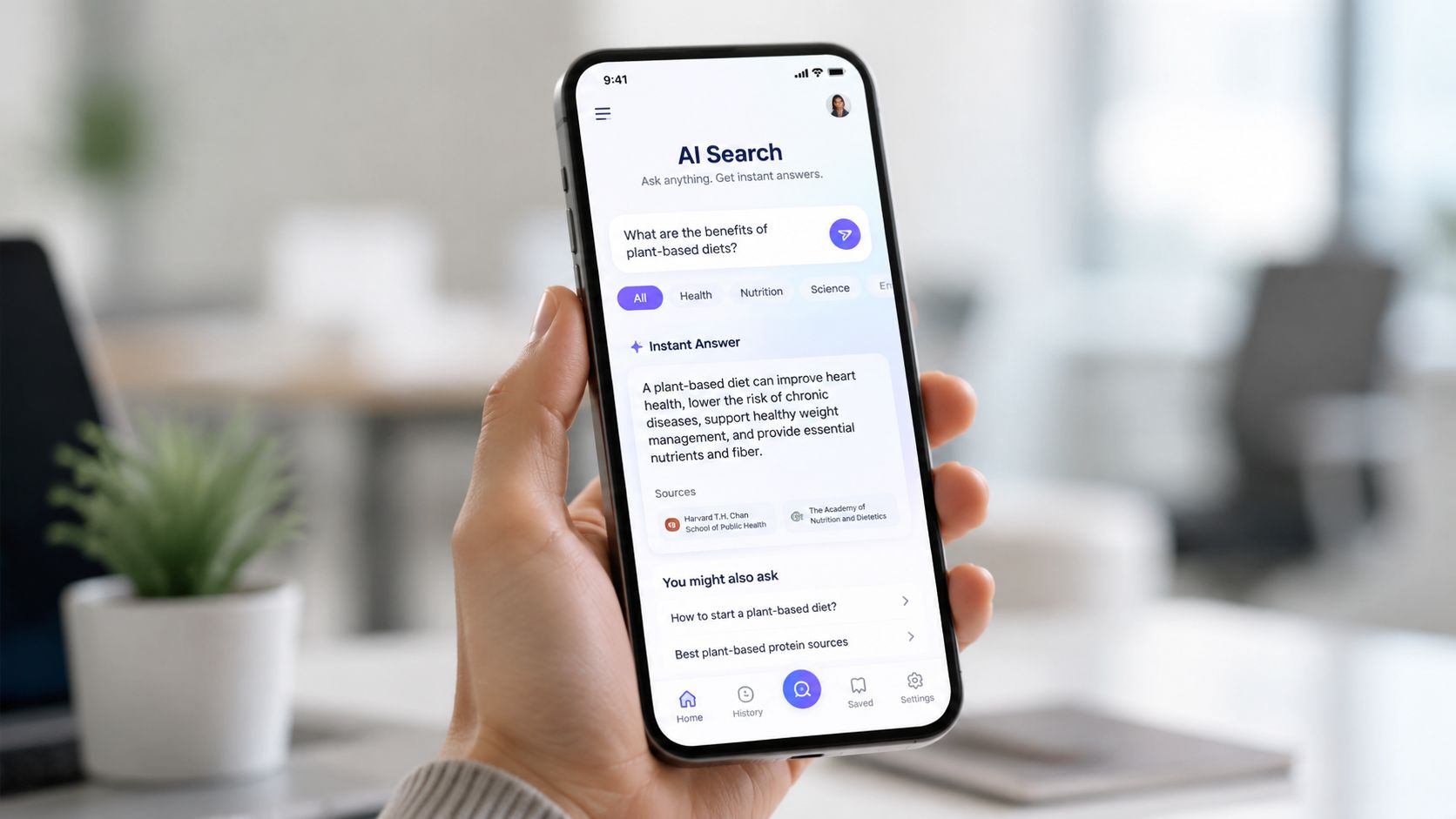
Make search speak employee language
AI-powered search works best when the knowledge base is written in the words employees use. A warehouse team might search by shift slang, a retail associate might type a product nickname, and a sales rep might look for a customer-facing term that doesn’t appear in the policy file. Synonyms, tags, and plain-language article titles matter because the system has to bridge human language and machine retrieval.
For mobile access, the priorities are different. Frontline workers need fast sign-in, role-based permissions, and pages that load well on a phone. They also need content formats that travel well, like short SOPs, FAQ snippets, microlearning quizzes, and brief videos. That’s why a knowledge base should be usable as a live companion, not only as a desktop archive.
A few practical rules help:
- Write one answer per page. It improves search and reduces clutter.
- Use conversational headings. Match how employees ask the question.
- Keep mobile flows short. A phone screen is not the place for dense policy text.
- Surface verified answers first. AI should point to authoritative content before it drafts from context.
The full benefit is realized when AI drafts an FAQ from chat logs, then a human owner approves it before publication. That keeps speed and control in the same workflow. For field teams, that can be the difference between waiting for a callback and resolving the issue on the spot.
Selecting Vendors and Rollout Resources
Enterprise rollout works best when teams resist the urge to launch everything at once. The strongest pattern is audit-first, pilot-led deployment. Inventory the current documents, map them into the taxonomy, then launch to a limited user group before broad rollout, a model supported by secure internal knowledge base rollout guidance.
What to look for in a platform
The right system should support permissions, search analytics, content controls, and an API or export path if retrieval-augmented AI will index the content. For larger teams, mobile readiness and clean integration with HR and communication tools matter just as much as editing features.
Use this checklist during selection:
- Role-based permissions so sensitive policies stay visible only to the right audience.
- Search analytics to identify failed queries and content gaps.
- Content workflows so drafts, approvals, and reviews don’t happen in email threads.
- API or export access if AI search or downstream systems need indexed content.
- Mobile access for frontline and field employees who don’t sit at a desk.
A practical rollout package should also include a content inventory spreadsheet, a stakeholder sign-off template, and an approval workflow. That keeps the launch grounded in real ownership instead of enthusiasm alone.
If you want the knowledge base to become part of the broader employee experience stack, review how it fits with Turn On Work’s workforce experience platform coverage. The right platform won’t fix weak governance, but it can make strong governance much easier to sustain.
FAQs on Internal Knowledge Base
What should go in an internal knowledge base?
The best content includes SOPs, FAQs, policies, onboarding materials, role-specific guides, and training resources. For many teams, it also helps to include employee tips that can later be validated into standard processes.
How do you keep an internal knowledge base from going stale?
Assign ownership to specific articles, use status tags like Living or Archived, and review high-impact content on a regular cadence. Stale pages lose trust quickly, especially when employees find conflicting instructions elsewhere.
Why do employees ignore knowledge bases?
Usually because search is weak, content is too dense, or the information isn’t where they work. Adoption improves when the system is easy to search, mobile-friendly, and tied to daily workflows instead of separate documentation chores.
How does AI help an internal knowledge base?
AI can draft FAQs from repeated questions, improve search relevance, and help employees find the right answer faster. It works best when the underlying content is clean, current, and clearly governed.
What’s the best way to roll out a new knowledge base?
Start with an audit of existing content, map it into a simple taxonomy, then pilot the system with a limited group before full launch. That approach gives you real feedback before the knowledge base becomes company-wide.
If you’re ready to turn scattered SOPs, policy docs, and frontline know-how into a system employees rely on, start by auditing the knowledge you already have, then build the first pilot around the questions people ask most often. For teams that want practical guidance on communication, AI, and workforce operations together, keep following Turn On Work and apply the same discipline to knowledge that you’d apply to any other critical operating process.