
That knowledge supply chain still has to be published where employees already look, often an employee communications hub or intranet replacement, not a second file dump.
An employee asks an AI assistant whether they can swap tomorrow’s shift. The system finds three internal documents: an old policy, a local manager guide, and a newer FAQ with slightly different rules.
The answer arrives in seconds. It sounds confident. It is also wrong.
Most conversations about workplace AI begin with models, prompts, and vendor demonstrations. They should begin with a harder question: Can the organization trust the knowledge the AI will use?
If policies are outdated, standard operating procedures conflict, frontline guidance is scattered across multiple systems, and no one owns updates, AI does not solve the problem. It retrieves, summarizes, and scales the confusion.
That is why an internal knowledge base is no longer simply a documentation library. It is the governed knowledge layer behind AI chatbots, copilots, employee self-service, onboarding, training, search, and workflow automation.
The success of workplace AI will depend not only on the intelligence of the model, but also on the quality of the knowledge underneath it.
Key Takeaways
- Workplace AI is only as reliable as the company knowledge it can access.
- Outdated, conflicting, or unowned content causes AI to deliver unreliable answers at scale.
- SOPs, policies, FAQs, training materials, and frontline know-how now form part of the organization’s AI infrastructure.
- Strong knowledge systems combine accurate content, clear ownership, permissions, context, and regular review.
- Organizations should begin with a small set of high-value employee questions rather than indexing everything at once.
- AI-ready knowledge must be designed around how employees work and ask questions, not how departments organize files.
Why Your Knowledge Base Is Now AI Infrastructure
A traditional knowledge base stores information so employees can search for and read it.
An AI-powered knowledge system goes further. It supplies the company-specific information that chatbots, copilots, search tools, and automated workflows use to understand questions and generate answers.
That changes the role of internal knowledge.
A policy is no longer only a document someone may open. It may become the source behind hundreds of AI-generated answers.
An SOP is no longer only a reference file. It may guide an employee through a task at the exact moment the work is being performed.
A training article may support onboarding, answer follow-up questions, trigger workflow steps, and help an AI assistant determine what an employee should do next.
The knowledge base therefore becomes part of the organization’s operating infrastructure. It must be accurate, retrievable, permissioned, current, and reliable enough to support real decisions.
For HR, internal communications, operations, IT, and employee experience teams, this is not just a technology concern. It is an ownership and operating-model concern.
Employees do not experience company knowledge as separate HR, communications, training, and operations programs. They experience one question: Can I get the right answer and move forward with my work?
From Documentation Library to Operational Memory
Employees rarely search for knowledge in the neat, structured language used by internal departments.
They do not ask:
“Where is the benefits administration documentation?”
They ask:
“Can I add my spouse to my health plan?”
A store employee may ask how to swap a shift. A supervisor may need the latest closing procedure. A new hire may ask what to do after completing orientation. A technician may need an approved safety step while standing beside a piece of equipment.
These questions are immediate, contextual, and connected to work.
A modern knowledge base functions as an external memory layer for the organization. It helps AI systems retrieve relevant company information rather than rely on generic knowledge or generate unsupported answers.
That knowledge may include:
- Standard operating procedures
- HR policies
- Frequently asked questions
- Training and onboarding materials
- Product and service information
- Frontline task instructions
- Manager guides
- Internal communications
- Support resolutions
- Approved local exceptions
- Informal expertise that has been documented and verified
These content types may still be managed by different teams. But from the AI system’s perspective, they are inputs to the same answer layer.
Practical rule: If the knowledge base cannot reliably support an employee during a difficult shift, it will not reliably support an AI copilot either.
Why Weak Knowledge Causes AI to Fail
A chatbot can have an excellent interface and still give employees a poor experience.
The failure often begins before the question reaches the language model.
Outdated content creates confident mistakes
An old leave policy may still appear official. An outdated safety procedure may remain searchable. A revised payroll rule may exist in one system while an earlier version remains in another.
When AI retrieves outdated material, it may present the information fluently and confidently. That makes the error more dangerous, not less.
Employees may not know the source is old. Managers may repeat the answer. Support teams may then spend time correcting the mistake and rebuilding trust.
Conflicting sources create inconsistent answers
Many organizations have multiple versions of the same information:
- A formal policy
- A manager guide
- An FAQ
- A training slide
- A regional document
- An old announcement
- A team-created workaround
Each version may reflect part of the truth. But an AI system needs to know which source is authoritative, which version is current, and which exceptions apply.
Without those signals, the system may produce different answers to similar questions.
Scattered knowledge reduces reliability
Company knowledge often lives across SharePoint, intranets, employee apps, ticketing tools, shared drives, chat archives, learning platforms, and local folders.
Employees do not experience this as a distributed information architecture. They experience it as inconsistency.
One system contains the policy. Another contains the actual procedure. A manager knows about a local exception. The newest update was posted in a message that employees can no longer find.
AI may be able to search several systems, but access alone does not create clarity. The information still needs structure, authority, permissions, and ownership.
Missing context produces incomplete answers
A policy may be correct in one country and wrong in another. A procedure may apply only to a certain location, role, shift, or type of equipment.
An answer can be accurate in general but wrong for the employee asking.
That means AI-ready content needs more than text. It may also need context such as:
- Audience
- Role
- Location
- Business unit
- Employment type
- Effective date
- Policy version
- Device or equipment type
- Required permission level
- Related workflow
- Local or regulatory exceptions
Without context, a knowledge system may retrieve a technically relevant document that does not apply to the situation.
Unowned knowledge becomes operational risk
Many organizations cannot easily answer basic governance questions:
- Who owns this policy?
- Who approves changes?
- When was it last reviewed?
- Which source replaces the older version?
- Who is responsible when the process changes?
- What happens when two documents disagree?
A document without an owner may remain visible long after it stops reflecting reality.
Once that document becomes part of an AI retrieval system, the problem scales. What was once a buried content error can become a repeated AI answer across locations, teams, and shifts.
The knowledge supply chain, not just the model, determines whether employees can trust the result.
What AI-Ready Knowledge Looks Like
AI-ready knowledge is not simply content that has been uploaded into a searchable system.
It has several important qualities.
It is authoritative
Employees and AI systems need a clear source of truth.
When multiple documents cover the same topic, the organization should identify:
- Which source is official
- Which version is current
- Whether local variations are allowed
- What replaces an older document
- Who can approve a change
Authority should be visible in the content and encoded in the system’s metadata where possible.
It is current
Every important content item should have an owner, a review date, and a process for responding to change.
Review schedules may vary. A stable company-history page may need little maintenance. A safety procedure, benefits policy, or local labor rule may require frequent review or an immediate update when conditions change.
Freshness should be triggered not only by a calendar. It should also be triggered by events such as:
- Policy changes
- Regulatory updates
- New technology
- Process redesign
- Product launches
- Location openings
- Repeated employee questions
- High rates of failed or corrected answers
It is structured around employee needs
A 40-page policy document may be legally complete but difficult for an employee or AI system to use.
AI-ready content should make the essential information easier to identify:
- What does this mean?
- Who does it apply to?
- What action should the employee take?
- What exceptions exist?
- Which forms or systems are required?
- Who should be contacted when the standard process does not apply?
Long documents can remain available as authoritative sources. But common employee questions may also need shorter, task-oriented explanations derived from and linked to those sources.
It includes the right context
Content should be labeled so the retrieval system can distinguish between universal guidance and information that applies only to a particular role, location, or audience.
Useful labels may include:
- Content owner
- Approved audience
- Effective date
- Expiration or review date
- Geography
- Role or job family
- Department
- Confidentiality level
- Source system
- Policy or procedure type
- Related task
- Local versus global status
This context helps the system return the right answer rather than merely a similar passage.
It respects permissions
A knowledge system should not expose restricted information simply because it is semantically relevant to a question.
Permissions must remain intact when content is retrieved, not only when it is originally stored.
For example, an employee-facing AI assistant should not surface:
- Confidential employee relations guidance
- Restricted incident-response procedures
- Manager-only performance documentation
- Sensitive legal advice
- Information belonging to another location or client
- Personal employee data
Retrieval quality and permission control must work together. An accurate answer that exposes inappropriate information is still a failed answer.
It is written to support action
Employees usually search for information because they need to do something.
Knowledge should therefore help them move forward.
A useful article about shift swaps should explain eligibility, required notice, approval steps, system actions, common exceptions, and what to do if the normal process fails.
The strongest knowledge does not merely describe the rule. It connects the rule to the work.
The CLEAR Framework for AI-Ready Knowledge
Organizations need a practical way to convert messy internal content into a trusted AI foundation.
The CLEAR framework provides five steps.
C – Curate the content
Begin by identifying the content employees use most often.
Do not index the entire organization on day one. Start with high-volume, repeatable questions and workflows, such as:
- Leave and attendance
- Payroll questions
- Shift swaps
- Onboarding
- Benefits
- IT support
- Safety procedures
- Common operational tasks
- Manager approvals
- Frequently used policies
Review the content for:
- Duplicates
- Outdated versions
- Contradictions
- Drafts
- Broken links
- Missing information
- Unclear language
- Content that employees no longer use
The first AI-ready collection should be smaller and cleaner than the full document estate.
L – Label it with context
Add the metadata the system needs to understand when, where, and for whom the content applies.
At minimum, important content should include:
- Owner
- Audience
- Effective date
- Review date
- Approval status
- Location or jurisdiction
- Permission level
- Related workflow or topic
Without these labels, AI retrieval may find relevant words but miss the operational context.
E – Establish authority and ownership
Every high-value knowledge area needs an accountable owner.
Ownership should answer:
- Who writes or maintains the content?
- Who approves it?
- Who is notified when a related process changes?
- Who resolves conflicts between sources?
- Who retires outdated material?
- Who is responsible for local variations?
Ownership should follow the knowledge domain.
HR may own leave policies. Operations may own SOPs. Internal communications may own company-wide announcements. Local leaders may maintain site-specific overlays. IT may manage technical access and system reliability.
The important point is that responsibility must be explicit.
A – Adapt the content for retrieval and use
Knowledge should be organized around how employees ask questions and complete tasks.
That may involve:
- Breaking long documents into focused sections
- Adding clear headings
- Creating concise FAQs
- Separating global rules from local exceptions
- Connecting procedures to relevant roles and tasks
- Adding synonyms and common employee language
- Linking answers to forms, systems, or next steps
- Making frontline guidance mobile-friendly
- Showing the authoritative source behind the answer
This does not mean rewriting every policy from scratch. It means making existing knowledge easier for employees and AI systems to retrieve and use accurately.
R – Review and improve continuously
AI-ready knowledge is not a one-time cleanup project.
Monitor:
- Questions the system cannot answer
- Answers employees rate poorly
- Topics that generate repeated escalation
- Documents retrieved unusually often
- Content that has passed its review date
- Contradictory answers
- Policy changes
- Search terms that produce weak results
- Locations or roles with higher failure rates
These signals create a continuous improvement loop.
A failed answer should not be treated only as a chatbot issue. It may reveal a missing article, an unclear procedure, weak metadata, outdated content, or an ownership gap.
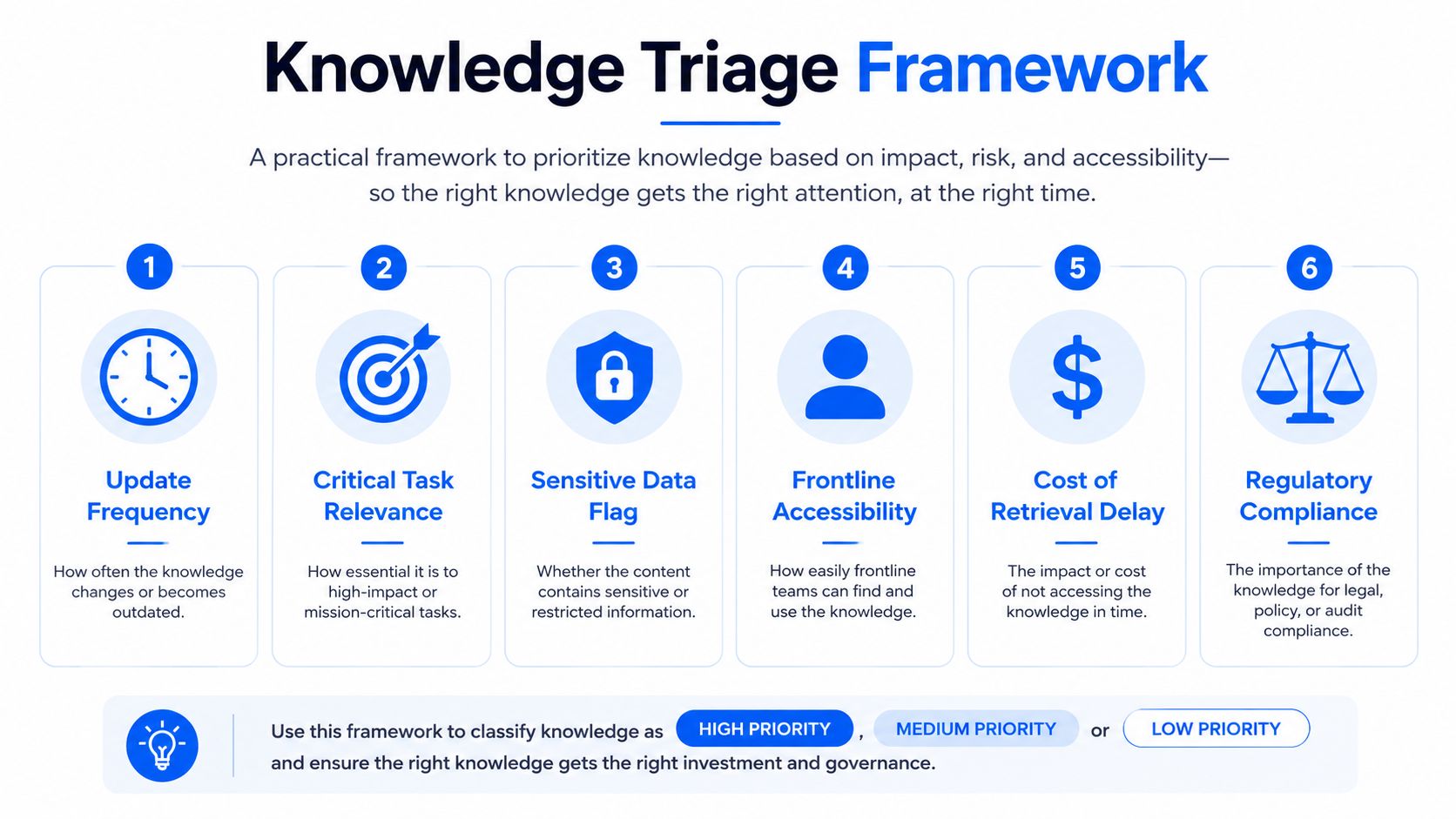
Knowledge Triage: What Belongs in the AI System?
One of the most common mistakes is attempting to index everything immediately.
More content does not automatically produce better answers. It can increase noise, conflict, permission risk, and maintenance demands.
A practical triage model separates content into four groups.
Put in now
Begin with content that is:
- Frequently requested
- Relatively stable
- Clearly owned
- Easy to verify
- Appropriate for the intended audience
- Useful across repeatable workflows
Examples may include approved leave policies, payroll FAQs, common onboarding instructions, shift-swap rules, basic IT guidance, and standard operating procedures.
Fix before indexing
Some content is important but not ready.
This category may include:
- Duplicate policies
- Conflicting SOPs
- Outdated training content
- Documents without owners
- Pages with unclear approval status
- Long documents that hide the relevant action
- Content missing location or audience information
Clean and certify this material before allowing AI to retrieve it.
Hold back initially
Some knowledge requires more context or governance than the initial pilot can support.
Examples may include:
- Complex regulatory exceptions
- Country-specific rules
- Version-sensitive procedures
- High-risk safety guidance
- Processes that depend heavily on human judgment
- Content that changes frequently
- Local practices that have not been formally approved
This content can be added after the organization has tested contextual retrieval, escalation, and governance controls.
Keep out for now
Some material may not belong in an employee-facing AI system.
Examples include:
- Highly confidential documents
- Sensitive employee relations records
- Content that cannot be permissioned reliably
- Unverified manager notes
- Legal advice intended for a restricted audience
- Draft content presented without clear status
- Information whose use would create disproportionate privacy risk
Keeping content out does not mean it lacks value. It means the system is not yet ready to use it safely or accurately.
Short rule: If a document only makes sense after a knowledgeable person explains the context, it is not yet ready for autonomous retrieval.
One Answer Layer Does Not Require One Repository
A common assumption is that organizations must move all knowledge into one centralized platform.
That is not always practical or desirable.
Large organizations may need to keep approved content in different source systems because of ownership, workflows, regional requirements, security, or existing investments.
The goal is not necessarily one repository. The goal is a consistent, governed answer layer.
AI and employees should be able to retrieve the correct information even when approved knowledge remains distributed across:
- HR platforms
- Intranets
- Learning systems
- Document repositories
- Service-management tools
- Operations platforms
- Employee apps
- Local knowledge systems
This requires shared standards for ownership, metadata, permissions, review, and source authority.
A centralized knowledge model can make governance simpler. A federated model may allow local teams to move faster. Many large employers will need a combination: common standards with distributed ownership.
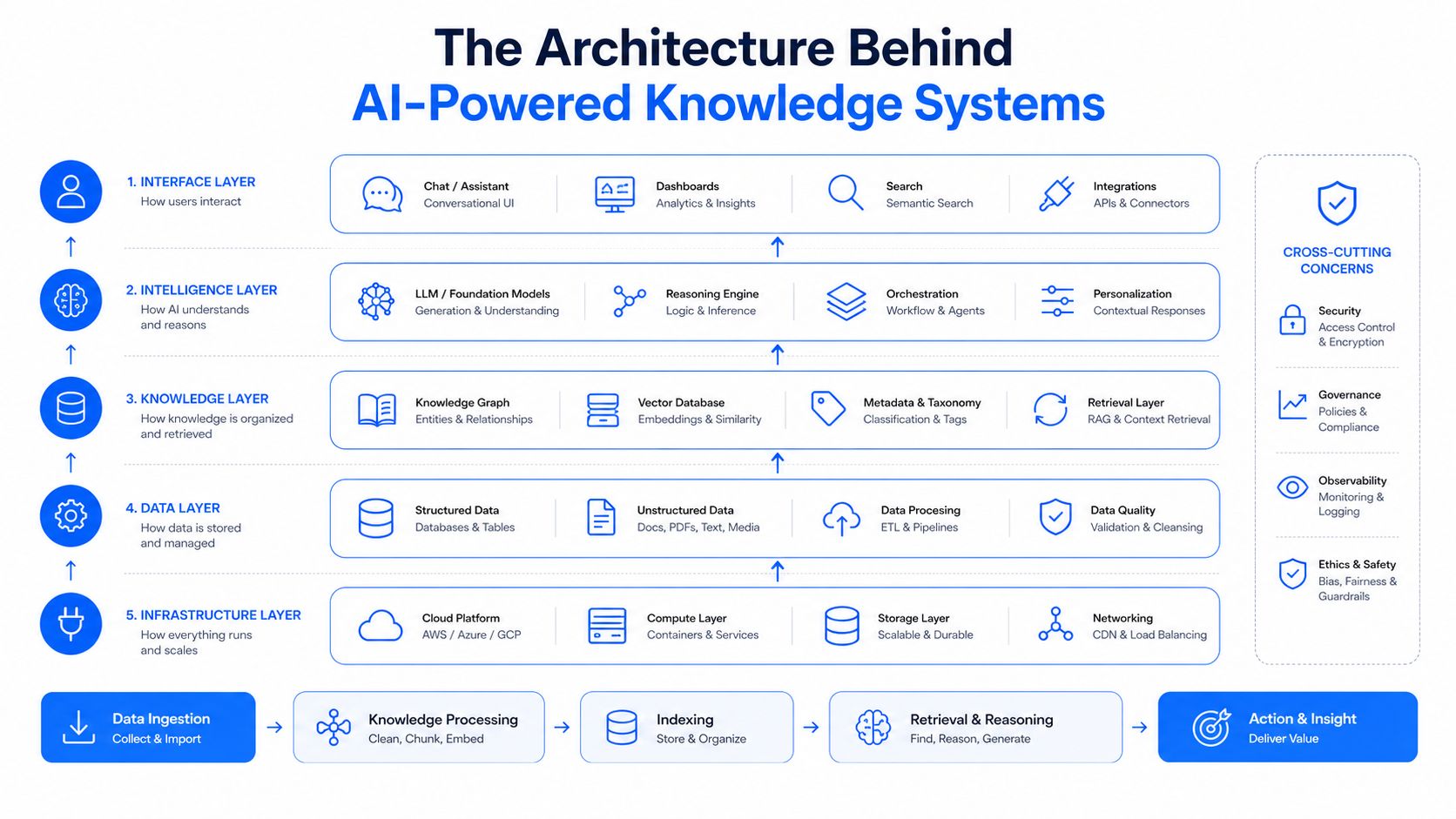
A Simpler View of the Technology
The technical architecture behind an AI-powered knowledge system can become complex, but workforce leaders do not need to begin with vector databases or model selection.
At a practical level, the system performs four jobs.
1. Gather
It connects to approved knowledge sources such as policy repositories, intranets, ticketing systems, learning platforms, and operational documentation.
2. Clean and organize
It removes duplicates, processes different file formats, divides long content into useful sections, and applies labels such as owner, audience, location, permissions, and dates.
3. Retrieve
When an employee asks a question, the system searches for the most relevant authorized information. Strong retrieval may combine keywords, meaning, metadata, and permissions.
4. Answer or act
The AI system uses the retrieved information to produce an answer, recommend a next step, or begin an approved workflow.
If confidence is low, sources conflict, or the question requires judgment, the system should escalate rather than invent an answer.
The key lesson is straightforward: even the strongest language model cannot compensate for a weak knowledge path.
How Knowledge Infrastructure Supports the Workforce
The same knowledge foundation can support several employee experiences.
AI Chatbots and Copilots
AI assistants need approved company knowledge to answer organization-specific questions.
Without that foundation, they may provide generic answers that ignore internal policies, locations, systems, or operating practices.
A reliable copilot should be able to:
- Retrieve an approved source
- Respect employee permissions
- Consider role and location
- identify relevant exceptions
- Show where the answer came from
- Escalate when confidence is low
- Avoid presenting outdated content as current
The chatbot is the visible layer. The knowledge system underneath determines whether the answer deserves trust.
Employee Self-Service
Employee self-service often fails because the employee must already know where to look.
An AI-supported knowledge layer can allow employees to ask questions naturally and receive the relevant policy, explanation, form, or next step.
Examples include:
- “How do I update my direct deposit?”
- “Can I carry unused leave into next year?”
- “Where do I report a workplace injury?”
- “What should I do if I miss a time-clock entry?”
- “How can I swap Saturday’s shift?”
- “Which benefits apply to part-time employees?”
Better self-service can reduce repetitive questions for HR, operations, IT, and managers. But deflection should not be the only goal. The answer must also be correct, understandable, and useful.
Onboarding
New hires are especially dependent on clear knowledge.
They do not yet know which systems are official, which documents are current, or who can resolve an exception.
An AI-ready knowledge base can connect onboarding questions with:
- Role
- Location
- Required training
- First tasks
- Policies
- Manager contacts
- Systems access
- Local procedures
- Frequently asked questions
Instead of sending every employee through the same information library, the system can provide guidance based on where the employee is in the journey.
Training and Performance Support
Formal training cannot anticipate every question employees will encounter later.
A knowledge system can support learning at the point of need by retrieving a procedure, refresher, checklist, or approved explanation while the employee is working.
This is especially useful when:
- Processes change frequently
- Employees perform tasks occasionally
- Teams operate across many locations
- Training and daily execution are separated
- Managers repeatedly answer the same questions
The knowledge base becomes a bridge between training completion and real-world performance.
Workflow Automation
Knowledge can also support action.
An employee asking about parental leave may need more than a policy explanation. They may need eligibility guidance, a form, an HR case, manager notification, and reminders.
A strong knowledge system can connect the answer with the next approved step.
This is where the shift from documentation to infrastructure becomes most visible. Knowledge does not simply explain the process. It helps the employee move through it.
Frontline Work
Frontline knowledge must be designed differently from a desktop wiki.
Employees may be:
- Working from a mobile device
- Standing beside equipment
- Serving a customer
- Moving between locations
- Working outside standard office hours
- Unable to search through long documents
- Dependent on time-sensitive updates
Frontline SOPs should therefore be concise, searchable, task-oriented, and connected to location, role, equipment, and shift context.
If finding the answer takes too long, the employee will call a supervisor or rely on memory.
For frontline teams, the practical checklist is direct:
- Use mobile-friendly formats.
- Break long instructions into clear steps.
- Identify the current source of truth.
- Tag content by location, role, and task.
- Remove expired procedures from retrieval.
- Assign an owner for each major job family or process.
- Test the system on the devices employees actually use.
Hybrid and Distributed Work
Distributed teams need consistent answers across locations and time zones.
Knowledge cannot depend on one team’s informal habits or an employee knowing whom to ask.
Organizations should separate global guidance from regional or local overlays. Employees should be able to see which version applies to them and when it was last updated.
Regional ownership can help maintain relevance, but all regions should follow shared standards for:
- Metadata
- Approval
- Versioning
- Review
- Permissions
- Escalation
- Source authority
Without these standards, a federated knowledge model can become a collection of inconsistent local systems.
Large Enterprises
Technology abundance does not eliminate fragmentation.
Large enterprises may have multiple intranets, overlapping HR systems, duplicate SOPs, and regional knowledge platforms. The scale is larger, but the fundamental problem remains the same.
The organization must decide:
- Who owns each knowledge domain?
- Which sources are authoritative?
- How are duplicates resolved?
- How do local exceptions relate to global standards?
- What happens when two approved sources conflict?
- How will changes reach every connected system?
The AI layer will expose weak governance quickly. It can retrieve organizational conflict faster than employees ever could.
Governance Is Part of Deployment
Governance should not be treated as a policy appendix added after the technology launches.
It is part of the product.
A practical governance model should define:
Content ownership
Every important knowledge area should have an accountable business owner.
Editorial and approval workflows
Teams should know who can draft, review, approve, publish, revise, and retire content.
Review rules
Content should have scheduled reviews and event-based triggers when policies, systems, or processes change.
Permissions
Access rules should follow the content into the retrieval and answer process.
Version control
Employees and AI systems should be able to distinguish current, previous, draft, and locally modified versions.
Conflict resolution
The organization needs a defined process for deciding what happens when two sources disagree.
Escalation
The AI system should know when not to answer and where to send the employee instead.
Employee participation
Employees and managers should be able to flag inaccurate, incomplete, or confusing content.
The organizations that succeed will not ask only, “How much content can we ingest?”
They will ask:
“Who owns this, why should employees trust it, and how will we know when it is no longer accurate?”
Build, Buy, Centralize, or Federate?
Technology selection should follow the knowledge strategy.
A custom approach may provide greater control over integrations, retrieval logic, permissions, and governance. It may be appropriate for complex enterprises with strict data boundaries.
A managed platform may allow the organization to move faster by handling much of the technical work involved in connecting content, processing documents, retrieving information, and generating answers.
Neither approach fixes weak knowledge ownership.
A centralized model can simplify standards and governance. A federated model may work better when regional or business-unit teams need to maintain their own content.
The right answer is often a hybrid model:
- Shared governance standards
- Common metadata requirements
- Consistent security rules
- Distributed domain ownership
- A unified employee answer experience
Vendor selection should evaluate more than search quality.
Important requirements include:
- Integration with existing knowledge sources
- Permission-aware retrieval
- Version and freshness controls
- Source citations
- Analytics on failed questions
- Support for local context
- Mobile experience
- Escalation workflows
- Auditability
- The ability to remove outdated content quickly
Start Small and Earn the Right to Scale
A useful pilot should solve a real workforce problem.
Good starting areas include:
- HR policy questions
- New-hire onboarding
- IT support
- Frontline SOPs
- Payroll FAQs
- Manager self-service
- Benefits guidance
- One high-volume operational process
Begin with a curated set of high-quality content rather than the full company archive.
A focused pilot may include a few hundred carefully reviewed documents or a narrower group of task-oriented articles. The exact number matters less than the quality, ownership, and usefulness of the content.
Before launch:
- Identify the most common employee questions.
- Measure current search time, ticket volume, and escalation patterns.
- Audit the relevant content.
- Remove or resolve duplicates.
- Assign owners.
- Add context and permissions.
- Test realistic employee questions.
- Define when the system should escalate.
- Launch with a clear feedback process.
- Review failures weekly during the pilot.
The pilot should be narrow enough to improve, but important enough that employees notice the difference.
Measuring Whether the System Works
Uptime alone does not show whether employees are receiving better answers.
A workforce knowledge system should be evaluated across four areas.
1. Answer Reliability
Measure whether the system gives correct, complete, and applicable answers.
Useful indicators include:
- Employee ratings
- Expert review
- Correction rates
- Unsupported-answer rates
- Conflicting-answer rates
- Percentage of answers linked to approved sources
- Escalations caused by low confidence
The question is not only whether the AI answered. It is whether the employee could safely rely on the answer.
2. Knowledge Freshness
Track whether the source content remains current.
Measures may include:
- Percentage of content with an owner
- Percentage reviewed on schedule
- Number of expired items still active
- Time required to update content after a policy change
- Duplicate-content rate
- Percentage of frequently retrieved content with current approval
Freshness should be monitored before outdated knowledge becomes an employee incident.
3. Operational Impact
Determine whether the system improves work.
Possible measures include:
- Reduction in repeated questions
- Lower support-ticket volume
- Faster employee search time
- Higher self-service completion
- Faster onboarding
- Lower escalation rates
- Fewer process errors
- Reduced manager intervention
- Faster access to frontline procedures
Establish a baseline before launching so improvement can be measured accurately.
4. Governance Compliance
Measure whether the organization is following its own knowledge standards.
Indicators may include:
- Ownership coverage
- Permission violations
- Review completion
- Unresolved content conflicts
- Time to retire outdated content
- Percentage of content with required metadata
- Number of unapproved sources entering retrieval
A wrong answer may be caused by weak retrieval. A wrong answer that continues after a policy change is often a governance failure.
Common Mistakes to Avoid
Indexing everything at once
More content can increase conflict and noise. Start with a focused, high-quality collection.
Treating content cleanup as a one-time project
Knowledge changes continuously. Ownership and review must continue after launch.
Designing around the org chart
Employees ask about tasks and situations, not departmental filing structures.
Measuring only deflection
Reducing support requests is useful only when employees receive reliable answers and complete the work successfully.
Hiding the source
Employees should be able to see where important answers came from, especially for policies, compliance, benefits, and safety.
Ignoring frontline context
A desktop-oriented knowledge system may fail for employees who need fast, mobile, location-specific guidance.
Adding AI before resolving authority
If the organization cannot decide which document is correct, the AI system cannot make that decision responsibly.
Assuming the model will fix weak content
A language model can summarize unclear content elegantly. It cannot turn unverified information into organizational truth.
Final Thoughts
The next generation of workplace AI will not be differentiated only by which model an organization selects.
It will be differentiated by the quality of the knowledge underneath it.
A company with current, clearly owned, well-structured, and trusted knowledge can use AI to improve self-service, onboarding, training, communication, frontline support, and workflow execution.
A company with scattered, outdated, and contradictory knowledge may use the same model and produce a very different result: faster confusion delivered through a more impressive interface.
That is why the knowledge base is now AI infrastructure.
The responsibility does not belong only to IT. HR owns critical policies. Operations owns procedures. Internal communications owns important updates. Learning teams own training content. Local leaders understand frontline exceptions. Employees know where the official process breaks down.
Building trustworthy workplace AI requires these groups to treat knowledge as a shared operational asset.
Turn On Work examines workforce experience at the intersection of communication, HR technology, AI, frontline enablement, and operations. That intersection is exactly where knowledge infrastructure belongs.
Before launching another chatbot or copilot, ask the question that determines whether employees will trust it:
Is the knowledge underneath it ready?